The Complete Claude
SEO Playbook
50 SEO playbooks, 50 Claude skills, 50 SEO prompts, 25 SEO workflows and 25 SEO templates. Keyword research, content, on-page, technical audits, internal linking, link building, Search Console, SERP analysis, local and AI search. Every one written out in full, no theory, no filler.
How one founder went from 250 to 750 clicks a day on this method →
Free · No credit card required

Hey there, I'm Nicholas 👋
I grew my last B2C app to 15K Google clicks/month as a solo founder, then sold it. Turns out I fell in love with SEO along the way.
So now I'm building ChatSEO.app — an all-in-one SEO employee whose job is to make sure you rank #1 in Google and in AI search.
This page is everything I use to run SEO with Claude, in one place. Try it free →
Five kinds of resource, one system
Two hundred files sounds like a pile. It is five layers, and each one answers a different question.
A playbook is the method: what to export, what threshold to cut at, what to give Claude, what to do with what comes back. A skill is the file Claude runs to do one job the same way every time. A prompt is the text you paste when you don't want to install anything. A workflow chains skills on a cadence, with the hand-offs written out, so a monthly routine is a checklist and not a memory. A template is the document you end up with: the brief, the report, the redirect map, the change log.
Two rules run through all two hundred. Nothing states a number it was not given; every prompt and every skill writes "cannot compute from this data" instead of estimating. And everything ends on one action, never a list of twenty. A system that returns twenty recommendations per job is a thousand-item to-do list, which is the same as no to-do list.
Install it in four minutes
One zip, five folders. Or copy any single resource from the cards below.
Get the files
All 200, exactly as shown on this page.
50 × playbooks/ · 50 × skills/<name>/SKILL.md · 50 × prompts/ · 25 × workflows/ · 25 × templates/
Claude Code
Skills become slash commands. The rest are markdown files Claude can read.
- Unzip into your project. Move
skills/to.claude/skills/so the fifty folders sit there. Keep the other four folders anywhere in the project,seo/is fine. - Open Claude Code in that project. Type / to see the fifty skills.
- Run a playbook by pointing at it: "Follow seo/playbooks/position-8-15-push.md on the export I just pasted." Claude reads the method, runs the skill it names, and ends on one action.
- Give it data before you judge it. See the step below.
Claude.ai, Claude Desktop, or any chat model
No folders needed. Prompts are pasted; skills and templates are pasted too.
- Open any prompt card below, press Copy, paste it above your export. That is the whole install for the fifty prompts.
- For a skill, create a Project and paste the skill file as its instructions, or upload the folder as a skill. For a template, paste it under the export and ask Claude to fill it.
- Start with three: the position 8-15 playbook, the low-CTR title prompt, the monthly report template. They pay back first.
- Give it data before you judge it. Same step below.
The step people skip
Two hundred resources that reason about your site are worth nothing if none of them can see your site. Every playbook opens with what it needs: a Search Console export, a crawl, a keyword list, the top ten for a query. Paste those and you get a specialist's answer. Skip them and you get a well-structured essay about SEO in general: confident, beautifully formatted, and about nobody's website. The rule that forces every prompt to write "cannot compute from this data" exists so you find that out on the first answer and not the fifth.
You can feed the exports by hand, and each playbook tells you exactly which one. The way I do it is the ChatSEO connection: one read-only Google OAuth link, and Claude can query Search Console, run crawls, pull SERPs and check citations as tools, with no export and no pasting, and re-pull next month without you.
Test it before you install a single file. Ask: "Which of my pages lost the most clicks last month?" Real URLs back means the model can see your data and the system has something to work on. Advice about how to find those pages means it can't, and all two hundred resources will produce fiction in a nice table. Connect ChatSEO free →
1 · 50 SEO playbooks
Five per area, in the order from the post. Each one is a job: what you need, the steps, and what done looks like.
- 🔍 Keyword research and clusteringplaybooks 1–5
- 📝 Content strategy and briefsplaybooks 6–10
- 🏷️ On-page optimizationplaybooks 11–15
- 🔧 Technical SEO and site auditsplaybooks 16–20
- 🔗 Internal linkingplaybooks 21–25
- 📣 Link building and digital PRplaybooks 26–30
- 📊 Google Search Console analysisplaybooks 31–35
- 🔭 Competitor and SERP analysisplaybooks 36–40
- 📍 Local SEOplaybooks 41–45
- 🤖 AI search visibilityplaybooks 46–50
Build a keyword universe from one seed
Turn a single seed keyword into a scored list of a few hundred related terms you can actually plan content against.
You need: one seed keyword and a one-line description of the site it is for; a keyword tool export for that seed (Ahrefs, Semrush or Keyword Planner) with volume and difficulty columns; the list of URLs you already have on the topic, if any.
- Export every keyword idea your tool gives for the seed, including matching terms and questions, keeping the volume and difficulty columns, and save it as a CSV.
- Delete rows with zero volume and any brand names that are not yours, then paste the remaining rows into Claude with the site description and the seed.
- Ask Claude to group the terms by the job the searcher is doing, flag terms that do not belong to the topic, and mark any volume it was not given as cannot compute from this data.
- Claude returns a table with one row per term, the group it belongs to, a keep or drop flag, and the difficulty as given, never estimated.
- Pick the three groups with the best volume-to-difficulty ratio for your site and mark each as a future cluster, dropping the rest for now.
Done when you have a CSV of kept terms grouped into named clusters and three clusters chosen for the next content plan.
Cluster a messy keyword export into topics
Turn a raw export of thousands of keywords into clean topic clusters, each mapped to one page to build or improve.
You need: the keyword export as CSV with a keyword column and at least a volume column; a list of your existing URLs with their primary topic, one per line.
- Clean the export first: lowercase every keyword, remove exact duplicates, and drop rows with fewer than 10 monthly searches so the noise does not swamp the clusters.
- Split the file into batches of about 500 rows, because one huge paste makes the grouping sloppy, and paste the first batch into Claude with your URL list.
- Ask Claude to cluster keywords that would be served by the same page, name each cluster with its head term, and attach an existing URL where one fits or write new page where none does.
- Claude returns a table: keyword, cluster name, cluster total volume as the sum of the given rows, and the URL or new page label, with no guessed numbers.
- Repeat for each batch, then paste all cluster names back into Claude and ask it to merge clusters that are the same topic under different names.
- Sort the merged clusters by total volume and pick the top ten that map to new page, which becomes your content backlog.
Done when every keyword sits in exactly one named cluster and each cluster points to one existing or planned URL.
Find and resolve cannibalising pages
Find the queries where two or more of your pages compete against each other, and decide one winner per query.
You need: a 3-month Search Console export with query, page, clicks, impressions and position (use the API, Looker Studio or a connector so you get query and page together); your list of target queries with the page each one is meant to rank.
- In the export, keep only queries that appear with two or more different pages, each with at least 50 impressions, so single-page and trivial cases are out.
- Paste those rows into Claude with your target query-to-page list and ask it to group by query and show every competing page with its clicks, impressions and position.
- Ask Claude to name, per query, the page with the most clicks as the intended winner, unless your target list names another page, and to flag that conflict explicitly.
- Claude returns one row per query: winner URL, loser URLs, and one action for each loser, either merge into winner, redirect to winner, or re-target to a different query.
- Apply the first five actions this week, starting with the queries that have the most impressions, and note the date so you can check positions in 4 weeks.
Done when every cannibalised query has one named winner and each losing page has one applied action and a check date.
Find the keywords a competitor owns and you miss
Get a short, ranked list of keywords one competitor ranks for that you are missing, filtered to what your site can realistically win.
You need: a keyword gap or content gap export from Ahrefs or Semrush for one competitor versus your domain; a one-paragraph description of what your site sells and what it will never write about.
- Run the gap report with your domain as the target and one competitor, export it, and keep the keyword, volume, difficulty and competitor position columns.
- Delete rows where the competitor ranks worse than position 20, and rows for their brand name, so you are left with keywords they actually own.
- Paste the remaining rows into Claude with your site description and ask it to drop any keyword your site would not credibly serve, giving a one-line reason for each drop.
- Claude returns the kept keywords grouped by the page type you would need, a blog post, a comparison page or a product page, with volume and difficulty copied from the export.
- Pick the ten kept keywords with the lowest difficulty above 200 monthly searches and add each to your backlog with its page type.
Done when ten gap keywords sit in your backlog, each with a page type and the competitor URL to beat.
Harvest the real questions for a topic
Collect the questions people actually ask about one topic, in their words, and pick the ones worth a section or a page.
You need: the topic and the audience in one sentence; raw question sources: People Also Ask captures, a Search Console query export filtered to words like how, what, why, can, and the question tab of a keyword tool; optionally, 20 to 50 support tickets, forum threads or sales call notes on the topic.
- Gather every question source into one text file, one question per line, keeping the original wording even when it is clumsy, and note the source next to each.
- Paste the file into Claude with the topic sentence and ask it to merge duplicates that mean the same thing, keeping the most common phrasing as the label.
- Ask Claude to tag each merged question as answerable in two sentences, needs its own section, or needs its own page, based only on the question itself.
- Claude returns a table: question, source count, tag, and the questions it merged under it, without adding questions that were not in the file.
- Take every question tagged needs its own section and slot it into your outline, and add the needs its own page ones to the content backlog.
Done when your outline holds the section questions in the searcher's words and the page-level questions are in the backlog.
Write a brief a writer cannot make generic
Produce a content brief with enough specifics that the draft, human or AI, cannot fall back to generic filler.
You need: the target keyword and the cluster it belongs to; the top 5 ranking URLs for the keyword, pasted as text or as a page-by-page notes file; three things your company knows about the topic that the ranking pages do not say.
- Open the top 5 results, copy their H2s and any numbers they cite into one notes file, and write down what every one of them repeats and what none of them covers.
- Paste the notes file, the keyword and your three proprietary points into Claude and ask for a brief with a stated reader, a stated promise, and the sections in order.
- Ask Claude to attach to every section one concrete requirement, a number, an example, a screenshot, or a named source, and to mark sections with no such requirement as at risk of filler.
- Claude returns the brief with a word target per section, the entities and terms that must appear, and the list of claims the writer must not make without a source.
- Cut every section marked at risk of filler unless you can supply the missing specific yourself, then send the brief.
Done when every section in the brief carries at least one concrete requirement and no section is marked at risk of filler.
Build an H2 outline from the SERP
Get an H2 outline that covers what ranks and adds at least two sections nobody in the top 10 has.
You need: the keyword and the intent you believe it carries; the H1, H2 and H3 headings of the top 10 results, captured with a crawler or copied by hand; a list of related questions from the People Also Ask box.
- Capture the headings of the top 10 results into one file, one result per block, and add the People Also Ask questions at the bottom.
- Paste the file into Claude with the keyword and ask it to list the headings that appear in at least 4 of the 10 results, which becomes the must-cover set.
- Ask Claude to propose two sections that appear in none of the 10 results but answer a People Also Ask question or a step the ranking pages skip.
- Claude returns an ordered outline of H2s, each with a one-line note on why it is there, and the two gap sections marked as the information-gain sections.
- Reorder the outline so the reader gets the answer within the first two H2s, then approve it or send it back with one change.
Done when an ordered H2 outline is approved with the must-cover set present and two gap sections marked.
Turn an approved brief into a first draft
Produce a complete first draft that follows the brief section by section and reads like the site, not like a model.
You need: the approved brief with sections, word targets and required specifics; two or three published pages from the site that sound the way you want, pasted in full; the list of facts and numbers the draft is allowed to use.
- Paste the sample pages into Claude first and ask it to describe the voice in five rules, such as sentence length, use of we, and how claims are backed.
- Paste the brief and the allowed facts and ask Claude to write the draft one section at a time, in that voice, using only the facts provided.
- Tell Claude that where the brief demands a number or an example you did not supply, it writes the placeholder NEEDS INPUT instead of inventing one.
- Claude returns the draft with every section at its word target and every NEEDS INPUT placeholder listed at the top for you to fill.
- Fill each placeholder from your own data, cut any sentence that could sit on a competitor's page unchanged, and pass the draft to editing.
Done when the draft has zero NEEDS INPUT placeholders left and every section matches the brief's word target within 20 percent.
Add real experience to a draft
Rework a draft so it shows first-hand experience and expertise a reader and a rater can see, not just claim.
You need: the draft, pasted in full; raw material from someone who did the work: call notes, screenshots described in words, numbers from a real project, or a short interview transcript; the author's name and the one credential that matters for this topic.
- Interview the person who did the work for 15 minutes and write down every specific, a date, a number, a mistake, a tool, a result, into one notes file.
- Paste the draft and the notes into Claude and ask it to mark every paragraph that makes a claim without a first-hand detail behind it.
- Ask Claude to rewrite only the marked paragraphs, weaving in a detail from the notes, and to leave paragraphs alone where the notes have nothing relevant.
- Claude returns the revised draft with each change listed, and a short list of paragraphs it could not fix because the notes had nothing, for you to cut or source.
- Add an author line with the credential and cut the paragraphs Claude could not fix rather than leaving unsupported claims in.
Done when every claim in the draft is backed by a first-hand detail or has been cut, and the author line is in place.
Plan the rewrite of a decaying page
Build a section-by-section rewrite plan for one page whose traffic has dropped, based on what it lost and who took it.
You need: a Search Console export for the page, Queries tab, comparing the last 3 months to the same 3 months a year earlier; the page's current content, pasted in full; the current top 3 results for its main query, with their headings.
- In the export, sort by click difference and keep the queries that lost the most clicks, and separately the queries that gained, so you see what moved.
- Paste the two lists, the page content and the competitor headings into Claude and ask which sections of your page served the lost queries.
- Ask Claude to produce a plan with one line per section: keep, rewrite, add or cut, with the query each change serves and what the top 3 do that you do not.
- Claude returns the plan plus a list of facts and dates in the page that look stale and need checking, without guessing their new values.
- Approve the plan, update the stale facts from your own sources, and schedule the rewrite with a re-check of the query export 6 weeks after publishing.
Done when a rewrite plan exists with one action per section and a 6-week check date is on the calendar.
Rewrite titles for pages ranking well with poor CTR
Rewrite the titles of pages that already rank in the top 5 but get fewer clicks than their position deserves.
You need: a 28-day Search Console export, Pages tab, with clicks, impressions, CTR and position; the current title tag of each page, from your crawler or the CMS; the top query for each of those pages, from the Queries tab filtered by page.
- In the export, keep pages with average position under 5 and at least 500 impressions, then sort by CTR ascending and take the bottom 20.
- Paste those 20 rows with their current titles and top query into Claude and ask it to explain, per page, why the title may be losing the click against the query.
- Ask Claude to write three title options per page under 60 characters, each leading with the query's main words, and to pick one with a one-line reason.
- Claude returns one recommended title per page with the reason, and marks pages where the low CTR is more likely a SERP feature issue than a title issue.
- Change only the recommended titles, note the date, and compare CTR for those pages against the 28 days before the change after 4 weeks.
Done when the 20 pages have new titles live and a dated note exists to compare CTR in 4 weeks.
Write missing meta descriptions in batch
Fill every missing or weak meta description on the pages that get impressions, in one sitting, without generic copy.
You need: a crawler export (Screaming Frog or similar) with URL, title, meta description and its length; a 28-day Search Console export, Pages tab, so you can prioritise by impressions; the first 200 words of each page you are fixing, or the page's H1 and H2s.
- Join the two exports on URL, keep rows where the description is empty, duplicated or under 70 characters, and sort by impressions descending.
- Take the top 30 rows and paste them into Claude with each page's H1, H2s and opening paragraph, in batches of 10.
- Ask Claude to write one description per page between 120 and 155 characters, stating what the page gives and to whom, using only what the page actually says.
- Claude returns URL, new description and character count, and flags pages where the content was too thin to describe honestly.
- Paste the descriptions into the CMS, and treat every flagged page as a content problem to fix rather than a description to fake.
Done when the top 30 pages by impressions each have a unique description of 120 to 155 characters live.
Fix a page's heading hierarchy
Repair a page whose headings skip levels, repeat the H1 or use headings for styling so the structure reads as an outline.
You need: the page's headings in order with their level, exported from your crawler or copied from the page source; the page's target query and one-line purpose.
- Copy the heading list with levels into a text file, keeping the order exactly as it appears in the HTML, including headings used for buttons or sidebars.
- Paste the file and the target query into Claude and ask it to list every violation: multiple H1s, skipped levels, headings that are not section titles, and empty headings.
- Ask Claude to propose the corrected outline with one H1 containing the query's main words, H2s for main sections and H3s only under a parent H2.
- Claude returns a before and after table, one row per heading, with the action for each: keep, change level, rewrite text or convert to styled paragraph.
- Apply the table in the CMS, then recrawl the single URL to confirm exactly one H1 and no skipped levels remain.
Done when a recrawl of the page shows one H1 and every H3 sits under an H2.
Pick and generate the right schema
Choose the one schema type a page genuinely qualifies for and get valid JSON-LD you can paste and test.
You need: the page URL and its full visible content pasted as text; the facts the schema needs, such as author, date, price, rating count, or address, taken from the page itself.
- Paste the page content into Claude and ask which schema types the page qualifies for based on what is visibly on the page, and which it does not, with the reason.
- Choose the single type Claude ranks first and paste the required facts, telling Claude that any property with no fact provided must be omitted, not filled in.
- Claude returns the JSON-LD block for that one type with only the provided properties, plus a list of the properties it left out for lack of data.
- Paste the block into the Rich Results Test or the Schema Markup Validator and fix any error it reports by editing the facts, not by adding invented values.
- Deploy the block in the page head, then request indexing for the URL in Search Console and check the rich result report after a week.
Done when the JSON-LD passes validation with zero errors and is live on the page.
Write alt text for images missing it
Give every image on your traffic pages a specific alt text that describes what is in it and serves the page's topic.
You need: a crawler images export with image URL, the page it sits on, and the alt text column; for each image, the filename, the caption or the surrounding paragraph, or the image itself if you can upload it; a 28-day Search Console Pages export to prioritise pages by impressions.
- Filter the images export to rows with empty alt, join it to the Pages export on the page URL, and sort by the page's impressions so the busiest pages come first.
- For the top 50 images, collect the filename, the caption if any and the paragraph around each, or upload the image files to Claude in batches of 10.
- Ask Claude to write one alt text per image under 125 characters that says what the image shows, and to write decorative for images that carry no information.
- Claude returns image URL, page URL, alt text or decorative, and flags any image it could not describe from the material given.
- Paste the alt texts into the CMS, set the flagged ones after looking at the image yourself, and set decorative images to an empty alt attribute.
Done when the top 50 images by page impressions have a specific alt text or an intentional empty alt attribute live.
Find pages blocked from indexing
List every page that should rank but is kept out of the index by robots.txt, a noindex tag or a canonical pointing elsewhere.
You need: a full crawl export with URL, indexability, indexability status, canonical URL and robots directives columns; your robots.txt file pasted as text; the list of URLs that must be indexable, such as products, categories and money pages.
- Filter the crawl export to rows marked non-indexable and keep the URL, the indexability status and the canonical column, then export that subset.
- Paste the subset, the robots.txt and the must-index list into Claude and ask it to match each blocked URL to the rule or tag that blocks it.
- Ask Claude to separate blocks that look intentional, such as cart and filter pages, from blocks on must-index URLs, and to name the single fix per wrongly blocked URL.
- Claude returns a table: URL, blocking mechanism, intentional or wrong, and the one fix, such as remove noindex, change canonical, or edit a named robots.txt line.
- Apply the fixes for the wrongly blocked URLs, then use URL Inspection in Search Console on three of them to confirm they now show as indexable.
Done when no must-index URL appears as non-indexable in a fresh crawl.
Triage Core Web Vitals by traffic cost
Rank Core Web Vitals failures by the clicks on the pages they affect so the developer fixes the expensive ones first.
You need: the Core Web Vitals report export from Search Console, mobile, with the URL groups and their failing metric; a 28-day Search Console Pages export with clicks per URL; PageSpeed Insights field data for one example URL per group, pasted as text.
- Export the poor and needs improvement URL groups from the Core Web Vitals report and note the failing metric per group, LCP, INP or CLS.
- Join each group's example URLs to the Pages export on URL and sum clicks per group, so each failing group carries the traffic it touches.
- Paste the groups with clicks and the PageSpeed field data into Claude and ask it to rank the groups by clicks affected and name the likely cause per metric from the data shown.
- Claude returns the ranked list with one fix per group, and writes cannot compute from this data where the field data is missing rather than guessing a cause.
- Hand the developer the top three groups as three tickets, each with the URLs, the failing metric and the one fix, and re-export the report after 28 days.
Done when the three highest-traffic failing groups are ticketed with a named metric and one fix each.
Explain what changed in index coverage this week
Turn two weekly snapshots of the Search Console Pages report into a plain explanation of what moved and whether it matters.
You need: last week's and this week's export of the Pages report in Search Console, with the reason and the count per reason; the URL list for the two reasons that changed the most, exported from the report; a note of what shipped on the site this week, deploys, redirects, new sections.
- Put both exports side by side in a sheet, one row per reason, and add a column with the difference in count so the biggest movers are obvious.
- Export the URL lists for the two reasons with the largest change and paste them into Claude with the diff sheet and the note of what shipped.
- Ask Claude to describe what kind of URLs moved, by folder or pattern, and to link each movement to a shipped change where the note supports it.
- Claude returns a short summary per moved reason: the pattern, the likely trigger from your notes or unknown, and whether it needs action or is expected.
- For each movement marked needs action, open one ticket naming the pattern and the reason, and file the summary so next week's diff has a baseline.
Done when each reason that moved has a written explanation and any harmful movement has a ticket.
Kill redirect chains and loops
Find every redirect chain and loop on the site and replace each with a single hop to the final URL.
You need: the redirect chains report from your crawler (Screaming Frog exports one under Reports, Redirects) with each hop and its status code; the internal links export showing which pages link to the first URL of each chain.
- Export the redirect chains report and the loops report and keep the columns for the starting URL, the number of redirects, each hop and the final status code.
- Paste the report into Claude with the internal links export and ask it to list every chain with its final destination and every loop with no destination.
- Ask Claude to output the rewrite rules needed so every starting URL redirects straight to its final URL, and to list source pages whose links should point to the final URL directly.
- Claude returns two lists: the redirect rules to change, one per starting URL, and the internal links to update, and marks loops as needing a human decision on the destination.
- Apply the rules, fix the internal links, choose a destination for each loop, and recrawl to confirm no chain longer than one hop remains.
Done when a fresh crawl reports zero redirect loops and every redirect resolves in one hop.
Find sitemap URLs Google skipped
List the URLs in your sitemap that Google has not indexed, sorted by the reason, and decide what to do with each group.
You need: your sitemap URLs as a list, fetched from the sitemap files; the Pages report export from Search Console filtered to the sitemap, with the reason per not-indexed URL; a crawl export with word count, canonical and internal link count per URL.
- Export the not-indexed URLs from the Pages report filtered to your sitemap, keeping the reason column, and join them to the crawl export on URL.
- Paste the joined table into Claude and ask it to group the URLs by reason and by URL pattern, and to summarise the word count and inlink count of each group from the columns given.
- Ask Claude to assign one action per group: improve content, add internal links, remove from sitemap, fix canonical, or wait, based only on the reason and the crawl columns.
- Claude returns the groups with counts, the one action each, and marks groups where the crawl data is missing as cannot compute from this data.
- Remove the remove-from-sitemap groups first, apply the other actions to the largest group, and re-export the report in 3 weeks.
Done when every not-indexed sitemap URL sits in a group with one action, and the sitemap no longer lists pages you do not want indexed.
Find and rescue orphan pages
Find pages that exist but receive no internal links, and give each one a link from a relevant page or a decision to remove it.
You need: the full URL list from your sitemap or CMS export; the crawl export from a crawl started at the homepage, with the inlinks count column; a 3-month Search Console Pages export, so orphans that still get traffic are visible.
- Compare the sitemap list against the crawled URL list and keep every URL that is in the sitemap but not in the crawl, or has zero inlinks in the crawl.
- Join that list to the Search Console export on URL so each orphan carries its clicks and impressions, and sort by impressions descending.
- Paste the list into Claude with your site's main section names and ask it to propose, per orphan, one existing page that should link to it and a suggested anchor.
- Claude returns URL, impressions, the proposed linking page, the anchor, or remove if the page has no traffic and no purpose it can see, with a reason.
- Add the links for every orphan with impressions, decide on each remove suggestion yourself, and recrawl to confirm no page shows zero inlinks.
Done when every orphan with impressions has at least one internal link and the rest have a keep or remove decision.
Point existing pages at a money page
Find the pages on your site that mention the money page's topic but do not link to it, and add a contextual link from each.
You need: the money page URL, its target query and three close variants; a crawl export with URL, title, H1 and word count, plus the inlinks list for the money page; a Search Console export for the money page, Queries tab, over 3 months.
- Search your site with a crawler custom search or a site search for the target query and its variants, and export the URLs whose body text contains them.
- Remove from that list every URL that already links to the money page, using the money page's inlinks export.
- Paste the remaining URLs with their titles into Claude, with the money page's query and its top Search Console queries, and ask it to rank them by topical closeness.
- Claude returns the ranked pages with, for each, the sentence where the link should go and an anchor built from a query the money page already gets impressions for.
- Add the top 10 links in the CMS this week, and check the money page's average position for its target query after 4 weeks.
Done when ten new contextual links point to the money page from relevant pages, with descriptive anchors.
Audit internal anchor text
Find internal anchors that are either vague, such as click here, or repeated exact-match for one page, and rewrite the worst.
You need: an internal links export from your crawler with source URL, destination URL and anchor text; the list of your 20 most important destination pages with their target query.
- Filter the inlinks export to the 20 destination pages and count, per destination, how many distinct anchors point to it and how often each one repeats.
- Paste the counts and the anchors into Claude with each page's target query and ask it to flag vague anchors and any single anchor above half of a page's inlinks.
- Ask Claude to propose replacements for the vague anchors and a spread of natural variants for the over-repeated ones, each variant describing the destination.
- Claude returns source URL, destination, current anchor, new anchor, and the reason, and leaves anchors that already describe the destination untouched.
- Apply the changes for the top 5 destination pages first, since those carry the most weight, and rerun the count after the next crawl.
Done when no top-20 page has a single anchor above half its inlinks and vague anchors to those pages are gone.
Turn a cluster into a hub and spokes
Take one topic cluster and define the hub page, the spoke pages and the exact links between them so the cluster reads as one structure.
You need: the cluster's keyword list with the URL currently ranking for each, from your clustering or Search Console; the current internal links between those URLs, from the crawl inlinks export.
- List every URL in the cluster with its main query and volume, and mark which pages currently link to which, from the inlinks export.
- Paste the list into Claude and ask it to name the hub as the page serving the broadest query, and each spoke as a page serving one narrower query.
- Ask Claude to output the full link map: hub links to every spoke with a descriptive anchor, every spoke links back to the hub, and spokes link sideways only where the topics touch.
- Claude returns a table of source, destination and anchor for every link to add, and a list of pages that do not fit the cluster and should be left out.
- Add the links in the CMS, hub first, and add a short section on the hub that introduces each spoke so the links sit in real text.
Done when the hub links to every spoke, every spoke links to the hub, and the link map has been applied in full.
Pull buried pages within 3 clicks
Find pages more than 3 clicks from the homepage that earn impressions, and bring each within 3 clicks with one added link.
You need: a crawl export from the homepage with the crawl depth column; a 3-month Search Console Pages export with impressions per URL; your navigation structure: which categories and hub pages sit at depth 1 and 2.
- Filter the crawl export to depth greater than 3, join it to the Search Console export on URL, and sort by impressions descending.
- Take the top 30 by impressions and paste them into Claude with the list of depth 1 and depth 2 pages and their topics.
- Ask Claude to assign each buried page to the one depth 2 page whose topic fits best, and to write the anchor that page should use.
- Claude returns buried URL, impressions, current depth, the depth 2 page to link from, the anchor, and flags pages it cannot place in any existing section.
- Add the links, decide whether unplaced pages need a new section or removal, and recrawl to confirm the 30 pages now sit at depth 3 or less.
Done when the top 30 buried pages by impressions show a crawl depth of 3 or less in a fresh crawl.
Find sites linking to competitors, not you
Build a shortlist of domains that link to two or more competitors and not to you, ranked by how winnable each looks.
You need: a link intersect export from Ahrefs or Semrush for three competitors versus your domain, with referring domain, domain rating and the linked competitor URLs; a one-paragraph description of your site and the content you could offer a linking site.
- Run the intersect for three competitors, export it, and keep only domains that link to at least two of the three, with the columns for the linking page and its anchor.
- Paste the export into Claude with your site description and ask it to tag each domain by link type from the linking page URL and anchor: resource list, guest article, directory, news mention or other.
- Ask Claude to drop directories and paid-looking domains and to rank the rest by how likely they are to link to a site like yours, with a one-line reason per domain.
- Claude returns the ranked shortlist with the type, the competitor page they linked to, and the page of yours that could replace it, or none if you have nothing comparable.
- Take the top 25 with a page of yours attached, put them in your outreach sheet, and leave the none rows as content ideas for later.
Done when 25 target domains sit in your outreach sheet, each with a link type and a page of yours to pitch.
Prospect broken pages you could replace
Find dead pages on your topic that still receive links, so you can offer a working replacement to the sites linking to them.
You need: a broken backlinks or broken pages export from your backlink tool for three competitor domains or for your topic; the list of linking pages for each broken URL, with anchor text; your resource pages that could replace each broken one.
- Export the broken pages with their referring domain counts, keep the ones with at least 5 referring domains, and pull the linking pages for each.
- Fetch each broken URL from the Wayback Machine and copy a short summary of what the page used to be, so you know what a replacement must cover.
- Paste the broken URLs, their summaries and your resource pages into Claude and ask it to match each broken page to your closest replacement, or to write no match.
- Claude returns broken URL, referring domain count, the matching page of yours and the gap between the two that you would need to close before pitching.
- For the top 10 matches, close the gap where it is small, then queue the linking pages for outreach with the broken URL and your replacement side by side.
Done when ten broken pages have a matched replacement and their linking pages are queued for outreach.
Turn your data into a PR story
Find the one angle in your own data that a journalist on your beat would cover, and shape it into a pitchable story.
You need: the dataset or the summary table, with the sample size and the date range; five recent headlines from the publications you want to reach, on your topic; one sentence on what your company is not allowed to claim.
- Write down the five most surprising numbers in the data, each with its sample size, and note anything you cannot claim for legal or accuracy reasons.
- Paste the numbers, the sample sizes, the headlines and the restriction into Claude and ask for the angles a journalist writing those headlines would run.
- Ask Claude to rank the angles by newsworthiness and to reject any angle that the sample size cannot support, saying why.
- Claude returns the top angle with a draft headline, the three numbers that carry it, the one chart to make, and the caveat a journalist would ask about.
- Make the chart from your own numbers, write the two-paragraph pitch around the headline, and pick the five journalists whose headlines matched.
Done when one angle has a headline, a chart, a pitch and five named journalists.
Write outreach emails that get replies
Write short, specific outreach emails for a batch of link targets, each referencing the page you want the link on.
You need: the outreach sheet: contact name, site, the exact page you want the link on, and the page of yours to add; one sentence per target on why your page improves theirs, written by you; the last three emails you sent that got no reply.
- Paste the three unanswered emails into Claude and ask it to list what they have in common that a busy editor would delete on sight, such as length or generic praise.
- Paste the sheet in batches of 10 and ask Claude to write one email per row, under 90 words, opening with the target page and the specific gap your page closes.
- Tell Claude that every email must contain the one-sentence reason you wrote and no claim about the target's site that is not in the sheet.
- Claude returns subject line and body per row, with the ask as one plain question, and flags rows where the reason you gave was too weak to build on.
- Send the batch from a real address, log the send date per row, and rewrite the flagged reasons before sending those.
Done when every row in the batch has a sent email under 90 words with a specific reason and a logged date.
Decide whether a backlink profile needs action
Look at a suspicious set of backlinks and decide, with evidence, whether to ignore them, monitor them or disavow.
You need: a backlinks export with referring domain, linking page, anchor text, first seen date and domain rating; a 6-month Search Console Performance export at the site level, weekly, so any ranking impact is visible; a note of any manual action shown in Search Console, or none.
- Sort the backlink export by first seen date and isolate the domains that appeared in the last 90 days, with their anchor text and linking page.
- Paste that subset, the weekly clicks series and the manual action note into Claude and ask it to describe the pattern: anchors, language, page types, and whether clicks moved after the burst.
- Ask Claude to give one verdict, ignore, monitor or disavow, and to reserve disavow for the case where a manual action exists or the anchors are clearly manipulative and clicks fell after them.
- Claude returns the verdict with the three facts from the data that support it, and says cannot compute from this data if the clicks series is missing.
- If the verdict is disavow, build the domain list from the flagged rows only and upload it; otherwise file the summary and re-check in 3 months.
Done when a written verdict with supporting facts exists and, if disavow, the file has been uploaded.
Push pages stuck at 8-15
Find the queries where you sit just below the top results with real impressions, and give each one a single push.
You need: a 28-day Search Console export, Queries tab, with clicks, impressions, CTR and position; the page ranking for each of those queries, from the Pages tab with the query filter, or from an API pull with both dimensions.
- In the export, keep rows with average position between 8 and 15 and at least 200 impressions, then sort by impressions descending and take the top 30.
- Add the ranking page for each query, then paste the 30 rows into Claude with each page's title and H2s.
- Ask Claude to say, per query, whether the query's main words appear in the title, an H2 and the first paragraph, and to name the one missing element.
- Claude returns query, page, position, the one gap, and the one fix: a title edit, a new H2 section, or an internal link from a named stronger page.
- Apply the fix for the 10 queries with the most impressions, note the date, and compare position for those queries after 4 weeks.
Done when ten queries have one applied fix each and a dated note to compare position in 4 weeks.
Run a low-CTR title round
Find the queries where you rank in the top 10 but get far fewer clicks than the position should bring, and fix the snippet.
You need: a 28-day Search Console export, Queries tab, with CTR and position; your own site's CTR by position, computed from the same export as the median CTR at each rounded position; the title and meta description of the page ranking for each low-CTR query.
- In a sheet, round position to the nearest whole number and compute the median CTR per position for rows with at least 100 impressions, which is your own benchmark.
- Keep rows with position 10 or better whose CTR is under half the benchmark for their position, and sort by impressions descending, keeping the top 25.
- Paste the 25 rows with each page's title and description into Claude, with the benchmark table, and ask it to explain the gap per row from the snippet alone.
- Claude returns per row: the likely snippet problem, a rewritten title under 60 characters, a rewritten description, or SERP feature likely if the snippet already matches the query.
- Ship the rewrites for the rows not marked SERP feature likely, and re-export CTR for those queries in 4 weeks against the same benchmark.
Done when every low-CTR query has a new snippet live or a SERP feature note, and a 4-week check is scheduled.
Catch traffic decay early
Spot pages whose clicks are sliding month over month before the drop shows up in the total, and pick the ones to refresh.
You need: a Search Console Pages export comparing the last 28 days to the previous 28 days, with clicks and impressions for both periods; the same comparison for 3 months ago, so a one-off dip and a trend look different; publish or last-updated dates per page, from the CMS.
- In the comparison export, compute the click difference and the percentage change per page, and keep pages that lost at least 20 percent and at least 30 clicks.
- Join the 3-month comparison so each page has two consecutive changes, and keep pages that dropped in both periods, which separates decay from noise.
- Paste the list with last-updated dates into Claude and ask it to sort by clicks lost and to tag each page as stale by date, seasonal by pattern, or unknown.
- Claude returns the sorted table with the tag and, for stale pages, the one refresh action, and writes cannot compute from this data for pages with no date.
- Put the top 5 stale pages into the refresh queue this month and set a reminder to rerun the export in 28 days.
Done when five decaying pages are in the refresh queue and the next monthly run is scheduled.
Map queries to the page Google serves
See which page Google actually shows for each of your target queries, and fix every case where it is not the page you built.
You need: your target keyword map: query and intended URL, one row per query; a 3-month Search Console export with both query and page dimensions, from the API, Looker Studio or a connector.
- Filter the export to your target queries and, for each query, keep the page with the most impressions as the served page.
- Put the intended URL and the served URL side by side per query and mark every row where they differ.
- Paste the mismatched rows into Claude with the titles of both pages per row and ask it to explain, from the titles and the query, why the served page wins.
- Claude returns per query: the mismatch reason, and one action, either strengthen the intended page for the query, redirect the served page, or update the map to the served page.
- Apply the update-the-map actions today, queue the strengthen actions by impressions, and treat the redirect actions as decisions to confirm before touching anything.
Done when every target query has either a matching served page or one queued action to close the gap.
Produce the monthly client report
Write a one-page monthly SEO report that says what changed, why, and what happens next, in words a client will read.
You need: a Search Console Performance export comparing last month to the previous month and to the same month last year, at site level and by page; GA4 organic sessions and conversions for the same periods, exported as a table; the list of work shipped last month with dates.
- Export the three comparisons and the GA4 table, and write the shipped-work list as dates and one line each, so Claude can connect changes to results.
- Paste everything into Claude and ask for a report in four blocks: the headline numbers with both comparisons, the three pages that moved most, what shipped and its visible effect, next month's plan.
- Tell Claude to use only numbers in the exports, to say cannot compute from this data where a figure is missing, and to keep the whole report under 400 words.
- Claude returns the report with each claim tied to a number from the exports and a plain-language sentence on what it means for the client.
- Read it once as the client would, cut any sentence that needs SEO knowledge to understand, and send it with the exports attached.
Done when a report under 400 words with four blocks has been sent, with every number traceable to an export.
Classify a keyword list by intent
Tag every keyword in a list as informational, commercial, transactional or navigational so each one gets the right page type.
You need: the keyword list as CSV with volume; for the 30 highest-volume keywords, the titles of the top 5 results, captured by hand or with a SERP tool.
- Paste the keyword list into Claude in batches of 300 and ask it to tag each keyword by intent from its wording alone, and to mark uncertain ones.
- For the 30 highest-volume keywords and every uncertain one, paste the top 5 result titles and ask Claude to confirm or change the tag from what actually ranks.
- Claude returns keyword, intent tag, confidence, and the page type that intent calls for: guide, comparison, category, product or brand page.
- Spot-check 10 random tags against a live search yourself and, if more than two are wrong, rerun the batch with the corrected examples as guidance.
- Save the tagged list and use the page type column as the input to your keyword-to-page mapping.
Done when every keyword carries an intent tag and a page type, and a 10-keyword spot check passed.
Read which format ranks for a keyword
Decide the content format for one keyword by reading what the top 10 actually are, not what you would like to write.
You need: the keyword; for each of the top 10 results: URL, title, page type as you see it, word count if your tool gives it, and any SERP features present.
- Search the keyword in a private window, and for each of the top 10 write the URL, the title, what kind of page it is, and note every SERP feature on the page.
- Paste the 10 rows and the features into Claude and ask it to count the formats and name the dominant one, and to note any format that appears only once.
- Ask Claude to state the one format you should build and the one feature you could target, based only on the counts, and to say mixed if no format has a majority.
- Claude returns the format decision with the count behind it, the outlier formats, and the feature to target with the result that currently holds it.
- Write the format decision at the top of the brief, and if the answer was mixed, pick the format closest to your site's strength and note the risk.
Done when the brief states one format with the SERP count that justifies it.
Find pages ranking for the wrong intent
Find your pages that get impressions for queries they were never built to answer, and decide whether to serve or release each query.
You need: a 3-month Search Console export with query and page together, from the API or a connector; each page's stated purpose in one line, from your keyword map or the H1.
- For each page, keep its top 20 queries by impressions and paste them into Claude with the page's one-line purpose, in batches of 10 pages.
- Ask Claude to tag each query as matched to the purpose, adjacent, or mismatched, and to state the intent the mismatched query actually carries.
- Claude returns per page the mismatched queries with their impressions, position and the intent they carry, and skips pages where everything matched.
- For each page with mismatched queries above 500 impressions total, decide one thing: build a new page for that intent or add a short section that serves it.
- Add the build decisions to the backlog with the impressions as the priority score, and write the sections for the add decisions this week.
Done when every page with material mismatched impressions has either a new page in the backlog or a new section live.
Map keywords to funnel stage
Assign every keyword in a cluster to awareness, consideration or decision so the content plan covers the whole path to purchase.
You need: the keyword list with volume and, if you have it, the URL currently ranking; a one-paragraph description of the product, who buys it, and what they compare it with before buying.
- Paste the keyword list and the product description into Claude and ask it to tag each keyword as awareness, consideration or decision, with the wording cue it used.
- Ask Claude to total the volume per stage from the given numbers and to list the decision-stage keywords with no ranking URL, which are your uncovered buying queries.
- Claude returns the tagged list, the volume per stage, and the uncovered decision keywords, without adding keywords that were not in the list.
- If the decision stage has fewer than 10 keywords with a ranking URL, make the uncovered decision keywords the next five pages to build, in volume order.
- Save the stage column into your keyword map so every future brief states the stage it serves.
Done when every keyword has a stage and the uncovered decision keywords are at the top of the content backlog.
Find SERP features you can win
List the SERP features on your target queries that a page like yours could realistically take, and the change each one needs.
You need: your top 50 queries by impressions with position, from a 28-day Search Console Queries export; for each of those queries, the SERP features present and who holds them, from a rank tracker export or a manual check; the page ranking for each query, with its headings.
- Build a sheet with query, your position, the features present, the holder of each feature, and your page URL, then keep queries where you rank 5 or better.
- Paste the sheet with your pages' headings into Claude and ask it to name, per feature, what the holder's snippet contains that your page lacks.
- Ask Claude to rank the features by winnability using only your position and the gap it found, and to mark features like ads or knowledge panels as not winnable by content.
- Claude returns the ranked list with, per winnable feature, the exact page change: a 40 to 60 word answer paragraph under a matching H2, a table, or a list.
- Make the top 5 changes, and check the features in your rank tracker or by hand after 3 weeks.
Done when five feature-targeted page changes are live and a 3-week check is scheduled.
Audit a Google Business Profile
Check every field of one Google Business Profile against the business's reality and its top local competitor, and fix what is missing.
You need: every field of the profile copied into a text file: name, categories, address, hours, phone, website, description, services, attributes, photo count, post dates, review count and rating; the same fields for the competitor that ranks first in the map pack for your main service; the business's real services, hours and locations from the owner.
- Copy every profile field into a file, then open the competitor's profile and copy the same fields, so the comparison is line by line.
- Paste both files and the owner's real services list into Claude and ask it to flag every field that is empty, outdated, different from the owner's facts, or weaker than the competitor's.
- Ask Claude to name the primary category the business should use and to list the services from the owner's list that are missing from the profile.
- Claude returns a checklist ordered by likely impact: the field, what is there now, what should be there, and the source of the correction, owner facts or competitor gap.
- Fix the fields in the profile in that order, upload at least five recent photos if the count is low, and set a monthly reminder to post and reply.
Done when every flagged field has been corrected in the profile and a monthly maintenance reminder exists.
Fix NAP inconsistencies across the web
Find every place online where the business name, address or phone differs from the official version, and correct the ones that matter.
You need: the official name, address and phone, exactly as on the Google Business Profile; a citation export from a local SEO tool, or a manual list of listings found by searching the old phone number and address in quotes.
- Search the old phone number in quotes, then the old address, then the business name with the city, and record every listing found with its URL and the exact name, address and phone shown.
- Paste the list and the official version into Claude and ask it to mark each listing as exact match, formatting difference only, or real inconsistency, field by field.
- Ask Claude to order the real inconsistencies by how likely the site matters: the major aggregators, industry directories, then the rest.
- Claude returns the ordered list with the listing URL, the wrong field, the correct value, and marks listings it could not read as needs manual check.
- Correct the top listings yourself through each site's edit or claim process, and log the submission date so you can verify the change in a month.
Done when every real inconsistency on a major aggregator or industry directory has a correction submitted and logged.
Build a location page that is not thin
Write one location page with enough real local detail that it could not be swapped for another city's page.
You need: the location: address or service area, the team who covers it, and the services actually offered there; local specifics from the owner: recent jobs in that area, local regulations, landmarks customers mention, area-specific pricing or hours; three reviews from customers in that area, with permission to quote.
- Interview the owner or the local lead for 10 minutes and write down every area-specific fact: jobs done, streets or neighbourhoods served, local rules, seasonal issues.
- Paste the facts, the services list and the three reviews into Claude and ask for a page outline where every section carries at least one fact that is true only for this location.
- Ask Claude to write the page from the outline, and to write NEEDS LOCAL FACT wherever a section would otherwise fall back on generic text.
- Claude returns the page with the placeholders listed, plus a suggested title and H1 that include the service and the location without stuffing.
- Fill the placeholders from the owner or cut those sections, add the reviews with names and area, and link the page from the main services page and the footer.
Done when the page is live with zero placeholders and every section holds at least one fact specific to that location.
Answer a backlog of reviews
Reply to every unanswered review in one sitting with responses that are specific to each review and useful to the next reader.
You need: the unanswered reviews exported or copied, with rating, date, reviewer first name and the full text; the business's reply rules: who signs, what may never be promised, and how refunds or complaints are handled; the services list, so replies can name the service the reviewer used.
- Copy every unanswered review into a file with its rating and date, oldest first, and write the reply rules at the top.
- Paste the file into Claude in batches of 15 and ask it to write one reply per review under 80 words that references a detail from the review and names the service where it can.
- Tell Claude that negative replies must acknowledge the specific complaint, offer one next step from the rules, and never argue or promise what the rules forbid.
- Claude returns the replies with the detail it referenced highlighted, and flags reviews where it could not find a specific detail to reference, or that look like they need the owner.
- Post the replies, rewriting the flagged ones yourself, and start with the negative reviews since those are what prospects read first.
Done when every review in the batch has a posted reply that references something specific from it.
Work out why a competitor wins the map pack
Compare your profile, site and reviews against the competitor that beats you in the map pack, and pick the one gap to close first.
You need: your profile fields and the competitor's, side by side: primary category, review count, rating, review velocity over 90 days, photo count, services listed, website link; the homepage title, H1 and first paragraph of both websites; your positions for the main service query from three points in the service area, from a local rank tracker or a manual check.
- Fill a two-column sheet with the profile fields for both businesses, then add the homepage title, H1 and first paragraph of each site below.
- Add your three-point ranking check and the distance from each check point to both businesses, if you know the addresses.
- Paste the sheet into Claude and ask it to list every field where the competitor is stronger, with the size of the gap taken from the sheet, and to leave proximity out unless the addresses are given.
- Claude returns the gaps ranked by size, and names the single one to close first among category, reviews, site relevance or services, with the reason in one line.
- Close that one gap over the next 30 days, log the starting positions, and rerun the three-point check at the end of the month.
Done when one named gap is being worked with a 30-day plan and the starting positions are logged.
Check whether AI engines cite you
Find out, for your key questions, whether ChatGPT, Perplexity, Google AI Overviews and Claude mention or cite your brand, and record it.
You need: your 20 key questions, the ones a buyer would ask before choosing a product like yours; a spreadsheet with one row per question and one column per AI engine.
- Run each of the 20 questions in each engine in a fresh session, and paste the full answer, with any sources shown, into a text file labelled with the question and the engine.
- In the sheet, record per cell whether your brand was named, whether a URL of yours was cited, and which competitors were named, straight from the answers.
- Paste the sheet and the answer file into Claude and ask it to summarise, per engine, the share of questions where you are named, where you are cited, and who is named most.
- Claude returns the summary table from the counts given, the list of questions where no engine names you, and the competitor that appears most often, without extrapolating beyond the 20.
- Save the sheet with the date as this month's baseline and put the questions where nobody names you at the top of the answer content queue.
Done when a dated baseline sheet exists for all 20 questions across the engines and the unnamed questions are queued.
Work out why AI cites a competitor
For one question where an AI engine cites a competitor and not you, find the concrete differences between the two pages.
You need: the question and the AI engine's full answer with its cited URL; the competitor's cited page pasted as text, with its headings and any dates or author line; your page on the same question pasted as text, with the same details.
- Paste the AI answer first and ask Claude to mark which sentences in the answer trace back to the competitor page, quoting the matching passage.
- Then paste your page and ask Claude to check whether each of those points exists on your page and, if it does, how many words in it takes to reach it.
- Ask Claude to list every difference it can see between the two pages: passage position, directness of the answer, dates, author, headings phrased as the question, and structured data if visible.
- Claude returns the difference table and names the one change most likely to matter for this question, without claiming to know how the engine chooses.
- Make that one change on your page, recheck the question in the same engine after 2 weeks, and record the result next to the baseline.
Done when one concrete difference has been fixed on your page and a 2-week recheck is scheduled.
Write passages AI engines can lift
Add a short, direct, self-contained answer passage to each key page so an AI engine can quote it without rewriting it.
You need: the list of question and page pairs from your citation check where you are not cited; each page's content pasted as text; the facts and numbers you are willing to state as your answer.
- For each pair, paste the page and the question into Claude and ask it to locate where the page first answers the question and how many words a reader passes before reaching it.
- Ask Claude to write a 40 to 70 word passage that answers the question in the first sentence, uses only facts from the page or the ones you supplied, and names the subject rather than using it.
- Claude returns the passage, an H2 phrased as the question to sit above it, and a note of any fact it needed but did not have, written as cannot compute from this data.
- Place the H2 and the passage within the first screen of the page, above the story, and keep the rest of the page as it was.
- Recheck the question in the engines after 3 weeks and record whether the passage is now quoted.
Done when every page in the list has a question H2 and a direct answer passage in the first screen.
Check AI engines describe your brand correctly
Find every wrong fact AI engines state about your brand, trace each to its likely source, and correct the source.
You need: the official brand facts: what you do, who it is for, pricing tiers, founders, founding year, headquarters, integrations; the answers from four AI engines to: what is BRAND, what does BRAND cost, who is BRAND for, and BRAND alternatives; the pages you control that state those facts: about page, pricing page, LinkedIn and Crunchbase profiles, Wikipedia if any.
- Run the four questions in each engine in a fresh session and save every answer with the sources shown, one file per engine.
- Paste the official facts and the answer files into Claude and ask it to list every statement that contradicts the facts, with the engine and the exact wording.
- Paste the text of your controlled pages and ask Claude to point, per wrong statement, to the controlled page that is silent or outdated on that fact, or to say no controlled source.
- Claude returns wrong statement, engine, the likely stale or missing source among your pages, and the exact sentence to add or change on that page.
- Update your controlled pages first, then the third-party profiles you can edit, and rerun the four questions in a month.
Done when every wrong statement has a corrected source page and a one-month recheck is scheduled.
Generate an llms.txt
Publish an llms.txt at the site root that gives an AI model a clean summary of the site and links to its most useful pages.
You need: your sitemap URL list or a crawl export with URL, title and meta description; a one-paragraph description of the site and who it serves; the 20 to 40 pages you consider the most useful and current, chosen by you.
- From the crawl export, keep only the pages you chose, with their title and description, and group them by section: docs, guides, product, pricing, about.
- Paste the grouped list and the site description into Claude and ask it to write the llms.txt in the standard format: an H1 with the site name, a blockquote summary, then an H2 per section with one link and one line per page.
- Tell Claude to use only the titles and descriptions given, to write nothing about pages not in the list, and to keep every page line under 20 words.
- Claude returns the file as Markdown, plus a list of any page whose description was empty and needs a line written by you.
- Write the missing lines, upload the file to the site root as /llms.txt, open it in a browser to confirm it serves as plain text, and put a quarterly review in the calendar.
Done when /llms.txt is live at the root, serves as plain text, and every listed page has a one-line description.
2 · 50 Claude skills
The files the playbooks run. Five per area. Each one is a short, repeatable method with its own output cap.
- 🔍 Keyword research and clustering5 skills
- 📝 Content strategy and briefs5 skills
- 🏷️ On-page optimization5 skills
- 🔧 Technical SEO and site audits5 skills
- 🔗 Internal linking5 skills
- 📣 Link building and digital PR5 skills
- 📊 Google Search Console analysis5 skills
- 🔭 Competitor and SERP analysis5 skills
- 📍 Local SEO5 skills
- 🤖 AI search visibility5 skills
seed-expander
Turn one seed keyword into a full keyword universe with volume and difficulty. Use at the start of any new topic.
Open the skill file
Save it as .claude/skills/seed-expander/SKILL.md, or paste it under a SKILL: line in a Claude.ai Project.
---
name: seed-expander
description: Turn one seed keyword into a full keyword universe with volume and difficulty. Use at the start of any new topic.
---

Take the seed. Expand via modifiers, questions, comparisons, alternatives, and long-tail variants.
For each keyword: volume | difficulty | intent | whether the site already ranks for it.
Drop anything with zero volume or an intent the site cannot serve.
Cap the output at 50 keywords.
End with the single keyword to build the pillar page around.
cluster-builder
Turn a messy keyword export into clean topic clusters. Use when handed a CSV of hundreds of keywords.
Open the skill file
Save it as .claude/skills/cluster-builder/SKILL.md, or paste it under a SKILL: line in a Claude.ai Project.
---
name: cluster-builder
description: Turn a messy keyword export into clean topic clusters. Use when handed a CSV of hundreds of keywords.
---

Read the export. Cluster by SERP overlap where available, otherwise by shared intent and entity — never by string similarity alone.
One cluster = one page. If two clusters would produce near-identical pages, merge them.
For each cluster: cluster name | primary keyword | supporting keywords | total volume | page type to build.
Cap at 15 clusters. Say how many keywords you dropped and why.
End with the one cluster with the best volume-to-difficulty ratio.
cannibalisation-finder
Find pages competing against each other for the same query. Use when rankings fluctuate or traffic is flat.
Open the skill file
Save it as .claude/skills/cannibalisation-finder/SKILL.md, or paste it under a SKILL: line in a Claude.ai Project.
---
name: cannibalisation-finder
description: Find pages competing against each other for the same query. Use when rankings fluctuate or traffic is flat.
---

Pull GSC query-page pairs for the last 90 days. Flag any query where 2+ URLs each took impressions.
Only report cases where the alternate URL took over 10% of impressions — below that it is noise.
Columns: query | URLs | impressions split | clicks | which URL should win and why.
Recommend one of: merge, differentiate intent, or canonicalise. Never all three.
End with the one query costing the most clicks.
keyword-gap
Find keywords a competitor ranks for that you do not. Use for competitive research.
Open the skill file
Save it as .claude/skills/keyword-gap/SKILL.md, or paste it under a SKILL: line in a Claude.ai Project.
---
name: keyword-gap
description: Find keywords a competitor ranks for that you do not. Use for competitive research.
---

Pull the competitor's ranking keywords. Remove anything the site already ranks top 20 for, and anything branded to them.
Keep only keywords the site could credibly rank for given its existing topical authority — say so if a keyword is out of reach.
Columns: keyword | their position | volume | intent | the page you would need to build.
Cap at 25.
End with the one keyword to target this month.
question-harvester
Collect the real questions people ask about a topic. Use before writing an FAQ or GEO content.
Open the skill file
Save it as .claude/skills/question-harvester/SKILL.md, or paste it under a SKILL: line in a Claude.ai Project.
---
name: question-harvester
description: Collect the real questions people ask about a topic. Use before writing an FAQ or GEO content.
---

Gather questions from People Also Ask, GSC queries containing question words, and forum and Reddit threads on the topic.
Deduplicate by meaning, not by wording.
For each: question | volume or frequency signal | whether the site already answers it | best format for the answer.
Cap at 20 questions.
End with the one unanswered question worth a dedicated page.
brief-builder
Write a content brief specific enough that the draft is not generic AI mush. Use before writing any page.
Open the skill file
Save it as .claude/skills/brief-builder/SKILL.md, or paste it under a SKILL: line in a Claude.ai Project.
---
name: brief-builder
description: Write a content brief specific enough that the draft is not generic AI mush. Use before writing any page.
---

Analyse the top 10 for the primary keyword. Build a brief containing: target keyword and cluster, search intent, mandatory format, required H2s with the gap each fills, entities and facts that must appear, the angle no competitor has taken, internal links to include, and the CTA.
Every required section must state WHY it is required, citing what ranks.
Ban generic sections: no "Introduction", no "Conclusion", no "What is X" unless the SERP demands it.
End with the one angle that differentiates this page.
outline-from-serp
Build an H2 outline from what ranks plus what nobody covers. Use after the brief.
Open the skill file
Save it as .claude/skills/outline-from-serp/SKILL.md, or paste it under a SKILL: line in a Claude.ai Project.
---
name: outline-from-serp
description: Build an H2 outline from what ranks plus what nobody covers. Use after the brief.
---

Extract every H2 and H3 from the top 10 results. Cluster them by topic and count frequency.
Sections appearing in 5+ results are table stakes — include them. Sections in 1-2 results are optional.
Then name what NO result covers but the searcher needs. That is the differentiator.
Output the outline with a one-line note per section on what it must contain.
End with the one section that will make this page better than the current number one.
first-draft
Write the first draft from an approved brief, in the site's voice. Use only after brief-builder.
Open the skill file
Save it as .claude/skills/first-draft/SKILL.md, or paste it under a SKILL: line in a Claude.ai Project.
---
name: first-draft
description: Write the first draft from an approved brief, in the site's voice. Use only after brief-builder.
---

Read the brief and follow it exactly — do not add sections it did not ask for.
Open with the answer, not with context-setting. No "In today's digital landscape".
Every claim gets a specific number, example, or source. If you cannot source it, cut it.
Match sentence length to the site's existing content. Short sentences. Plain words.
End the draft with the CTA from the brief and nothing after it.
eeat-injector
Add real experience and expertise signals to a draft. Use before publishing anything YMYL or competitive.
Open the skill file
Save it as .claude/skills/eeat-injector/SKILL.md, or paste it under a SKILL: line in a Claude.ai Project.
---
name: eeat-injector
description: Add real experience and expertise signals to a draft. Use before publishing anything YMYL or competitive.
---

Read the draft. Find every claim stated without evidence.
For each, specify what would make it credible: a named source, a first-hand result, a screenshot, a date, a methodology note, or an author credential.
Columns: claim | current evidence | what to add | where to get it.
Do not invent experience the author does not have — mark those claims for cutting instead.
End with the one addition that most raises the page's credibility.
content-refresh
Build a rewrite plan for a page that is losing traffic. Use when a page decays.
Open the skill file
Save it as .claude/skills/content-refresh/SKILL.md, or paste it under a SKILL: line in a Claude.ai Project.
---
name: content-refresh
description: Build a rewrite plan for a page that is losing traffic. Use when a page decays.
---

Pull the page's GSC data for the last 90 days vs the prior 90. Identify which queries lost position and which are new.
Compare the page to what currently ranks top 3 — what do they cover that it does not, and what has changed since publication.
Output: sections to add, sections to cut, facts to update, title and meta to rewrite.
If the page lost to a different content format entirely, say so — a refresh will not save it.
End with the one change to make first.
title-rewriter
Rewrite titles for pages ranking well with poor CTR. Use monthly.
Open the skill file
Save it as .claude/skills/title-rewriter/SKILL.md, or paste it under a SKILL: line in a Claude.ai Project.
---
name: title-rewriter
description: Rewrite titles for pages ranking well with poor CTR. Use monthly.
---

Pull GSC pages in positions 1-10 with CTR below the expected rate for their position.
For each, write 3 title options under 60 characters that carry the primary query, a reason to click, and no clickbait.
Columns: URL | position | current CTR | expected CTR | current title | 3 options.
Cap at 10 pages, sorted by impressions.
End with the one title to ship today.
meta-description-batch
Write meta descriptions for pages that lack one or have a weak one. Use in batches.
Open the skill file
Save it as .claude/skills/meta-description-batch/SKILL.md, or paste it under a SKILL: line in a Claude.ai Project.
---
name: meta-description-batch
description: Write meta descriptions for pages that lack one or have a weak one. Use in batches.
---

For each URL, write a meta description of 140-160 characters containing the primary query, the specific benefit, and a verb.
Do not restate the title. Do not use "Learn more about".
Skip any page where Google is already rewriting the description to something better — say which those are.
Cap at 20 URLs.
End with the one page where a better description would earn the most clicks.
heading-structure-fix
Fix broken heading hierarchy that confuses crawlers and readers. Use during on-page audits.
Open the skill file
Save it as .claude/skills/heading-structure-fix/SKILL.md, or paste it under a SKILL: line in a Claude.ai Project.
---
name: heading-structure-fix
description: Fix broken heading hierarchy that confuses crawlers and readers. Use during on-page audits.
---

For each page, extract the heading tree. Flag: multiple H1s, skipped levels, headings used for styling, and H2s that do not describe their section.
Columns: URL | issue | current heading | corrected heading.
Rewrite headings to carry the query variant they should target, without keyword stuffing.
Cap at 15 pages.
End with the one page whose structure is costing it the most.
schema-picker
Choose the right schema type and generate valid JSON-LD. Use when adding structured data.
Open the skill file
Save it as .claude/skills/schema-picker/SKILL.md, or paste it under a SKILL: line in a Claude.ai Project.
---
name: schema-picker
description: Choose the right schema type and generate valid JSON-LD. Use when adding structured data.
---

Identify the page type, then select the schema type that actually earns a rich result for it — not every type does.
Generate valid JSON-LD using only fields the page genuinely contains. Never fabricate ratings, prices, or dates.
State which rich result this makes the page eligible for, and that eligibility is not a guarantee.
Validate required vs recommended properties and flag anything missing.
End with the one page to add schema to first.
image-alt-batch
Write alt text for images missing it, for accessibility and image search. Use in batches.
Open the skill file
Save it as .claude/skills/image-alt-batch/SKILL.md, or paste it under a SKILL: line in a Claude.ai Project.
---
name: image-alt-batch
description: Write alt text for images missing it, for accessibility and image search. Use in batches.
---

For each image, write alt text under 125 characters describing what the image shows in context.
Decorative images get empty alt, not a description — identify those.
Include the target keyword only where the image genuinely depicts it.
Columns: image | page | current alt | new alt.
End with the one page whose images could realistically earn image-search traffic.
crawl-blockers
Find pages blocked from indexing by robots.txt, noindex, or canonical conflicts. Use for a technical audit or when pages are missing from Google.
Open the skill file
Save it as .claude/skills/crawl-blockers/SKILL.md, or paste it under a SKILL: line in a Claude.ai Project.
---
name: crawl-blockers
description: Find pages blocked from indexing by robots.txt, noindex, or canonical conflicts. Use for a technical audit or when pages are missing from Google.
---

Pull every indexable URL from the sitemap. For each, check: robots.txt disallow, meta robots noindex, canonical pointing elsewhere, and GSC coverage state.
Report ONLY conflicts — a URL that is submitted but blocked, or canonicalised to a page that is itself noindexed.
Columns: URL | blocker | where it is set | traffic at stake (GSC clicks, last 28d).
Cap at 20 rows, sorted by clicks lost.
End with the single blocker fix that unlocks the most traffic.
core-web-vitals-triage
Rank Core Web Vitals failures by the traffic they actually cost. Use when CWV is failing or a speed audit is requested.
Open the skill file
Save it as .claude/skills/core-web-vitals-triage/SKILL.md, or paste it under a SKILL: line in a Claude.ai Project.
---
name: core-web-vitals-triage
description: Rank Core Web Vitals failures by the traffic they actually cost. Use when CWV is failing or a speed audit is requested.
---

Pull CWV field data by URL group. Join each group to its GSC clicks over the last 28 days.
Ignore any failing group under 1% of total clicks — it is noise.
For each remaining group: metric failing | current value | threshold | clicks affected | the one technical cause.
Do not list generic advice like "optimise images" without naming the specific asset or script.
End with the single template to fix first.
index-coverage-diff
Compare GSC index coverage week over week and explain what changed. Use for weekly technical monitoring.
Open the skill file
Save it as .claude/skills/index-coverage-diff/SKILL.md, or paste it under a SKILL: line in a Claude.ai Project.
---
name: index-coverage-diff
description: Compare GSC index coverage week over week and explain what changed. Use for weekly technical monitoring.
---

Pull GSC index coverage counts by state for this week and the previous week.
Report only states that moved more than 5% or 50 URLs, whichever is larger.
For each: state | last week | this week | delta | most likely cause given what else changed.
Flag any move into 'Crawled - currently not indexed' as a quality signal, not a technical one.
End with the one state to investigate.
redirect-chain-map
Find redirect chains and loops wasting crawl budget and link equity. Use during a migration or technical audit.
Open the skill file
Save it as .claude/skills/redirect-chain-map/SKILL.md, or paste it under a SKILL: line in a Claude.ai Project.
---
name: redirect-chain-map
description: Find redirect chains and loops wasting crawl budget and link equity. Use during a migration or technical audit.
---

Crawl the URL list and follow every 3xx to its final destination.
Report only chains of 2+ hops, and any loop.
Columns: start URL | hops | final status | inbound internal links | inbound external links.
Sort by external links, because that is where equity is leaking.
End with the one chain to flatten first.
sitemap-vs-index
Find sitemap URLs Google has not indexed, and say why. Use when new pages are not appearing in search.
Open the skill file
Save it as .claude/skills/sitemap-vs-index/SKILL.md, or paste it under a SKILL: line in a Claude.ai Project.
---
name: sitemap-vs-index
description: Find sitemap URLs Google has not indexed, and say why. Use when new pages are not appearing in search.
---

Diff the sitemap URL set against GSC indexed URLs.
For each missing URL, classify the reason: discovered-not-crawled, crawled-not-indexed, duplicate, soft 404, or blocked.
Group by reason and count. Show 3 example URLs per reason, not all of them.
Crawled-not-indexed means thin or duplicate content — say so plainly rather than suggesting a resubmit.
End with the one reason group to fix.
orphan-finder
Find pages with no internal links pointing to them. Use during a site audit.
Open the skill file
Save it as .claude/skills/orphan-finder/SKILL.md, or paste it under a SKILL: line in a Claude.ai Project.
---
name: orphan-finder
description: Find pages with no internal links pointing to them. Use during a site audit.
---

Build the internal link graph from a crawl. Flag every indexable URL with zero inbound internal links.
Join each orphan to its GSC impressions — an orphan with impressions is a real loss, one with none may deserve to be cut.
Columns: orphan URL | impressions | topic | 3 existing pages that should link to it.
Cap at 20.
End with the one orphan to link first.
link-opportunity-finder
Find existing pages that should link to your money page. Use to push a specific URL.
Open the skill file
Save it as .claude/skills/link-opportunity-finder/SKILL.md, or paste it under a SKILL: line in a Claude.ai Project.
---
name: link-opportunity-finder
description: Find existing pages that should link to your money page. Use to push a specific URL.
---

Take the target URL. Find every page on the site that mentions its topic or ranks for a related query but does not link to it.
For each, quote the exact sentence where the link belongs and propose the anchor text.
Columns: source page | its authority signal | sentence to link from | proposed anchor.
Cap at 15 opportunities, sorted by the source page's own traffic.
End with the single highest-value link to add.
anchor-text-audit
Audit internal anchor text for over-optimisation and vagueness. Use during a link audit.
Open the skill file
Save it as .claude/skills/anchor-text-audit/SKILL.md, or paste it under a SKILL: line in a Claude.ai Project.
---
name: anchor-text-audit
description: Audit internal anchor text for over-optimisation and vagueness. Use during a link audit.
---

Pull every internal anchor pointing to each target URL. Group by anchor text.
Flag two problems: generic anchors ("click here", "read more") and exact-match repetition above 40% of a page's inbound anchors.
Columns: target URL | anchor | count | share | replacement anchor.
End with the one target URL whose anchor profile needs fixing most.hub-spoke-builder
Turn a topic cluster into a linked hub-and-spoke structure. Use after cluster-builder.
Open the skill file
Save it as .claude/skills/hub-spoke-builder/SKILL.md, or paste it under a SKILL: line in a Claude.ai Project.
---
name: hub-spoke-builder
description: Turn a topic cluster into a linked hub-and-spoke structure. Use after cluster-builder.
---

Take the cluster. Designate one pillar page and assign every other page as a spoke.
Specify: pillar links down to every spoke, every spoke links up to the pillar, and spokes link sideways only where topically adjacent.
Output the full link map with the anchor text for each link.
Flag any spoke that duplicates the pillar's intent — that one should be merged, not linked.
End with the one link that completes the structure.
link-depth-fix
Find pages buried more than 3 clicks from the homepage. Use when deep pages underperform.
Open the skill file
Save it as .claude/skills/link-depth-fix/SKILL.md, or paste it under a SKILL: line in a Claude.ai Project.
---
name: link-depth-fix
description: Find pages buried more than 3 clicks from the homepage. Use when deep pages underperform.
---

Crawl from the homepage and record click depth for every indexable URL.
Flag pages at depth 4+ that have GSC impressions — those are earning attention despite being buried.
Columns: URL | depth | impressions | the shallow page that should link to it.
Do not recommend adding links to the main navigation for every page — name the one or two that deserve it.
End with the one page to surface.
Halfway through the skills. Twenty-five in, and every one of them has asked you for an export. That is the honest cost of running this on a folder of text files: the system is only as current as the last CSV you pasted. If you would rather Claude pulled its own inputs, this is the connection I use. The files stay identical.
link-gap
Find sites linking to competitors but not to you. Use for link prospecting.
Open the skill file
Save it as .claude/skills/link-gap/SKILL.md, or paste it under a SKILL: line in a Claude.ai Project.
---
name: link-gap
description: Find sites linking to competitors but not to you. Use for link prospecting.
---

Pull backlink profiles for 3 competitors. Keep only referring domains linking to 2+ of them but not to you.
Remove directories, scrapers, and anything with no real traffic.
Columns: domain | authority | which competitors it links to | the page it linked to | why it would link to you.
Cap at 25 prospects.
End with the one prospect most likely to say yes.
broken-link-prospector
Find broken pages on relevant sites you could replace with your content. Use for outreach.
Open the skill file
Save it as .claude/skills/broken-link-prospector/SKILL.md, or paste it under a SKILL: line in a Claude.ai Project.
---
name: broken-link-prospector
description: Find broken pages on relevant sites you could replace with your content. Use for outreach.
---

Find pages on target sites that link out to URLs returning 404.
Keep only broken targets whose topic matches content you already have or could write in a day.
Columns: host page | broken URL | its former topic | your replacement URL | inbound links the broken URL still has.
End with the one replacement worth pitching first.
digital-pr-angle
Turn your own data into a story a journalist would actually cover. Use for link earning.
Open the skill file
Save it as .claude/skills/digital-pr-angle/SKILL.md, or paste it under a SKILL: line in a Claude.ai Project.
---
name: digital-pr-angle
description: Turn your own data into a story a journalist would actually cover. Use for link earning.
---

Take the available proprietary data. Find the angle that is genuinely newsworthy: a counterintuitive finding, a ranking or league table, a trend with a number attached, or a seasonal hook.
State the headline a journalist would write, the single statistic that carries it, and the 3 publications that cover this beat.
If the data does not support a real story, say so — do not manufacture one.
End with the one angle to pitch.
outreach-writer
Write outreach emails that get replies. Use after any prospecting skill.
Open the skill file
Save it as .claude/skills/outreach-writer/SKILL.md, or paste it under a SKILL: line in a Claude.ai Project.
---
name: outreach-writer
description: Write outreach emails that get replies. Use after any prospecting skill.
---

For each prospect, write an email under 120 words. Reference the specific page and what is actually on it, state the value in one sentence, make one ask.
No compliments about their "amazing blog". No "I hope this email finds you well". No follow-up threat.
Subject line under 45 characters, lowercase, specific.
End with the one prospect to send to first.
toxic-link-triage
Decide whether a suspicious backlink profile needs action. Use when links look spammy.
Open the skill file
Save it as .claude/skills/toxic-link-triage/SKILL.md, or paste it under a SKILL: line in a Claude.ai Project.
---
name: toxic-link-triage
description: Decide whether a suspicious backlink profile needs action. Use when links look spammy.
---

Classify referring domains as: natural, low quality but harmless, or genuinely manipulative.
Google ignores most spam automatically — recommend disavow only for links that are paid, part of a scheme, or arrived alongside a manual action.
Columns: domain | classification | evidence | action.
If there is no manual action and no pattern of paid links, recommend doing nothing and say why.
End with the one decision: disavow or leave it.
position-8-15-finder
Find pages sitting at position 8-15 that deserve a push. Use first — this is the fastest win on the list.
Open the skill file
Save it as .claude/skills/position-8-15-finder/SKILL.md, or paste it under a SKILL: line in a Claude.ai Project.
---
name: position-8-15-finder
description: Find pages sitting at position 8-15 that deserve a push. Use first — this is the fastest win on the list.
---

Pull GSC queries from the last 28 days with average position between 8 and 15 and impressions above 100.
Rank by impressions multiplied by the CTR you would gain moving to position 3.
Columns: URL | query | position | impressions | estimated clicks gained | the one change to make.
The change must be specific: a section to add, a link to build, a title to rewrite. Not "improve the content".
Cap at 10 rows. End with the single page to push first.
low-ctr-finder
Find pages ranking in the top 10 with a CTR far below expectation. Use monthly.
Open the skill file
Save it as .claude/skills/low-ctr-finder/SKILL.md, or paste it under a SKILL: line in a Claude.ai Project.
---
name: low-ctr-finder
description: Find pages ranking in the top 10 with a CTR far below expectation. Use monthly.
---

Pull GSC pages in positions 1-10. Compare each page's CTR to the benchmark for its position.
Flag only pages more than 40% below benchmark with over 200 impressions.
Columns: URL | position | actual CTR | expected CTR | clicks left on the table | likely cause.
A position-4 page with 1.2% CTR is a packaging problem, not a ranking problem — say which it is.
End with the one page to rewrite.
decay-detector
Find pages losing traffic before the decline becomes serious. Use weekly.
Open the skill file
Save it as .claude/skills/decay-detector/SKILL.md, or paste it under a SKILL: line in a Claude.ai Project.
---
name: decay-detector
description: Find pages losing traffic before the decline becomes serious. Use weekly.
---

Compare the last 28 days to the prior 28, and to the same period last year to control for seasonality.
Flag pages down more than 20% that are not explained by seasonality.
For each: URL | clicks then | clicks now | position change | whether it lost position or lost impressions.
Losing impressions at a stable position means the SERP changed, not your page — distinguish the two.
End with the one page to refresh.
query-to-page-map
Map which page Google actually serves for each of your target queries. Use to catch mismatches.
Open the skill file
Save it as .claude/skills/query-to-page-map/SKILL.md, or paste it under a SKILL: line in a Claude.ai Project.
---
name: query-to-page-map
description: Map which page Google actually serves for each of your target queries. Use to catch mismatches.
---

For each target query, pull the URL GSC reports as ranking.
Compare it to the URL you intended to rank. Flag every mismatch.
Columns: query | intended URL | actual URL | position | why Google chose differently.
A mismatch usually means intent or internal linking, not keyword density.
End with the one query where the wrong page is ranking and it matters most.
monthly-report
Produce a monthly SEO report a client will actually read. Use at month end.
Open the skill file
Save it as .claude/skills/monthly-report/SKILL.md, or paste it under a SKILL: line in a Claude.ai Project.
---
name: monthly-report
description: Produce a monthly SEO report a client will actually read. Use at month end.
---

Pull clicks, impressions, average position and indexed pages for the month and the prior month.
Structure: what moved and by how much, what we shipped, what it produced, what is next.
Every number carries its absolute value alongside the percentage. Every win names the action that caused it.
No screenshots of dashboards. No metric without a decision attached to it.
Cap at one page. End with the one priority for next month.
intent-classifier
Classify keywords by search intent so you build the right page type. Use before any content decision.
Open the skill file
Save it as .claude/skills/intent-classifier/SKILL.md, or paste it under a SKILL: line in a Claude.ai Project.
---
name: intent-classifier
description: Classify keywords by search intent so you build the right page type. Use before any content decision.
---

For each keyword, classify as informational, commercial investigation, transactional, or navigational.
Base the call on what actually ranks in the SERP, not on the wording of the keyword.
Columns: keyword | intent | evidence from the SERP | correct page type.
Flag any keyword where the SERP shows mixed intent — those need a hybrid page or should be skipped.
End with the one keyword whose intent the site is currently getting wrong.
serp-shape-reader
Read what content format actually ranks for a keyword. Use before writing anything.
Open the skill file
Save it as .claude/skills/serp-shape-reader/SKILL.md, or paste it under a SKILL: line in a Claude.ai Project.
---
name: serp-shape-reader
description: Read what content format actually ranks for a keyword. Use before writing anything.
---

Analyse the top 10 for the keyword. Record: dominant format (listicle, guide, tool, product, video, forum), median word count, and how many results are from the same site type.
If 6+ results share one format, that format is mandatory — say so.
Note which SERP features occupy space above the fold.
Do not summarise the content of each result; report the pattern.
End with the one format decision for this page.
intent-mismatch
Find pages ranking for queries they were not built to serve. Use when a page has impressions but no clicks.
Open the skill file
Save it as .claude/skills/intent-mismatch/SKILL.md, or paste it under a SKILL: line in a Claude.ai Project.
---
name: intent-mismatch
description: Find pages ranking for queries they were not built to serve. Use when a page has impressions but no clicks.
---

Pull GSC queries per page. For each page, compare the intent of its top queries to the page's actual type.
Flag pages where the dominant query intent does not match the page type — a product page pulling informational queries, or a blog post pulling transactional ones.
Columns: URL | page type | dominant query intent | impressions | clicks | CTR.
Cap at 10 pages.
End with the one page to repurpose.
buying-stage-mapper
Map keywords to funnel stage so content matches where the buyer is. Use when planning a content calendar.
Open the skill file
Save it as .claude/skills/buying-stage-mapper/SKILL.md, or paste it under a SKILL: line in a Claude.ai Project.
---
name: buying-stage-mapper
description: Map keywords to funnel stage so content matches where the buyer is. Use when planning a content calendar.
---

For each keyword, assign a stage: unaware, problem-aware, solution-aware, product-aware, or ready to buy.
For each: keyword | stage | what the reader needs at that moment | the CTA that fits.
Flag any stage with no coverage on the site — that gap is the finding.
Do not assign a hard-sell CTA to a problem-aware keyword.
End with the one funnel stage to fill first.
serp-feature-audit
Find SERP features you could realistically win. Use to capture clicks without moving position.
Open the skill file
Save it as .claude/skills/serp-feature-audit/SKILL.md, or paste it under a SKILL: line in a Claude.ai Project.
---
name: serp-feature-audit
description: Find SERP features you could realistically win. Use to capture clicks without moving position.
---

For each target keyword, list which SERP features appear: featured snippet, PAA, image pack, video, local pack, AI Overview.
For each feature the site does not hold, judge whether it is winnable given current position — anything outside the top 10 is not.
Columns: keyword | feature | current holder | your position | the specific change needed to win it.
Cap at 15.
End with the one feature to go after.
gbp-audit
Audit a Google Business Profile for completeness and ranking signals. Use for any local business.
Open the skill file
Save it as .claude/skills/gbp-audit/SKILL.md, or paste it under a SKILL: line in a Claude.ai Project.
---
name: gbp-audit
description: Audit a Google Business Profile for completeness and ranking signals. Use for any local business.
---

Check the profile for: primary and secondary categories, full description, hours including holiday hours, service area, attributes, products or services listed, photo count and recency, Q&A, and post frequency.
Columns: element | current state | impact on local ranking | fix.
Category choice outranks almost everything else — check it first and say if it is wrong.
End with the one element to fix today.
nap-consistency
Find name, address and phone inconsistencies across the web. Use before any local campaign.
Open the skill file
Save it as .claude/skills/nap-consistency/SKILL.md, or paste it under a SKILL: line in a Claude.ai Project.
---
name: nap-consistency
description: Find name, address and phone inconsistencies across the web. Use before any local campaign.
---

Collect the business NAP as listed on the site, GBP, and the major directories and aggregators.
Compare against the canonical version character by character — abbreviations, suite numbers, and phone formats all count.
Columns: source | name | address | phone | mismatch | how to correct it.
End with the one citation to correct first, weighted by the directory's authority.
local-landing-page-builder
Build a location page that is not thin duplicate content. Use when targeting multiple cities.
Open the skill file
Save it as .claude/skills/local-landing-page-builder/SKILL.md, or paste it under a SKILL: line in a Claude.ai Project.
---
name: local-landing-page-builder
description: Build a location page that is not thin duplicate content. Use when targeting multiple cities.
---

For the target location, produce a page outline containing: locally specific service detail, named neighbourhoods or districts served, a local case study or customer, location-specific FAQs, embedded map, and NAP.
At least 40% of the body must be content that could not appear on any other location page. Name exactly which sections carry that.
If you cannot find enough local specifics, say the page should not be built.
End with the one local detail that makes this page unique.
review-response-writer
Write responses to customer reviews that help local ranking. Use weekly.
Open the skill file
Save it as .claude/skills/review-response-writer/SKILL.md, or paste it under a SKILL: line in a Claude.ai Project.
---
name: review-response-writer
description: Write responses to customer reviews that help local ranking. Use weekly.
---

For each review, write a response under 60 words. Thank by name, address the specific point raised, and where natural include the service and city once.
Negative reviews: acknowledge, take it offline with a contact route, never argue, never blame the customer.
Do not use the same opening line twice across responses.
End with the one review that needs a reply today.
local-pack-gap
Work out why a competitor outranks you in the map pack. Use when local rankings stall.
Open the skill file
Save it as .claude/skills/local-pack-gap/SKILL.md, or paste it under a SKILL: line in a Claude.ai Project.
---
name: local-pack-gap
description: Work out why a competitor outranks you in the map pack. Use when local rankings stall.
---

Compare your GBP to the top 3 map pack competitors on: primary category, review count, average rating, review recency, photo count, post frequency, proximity to the searcher, and website relevance for the query.
Columns: signal | you | competitor 1 | competitor 2 | competitor 3 | gap.
Proximity cannot be changed — if that is the whole gap, say so honestly.
End with the one closable gap.
citation-checker
Check whether AI engines cite your brand for your key questions. Use monthly.
Open the skill file
Save it as .claude/skills/citation-checker/SKILL.md, or paste it under a SKILL: line in a Claude.ai Project.
---
name: citation-checker
description: Check whether AI engines cite your brand for your key questions. Use monthly.
---

Take the 10 questions your buyers actually ask. Query each against ChatGPT, Claude and Perplexity.
Record: are you cited, which competitors are, which source URL the engine used, and how your brand is described.
Columns: question | cited yes/no | competitors cited | source used.
Do not treat one absent citation as a trend — note the sample size.
End with the one question where a citation is most winnable.
competitor-citation-teardown
Work out why an AI engine cites a competitor instead of you. Use after citation-checker.
Open the skill file
Save it as .claude/skills/competitor-citation-teardown/SKILL.md, or paste it under a SKILL: line in a Claude.ai Project.
---
name: competitor-citation-teardown
description: Work out why an AI engine cites a competitor instead of you. Use after citation-checker.
---

Take a question where a competitor is cited. Fetch the exact page the engine used.
Compare it to your equivalent page on: directness of the answer in the first 100 words, presence of a quotable standalone passage, structured data, freshness date, named author, and third-party corroboration elsewhere on the web.
Columns: signal | their page | your page | gap.
End with the one change that would make your page the better citation.
answer-block-writer
Write passages an AI engine can lift and cite. Use on every page you want cited.
Open the skill file
Save it as .claude/skills/answer-block-writer/SKILL.md, or paste it under a SKILL: line in a Claude.ai Project.
---
name: answer-block-writer
description: Write passages an AI engine can lift and cite. Use on every page you want cited.
---

For each target question, write a 40-60 word answer block that stands alone with no surrounding context, states the answer in the first sentence, includes one specific number or named entity, and reads as a complete quote.
Place it directly under a heading phrased as the question.
No hedging, no "it depends" openers, no marketing language.
End with the one page to add an answer block to first.
entity-consistency
Check that AI engines describe your brand accurately and consistently. Use quarterly.
Open the skill file
Save it as .claude/skills/entity-consistency/SKILL.md, or paste it under a SKILL: line in a Claude.ai Project.
---
name: entity-consistency
description: Check that AI engines describe your brand accurately and consistently. Use quarterly.
---

Ask each engine to describe the brand, its category, its pricing, and its main alternatives.
Compare answers against the truth. Flag every inaccuracy and where the engine likely picked it up.
Columns: claim made | accurate? | likely source | correction route.
Corrections come from fixing the source, not from prompting the engine — say which source to fix.
End with the one inaccuracy to correct first.
llms-txt-builder
Generate an llms.txt that tells AI crawlers what matters on your site. Use once, then maintain.
Open the skill file
Save it as .claude/skills/llms-txt-builder/SKILL.md, or paste it under a SKILL: line in a Claude.ai Project.
---
name: llms-txt-builder
description: Generate an llms.txt that tells AI crawlers what matters on your site. Use once, then maintain.
---

Build llms.txt listing the site's purpose in one line, then the pages that genuinely represent it: docs, pricing, key guides, and about.
One line per URL with a short description of what it answers. Exclude blog archives, tags, and thin pages.
Keep it under 50 URLs — this is a curation, not a sitemap.
Note that adoption is not universal and this is a low-cost bet, not a ranking factor.
End with the one page that most deserves to be in it.
3 · 50 SEO prompts
Copy, paste above your export, done. Each prompt names what it expects, caps its output, forbids invented numbers and ends on one action.
- 🔍 Keyword research and clustering5 prompts
- 📝 Content strategy and briefs5 prompts
- 🏷️ On-page optimization5 prompts
- 🔧 Technical SEO and site audits5 prompts
- 🔗 Internal linking5 prompts
- 📣 Link building and digital PR5 prompts
- 📊 Google Search Console analysis5 prompts
- 🔭 Competitor and SERP analysis5 prompts
- 📍 Local SEO5 prompts
- 🤖 AI search visibility5 prompts
Expand seed keywords into candidates
Paste this when you have a handful of seed terms and need a wider candidate list before opening a keyword tool.
Open the prompt
Paste it above the export it asks for. It ends on one action and refuses to invent numbers.
You are helping me expand a seed keyword list before I run it through a keyword tool. Below are my 3 to 10 seed keywords, one line describing what the site sells, and one line on who buys it. If any of the three is missing, ask me for it before doing anything.

For each seed, generate candidates in four buckets: modifiers (best, vs, alternative, pricing, template, example), questions (how, why, what, can), audience (for small business, for agencies, for beginners), and job to be done (the verb a buyer would type). Skip any candidate that is only a plural or a word order swap of another. Skip candidates that describe a different product category than the one I described.

Output one table, max 40 rows, columns: candidate, seed, bucket, likely intent (informational, commercial, transactional), why a buyer types it (max 10 words). Do not write search volumes or difficulty scores. If a number is not in the data I gave you, write "cannot compute from this data". Never estimate.

Finish with one action: the single bucket I should paste into my keyword tool first and why, no alternatives.
Cluster a keyword export into pages
Paste this with a raw keyword export when you need to turn hundreds of keywords into a short list of pages.
Open the prompt
Paste it above the export it asks for. It ends on one action and refuses to invent numbers.
Below is my keyword export (Ahrefs or Semrush) with columns keyword, volume, difficulty, and the URL currently ranking for me if any. If the export is not pasted below, ask me for it before doing anything.

Cluster the keywords so that one page can rank for every keyword in a cluster. Two keywords belong together when a searcher would be satisfied by the same page: same intent, same entity, same format. Treat modifiers like best, vs, pricing and how to as different intents and keep them in separate clusters even when the head term matches. Move keywords with volume under 10 to an ignored list. Rank clusters by summed volume, then by the lowest median difficulty.

Output a table, max 25 clusters, columns: cluster name, primary keyword, keyword count, summed volume, median difficulty, current ranking URL if one exists, page type (guide, comparison, product, tool). Below it, give the ignored keywords as a count only. If a number is not in the data I gave you, write "cannot compute from this data". Never estimate.

Finish with one action: the one cluster to build or optimise first, no alternatives.
Find pages cannibalising each other
Paste this when two of your pages seem to trade places for the same queries and you need to know which one should win.
Open the prompt
Paste it above the export it asks for. It ends on one action and refuses to invent numbers.
Below is my Search Console export for the last 3 months with one row per query and page pair, columns query, page, clicks, impressions, CTR, position, plus my brand terms. If the export or the brand terms are missing, ask me to paste them before doing anything.

Find cannibalisation: queries where two or more of my pages each have at least 50 impressions. Exclude brand queries. Exclude queries under 100 total impressions. For each query, name the page with the most clicks as the leader and the others as competitors. Mark the case serious when the leader holds under 60 percent of the query's clicks or when the pages sit within 3 positions of each other.

Output a table, max 15 rows, sorted by total impressions descending, columns: query, total impressions, leader page, competitor pages, leader click share, severity (serious or minor), fix (consolidate, redirect, differentiate intent, or canonical). If a number is not in the data I gave you, write "cannot compute from this data". Never estimate.

Finish with one action: the single query to fix first and which fix, no alternatives.
Rank the competitor keyword gap by topic
Paste this with a content gap export when you want to know which competitor topics are worth chasing and which are noise.
Open the prompt
Paste it above the export it asks for. It ends on one action and refuses to invent numbers.
Below is a keyword gap export (Ahrefs Content Gap or Semrush Keyword Gap) listing keywords where at least one competitor ranks and I do not, with columns keyword, volume, difficulty, and each competitor's position. If it is missing, ask me for it before doing anything.

Keep only keywords where at least two competitors rank in the top 10, volume is at least 50, and the keyword is not a competitor brand or product name. Group what remains by topic. For each group say whether I already have a page that could rank; ask for my page list if I have not pasted one. Score each group by competitors covering it, summed volume and median difficulty.

Output a table, max 20 rows, one per topic, sorted by summed volume descending, columns: topic, example keyword, keyword count, summed volume, median difficulty, competitors in top 10, my existing page or "none". If a number is not in the data I gave you, write "cannot compute from this data". Never estimate.

Finish with one action: the one topic to create or expand a page for first, no alternatives.
Harvest questions worth answering
Paste this when you want a list of real questions to answer, ranked by the demand you can already see.
Open the prompt
Paste it above the export it asks for. It ends on one action and refuses to invent numbers.
Below are two inputs: my Search Console Queries export for the last 12 months (query, clicks, impressions, position) and a list of People Also Ask questions I collected for my main topic. If either is missing, ask me for it before doing anything.

Harvest questions. From the export, keep only queries that start with how, what, why, when, which, can, does, is, or should, and have at least 30 impressions. From the People Also Ask list, keep every question. Merge duplicates worded differently. Mark each question as answered (I rank in position 1 to 10), weak (position 11 to 30), or missing (no position, or only in the People Also Ask list).

Output a table, max 30 rows, sorted by impressions descending with People Also Ask only rows at the end, columns: question, source (GSC, PAA, both), impressions, position, status, suggested home (existing page URL or new page). If a number is not in the data I gave you, write "cannot compute from this data". Never estimate.

Finish with one action: the one question to answer this week and where, no alternatives.
Build a content brief from the SERP
Paste this when a writer needs a brief for one keyword and you have copied the top 10 titles and headings.
Open the prompt
Paste it above the export it asks for. It ends on one action and refuses to invent numbers.
Below are: my target keyword, the titles and H2 headings of the top 10 ranking pages copied from the SERP, and who the reader is. If any of these is missing, ask me for it before doing anything.

Write a brief for a writer who does not know SEO. Include: the search intent in one sentence; the angle that separates this page from the 10 pasted (something at most 2 of them cover); a target length as a range taken from the pasted pages only, and if I did not give their lengths write "cannot compute from this data"; a heading outline with H2s and H3s, max 8 H2s; entities and terms to include, max 15; questions to answer, max 6; internal pages to link (ask for my sitemap if needed); what to avoid, max 4 items taken from the top 10's weaknesses.

Use exactly these sections in this order: Intent, Angle, Length, Outline, Entities, Questions, Internal links, Avoid. Never estimate a number that is not in the data.

Finish with one action: the single section the writer should draft first, no alternatives.
Merge top page headings into one outline
Paste this when you have the heading structures of the top pages and want an outline that covers them and beats them.
Open the prompt
Paste it above the export it asks for. It ends on one action and refuses to invent numbers.
Below are the full heading structures (H1 to H3) of the top 5 pages ranking for my keyword, plus the keyword itself. If I have pasted fewer than 3 pages or no keyword, ask me for the rest before doing anything.

Build one outline that beats them. List every heading topic that appears in at least 3 of the 5 pages: these are mandatory. List topics that appear in only 1 or 2 pages: these are optional, keep the ones a reader with this intent needs. Propose max 3 topics none of the 5 cover, from what a reader asks next. Put the answer to the query before the background. Cap the outline at 10 H2s, each with 0 to 3 H3s.

Output three fixed sections: Coverage table (topic, pages covering it out of 5, mandatory or optional), Proposed outline, Gaps (max 3, one line each on why it earns a citation). If a number is not in the data I gave you, write "cannot compute from this data". Never estimate.

Finish with one action: the one section to write first, no alternatives.
Write the first draft in my voice
Paste this with a finished brief and two sample articles when you want a draft that sounds like the site, not like a model.
Open the prompt
Paste it above the export it asks for. It ends on one action and refuses to invent numbers.
Below are: a content brief with its outline, and two published articles from my site for voice. If the brief or the samples are missing, ask me for them before doing anything.

Write the first draft. Follow the outline exactly: do not add or drop H2s. Match the samples on sentence length, person (I, we, or you), and how much they hedge. The first paragraph answers the query in under 60 words with no preamble. Each H2 section opens with its direct answer, then supports it. Use only facts that are in the brief or the samples. Where the brief needs a statistic not given, write the placeholder [NEED SOURCE: what is needed] instead of a number. If a number is not in the data I gave you, write "cannot compute from this data". Never estimate. No introduction over 3 sentences, no section headed Conclusion, no bullet list over 5 items.

Output: the draft as markdown, then a table of max 10 rows listing every placeholder with the section it sits in.

Finish with one action: the single placeholder I should source first, no alternatives.
Replace generic claims with first hand signals
Paste this with a draft and a facts list when the article reads like anyone could have written it.
Open the prompt
Paste it above the export it asks for. It ends on one action and refuses to invent numbers.
Below is a draft article and a short list of facts about the author and the company: what we have done ourselves, data we own, credentials, and customers we can name. If the draft or the facts list is missing, ask me for it before doing anything.

Find where the draft makes a claim any generic writer could make and replace it with a signal only we can give. Signal types: a first hand result with a number we own, a screenshot or dataset we could add, a named customer example, a limitation we hit ourselves, a quote from a person on the facts list. Do not invent experiences, numbers, names or credentials that are not on the list. If a number is not in the data I gave you, write "cannot compute from this data". Never estimate.

Output a table, max 10 rows, ordered by how much the change strengthens the page, columns: section heading, current sentence (quoted), replacement sentence, signal type, fact used. Then an author box draft, max 60 words, using only listed credentials.

Finish with one action: the one edit to make first, no alternatives.
Plan the refresh of a decaying page
Paste this when a page that used to bring traffic has slipped and you need to know what to change, not just that it dropped.
Open the prompt
Paste it above the export it asks for. It ends on one action and refuses to invent numbers.
Below are: the current text of a page that lost traffic, and its Search Console Queries export for the last 3 months compared with the previous 3 months (query, clicks, impressions, position for both periods). If either is missing, ask me for it before doing anything.

Diagnose first, then plan. Split the loss three ways: queries where position dropped by 3 or more, queries where position held but impressions fell by 30 percent or more (demand or SERP change, not the page), and queries that disappeared. Ignore queries under 20 impressions in both periods. Read the page against the dropped queries: what does it fail to answer, what is stale (dates, prices, versions, screenshots)?

Output: a Diagnosis section (max 5 lines), a table of max 10 queries sorted by clicks lost, columns: query, clicks before, clicks after, position before, position after, cause, then a Refresh plan of max 6 edits naming the section and the change. If a number is not in the data I gave you, write "cannot compute from this data". Never estimate.

Finish with one action: the single edit to make first, no alternatives.
Rewrite titles for low CTR pages
Paste this when pages rank on page one but get fewer clicks than their position should earn.
Open the prompt
Paste it above the export it asks for. It ends on one action and refuses to invent numbers.
Below is my Search Console Pages export for the last 28 days (page, clicks, impressions, CTR, position) with the current title tag as a column, plus my brand name. If either is missing, ask me to paste it before doing anything.

Find pages where CTR falls below these floors: position 1 to 3, 15 percent; 4 to 6, 6 percent; 7 to 10, 3 percent. Keep pages with at least 200 impressions and position 10 or better. Exclude pages whose top query is branded. Rank by impressions multiplied by the CTR gap.

For each, write one new title of 50 to 60 characters: lead with the query the page already ranks for, state the format (guide, template, checklist, comparison), drop the brand name except on the home page. No clickbait, no year unless updated yearly.

Output a table, max 10 rows, columns: page, impressions, position, current CTR, expected CTR, current title, new title, character count. If a number is not in the data I gave you, write "cannot compute from this data". Never estimate.

Finish with one action: the single title to change today, no alternatives.
Write meta descriptions in batch
Paste this with a list of URLs when descriptions are blank, duplicated or written years ago.
Open the prompt
Paste it above the export it asks for. It ends on one action and refuses to invent numbers.
Below is a list of up to 20 URLs, each with its H1, its current meta description (blank if none) and its top Search Console query. If either is missing, ask me for it before doing anything.

Write one meta description per URL, 120 to 155 characters, that starts with the outcome the reader gets, contains the top query in natural wording within the first 100 characters, matches the page type (a product page says what it is and for whom, a guide what it teaches, a comparison what is compared), and ends with a concrete reason to click, not "learn more". Do not repeat the H1 verbatim. Do not claim numbers, prices or awards absent from the input. If a number is not in the data I gave you, write "cannot compute from this data". Never estimate.

Flag URLs whose current description is blank, duplicated, or under 70 characters, and put those first.

Output a table, max 20 rows, columns: URL, flag reason, new description, character count, top query included (yes or no).

Finish with one action: the one URL to update first, no alternatives.
Fix the heading hierarchy of a page
Paste this with a page's headings when the outline was set by design choices rather than by structure.
Open the prompt
Paste it above the export it asks for. It ends on one action and refuses to invent numbers.
Below is the heading list of one page in order, each line as heading level then heading text, plus the page's target keyword. If I have pasted only text with no levels, or no keyword, ask me for it before doing anything.

Audit the hierarchy. Check: exactly one H1 and it contains the target keyword or a clear synonym; no level is skipped (H2 to H4 with no H3 between); no heading is a styling choice (short bold labels like Note or Tip set as H3); headings are not questions where a plain statement is clearer, unless the section answers a People Also Ask question; every H2 states its subject so someone reading only headings understands the page; no two headings say the same thing.

Output a table, max 15 rows, one per problem, columns: current heading, level, problem, proposed heading, proposed level. Then the full corrected outline. Do not add sections the page does not have. If a number is not in the data I gave you, write "cannot compute from this data". Never estimate.

Finish with one action: the single heading change with the most effect, no alternatives.
Pick schema types and draft JSON-LD
Paste this with a page's visible text when you want structured data that the page can honestly carry.
Open the prompt
Paste it above the export it asks for. It ends on one action and refuses to invent numbers.
Below are: the URL and full visible text of one page, and its page type if I know it (article, product, FAQ, how to, local business, software). If the text is missing, ask me to paste it before doing anything.

Pick the schema types this page can honestly carry and draft the JSON-LD. Rules: choose only types whose required properties are visible on the page (a FAQPage needs visible question and answer pairs, a Product with offers needs a visible price, a HowTo needs numbered steps). Do not add ratings, review counts, prices, dates or author names that are not in the text. If a number is not in the data I gave you, write "cannot compute from this data". Never estimate. Prefer one main type plus at most two supporting types.

Output: a table with max 3 rows, columns: schema type, why it fits, required properties found, properties missing; then one JSON-LD block using a single @graph; then a list of max 5 things to verify before deploying.

Finish with one action: the single property I must confirm on the page before adding this markup, no alternatives.
Write alt text for a batch of images
Paste this with an image list when a crawl shows missing or keyword stuffed alt attributes.
Open the prompt
Paste it above the export it asks for. It ends on one action and refuses to invent numbers.
Below is a list of images: each row has the filename, the page URL, the nearest heading, and the current alt text (blank if none). If the list is missing page context, ask me for it before doing anything.

Write one alt text per image, 4 to 16 words, describing the image for someone who cannot see it, naming the subject specifically (the product, the chart, the screen), and using the page's topic term only where the image actually shows it. Rules: no "image of" or "picture of", no keyword lists, decorative images (dividers, icons) get an empty alt marked decorative, charts state their finding, screenshots name the tool and the screen. Do not guess what an image shows: if the filename and context do not tell you, write "needs a look". If a number is not in the data I gave you, write "cannot compute from this data". Never estimate.

Output a table, max 30 rows, columns: image, page, current alt, new alt, type (content, chart, screenshot, decorative, needs a look).

Finish with one action: the one image to fix first, no alternatives.
Find what blocks important pages from indexing
Paste this with a crawl export and robots.txt when pages you care about are not showing up in the index.
Open the prompt
Paste it above the export it asks for. It ends on one action and refuses to invent numbers.
Below are: my robots.txt, and a Screaming Frog internal HTML export with columns Address, Status Code, Indexability, Indexability Status, Meta Robots, Canonical Link Element, and Inlinks. If the export or the robots file is missing, ask me for it before doing anything.

Find what stops important pages from being indexed. Check, in this order: URLs blocked by a robots rule that also carry a noindex (Google cannot see the noindex); noindexed URLs with 5 or more inlinks; canonical conflicts (the canonical target is itself noindexed, redirected, non 200, or canonicalised elsewhere); indexable URLs with 0 inlinks; canonicals pointing elsewhere on pages that receive traffic, and ask for my Search Console pages if you need them. Ignore URLs with parameters unless they have inlinks.

Output a table, max 20 rows, ordered by inlinks descending, columns: URL, problem type, evidence (the exact directive or canonical target), inlinks, fix. Then a count per problem type. If a number is not in the data I gave you, write "cannot compute from this data". Never estimate.

Finish with one action: the single blocker to remove first, no alternatives.
Triage Core Web Vitals by traffic
Paste this with field data and traffic per URL when the vitals report is red and you need to know where to start.
Open the prompt
Paste it above the export it asks for. It ends on one action and refuses to invent numbers.
Below are: 75th percentile field data (LCP, INP, CLS from PageSpeed Insights or the Search Console Core Web Vitals report) per URL or URL group, and sessions or clicks per URL from GA4 or Search Console for the last 28 days. If the traffic numbers are missing, ask me for them before doing anything.

Triage by traffic, not by score. A URL fails when LCP is above 2.5 seconds, INP above 200 milliseconds, or CLS above 0.1. Group failing URLs by template (product, category, article, home) when paths make it obvious. Rank groups by traffic on failing URLs. For each group say which metric fails and which is within 20 percent of its threshold, the cheapest win. Name causes only if I pasted lab diagnostics; otherwise write "needs lab data".

Output a table, max 10 rows, columns: template or URL, URLs failing, traffic on failing URLs, failing metric, value, distance to threshold, likely cause. If a number is not in the data I gave you, write "cannot compute from this data". Never estimate.

Finish with one action: the single template and metric to fix first, no alternatives.
Diff index coverage week over week
Paste this with two weekly exports of the indexing report when the indexed count moved and you want to know which URLs and why.
Open the prompt
Paste it above the export it asks for. It ends on one action and refuses to invent numbers.
Below are two exports of the Search Console Pages indexing report (URL and its status or reason), one from last week and one from this week. If I pasted only one, ask me for the other before doing anything.

Diff them. Find: URLs that moved from indexed to not indexed, with the new reason; URLs that moved from not indexed to indexed; URLs new this week; URLs that disappeared from the report. Group by reason (crawled currently not indexed, discovered currently not indexed, noindex, redirect, soft 404, duplicate with Google chosen canonical, not found). Ignore groups under 5 URLs unless a URL sits in a money path, and ask for my key paths if I have not listed them. Rank reasons by URLs lost.

Output a table, max 10 rows, columns: reason, URLs lost this week, URLs gained, example URL, likely trigger (deploy, template change, robots change, or "unknown, needs a look"). If a number is not in the data I gave you, write "cannot compute from this data". Never estimate.

Finish with one action: the single reason group to investigate first, no alternatives.
Map and collapse redirect chains
Paste this with a redirect chains report after a migration or when old URLs hop several times before landing.
Open the prompt
Paste it above the export it asks for. It ends on one action and refuses to invent numbers.
Below is a Screaming Frog redirect chains report (each row: a starting URL, every hop with its status code, the final URL). If it is missing, ask me for it before doing anything.

Map the chains. Flag: chains of 2 or more hops; loops; chains ending in a 4xx or 5xx; chains mixing 301 and 302; http to https and www hops done separately (fold into one). For each start URL, state the final destination and the one direct redirect that replaces the chain. If I also paste an inlinks export, count internal links pointing at the first hop; those should be updated to the final URL.

Output a table, max 20 rows, sorted by hop count descending then by inlinks, columns: start URL, hops, status codes in order, final URL, final status, fix (collapse to one 301, fix loop, fix broken target, update internal links). Then totals: chains found, loops, broken endings. If a number is not in the data I gave you, write "cannot compute from this data". Never estimate.

Finish with one action: the single chain to collapse first, no alternatives.
Reconcile the sitemap with the crawl
Paste this with your sitemap URLs and a crawl export when you suspect the sitemap lists pages that should not be there or misses ones that should.
Open the prompt
Paste it above the export it asks for. It ends on one action and refuses to invent numbers.
Below are: the list of URLs in my XML sitemap, and a Screaming Frog crawl export (Address, Status Code, Indexability, Canonical Link Element) or the Search Console Pages report export. If either is missing, ask me for it before doing anything.

Compare the two sets. Report: sitemap URLs that return non 200, are noindexed, or canonicalise elsewhere (they should leave the sitemap); indexable 200 URLs found in the crawl but absent from the sitemap (they should join it, unless they are parameter or paginated URLs); sitemap URLs never seen in the crawl (orphans, check whether they should exist). Ignore image, PDF and feed URLs. Where the Search Console export is present, add how many sitemap URLs are reported as not indexed and the top reason.

Output three tables, max 15 rows each, columns: URL, issue, evidence (status, directive or canonical target), fix. Then a totals line: sitemap URLs, should leave, should join, orphans. If a number is not in the data I gave you, write "cannot compute from this data". Never estimate.

Finish with one action: the one set of URLs to fix in the sitemap first, no alternatives.
Find orphan and near orphan pages
Paste this with a crawl export and your sitemap when pages exist but nothing on the site links to them.
Open the prompt
Paste it above the export it asks for. It ends on one action and refuses to invent numbers.
Below are: a Screaming Frog crawl export with Address, Status Code, Indexability, Inlinks and Crawl Depth; my XML sitemap URL list; and, if I have it, a Search Console Pages export for the last 3 months. If the crawl or the sitemap is missing, ask me for it before doing anything.

Find orphans and near orphans. Orphan: an indexable 200 URL in the sitemap or in Search Console with 0 inlinks in the crawl. Near orphan: 1 to 2 inlinks, or inlinks only from paginated, tag or footer pages. Exclude legal pages, author pages and URLs with parameters. Rank by impressions if given, otherwise by whether the URL sits in a money path (ask for my key paths if needed).

Output a table, max 20 rows, columns: URL, inlinks, crawl depth, impressions, type (orphan, near orphan), suggested linking page (a topically close crawl page with at least 5 inlinks), proposed anchor. If a number is not in the data I gave you, write "cannot compute from this data". Never estimate.

Finish with one action: the single orphan to link first and from where, no alternatives.
Find internal links to a money page
Paste this when one page needs to rank and you want the exact pages, anchors and sentences to link from.
Open the prompt
Paste it above the export it asks for. It ends on one action and refuses to invent numbers.
Below are: the URL and target keyword of one money page, and a list of my other pages with URL, title, top 3 Search Console queries and impressions. If the money page or the page list is missing, ask me for it before doing anything.

Find internal link opportunities. A candidate qualifies when its title or queries share the money page's topic and it does not already link there. Ask for the money page's inlinks; if I cannot give them, mark that column unknown. Prefer candidates with more impressions; they are crawled and read more. For each candidate write the anchor (3 to 7 words, containing the target keyword or a close variant, no two identical) and the body sentence it should live in, never footer or sidebar.

Output a table, max 10 rows, ordered by impressions descending, columns: candidate URL, shared topic, impressions, already links (yes, no, unknown), anchor, sentence. If a number is not in the data I gave you, write "cannot compute from this data". Never estimate.

Finish with one action: the single link to add first, no alternatives.
Audit internal anchor text
Paste this with an inlinks export when you suspect anchors are generic, over optimised or pointing the wrong way.
Open the prompt
Paste it above the export it asks for. It ends on one action and refuses to invent numbers.
Below is an internal links export (Screaming Frog All Inlinks or similar) with columns Source, Destination, Anchor, and Link Position if available. If it is missing, ask me for it before doing anything.

Audit anchors on the most linked destinations. For each destination with at least 5 inlinks, count its anchors. Flag: generic anchors (click here, read more, here, this page, learn more) as a share of the page's inlinks; one exact keyword anchor on more than 60 percent of inlinks (over optimised); anchors describing a different topic from the destination's title; the same anchor pointing to two different destinations. If Link Position is present, keep body links only and skip navigation and footer.

Output a table, max 15 rows, sorted by inlinks descending, columns: destination, inlinks, generic share, top anchor and its share, distinct anchors, flags, proposed anchor variants (max 3, each 3 to 7 words). If a number is not in the data I gave you, write "cannot compute from this data". Never estimate.

Finish with one action: the one destination whose anchors to rewrite first, no alternatives.
Design a hub and spoke for one topic
Paste this with the pages you have on one topic when they exist as a pile rather than a structure.
Open the prompt
Paste it above the export it asks for. It ends on one action and refuses to invent numbers.
Below are my pages on one topic (URL, title, top Search Console query, impressions), plus the topic name. If it has under 4 pages or no impressions, ask me for a fuller list first.

Choose the hub: the page whose query is the broadest head term with the most impressions, or say a new hub is needed if none targets it. Every other page is a spoke. Rules: each spoke links up to the hub with an anchor containing the head term; the hub links down to every spoke, saying what each answers; spokes link sideways only to the 2 spokes closest in sequence; off topic pages are excluded and listed. Merge spokes whose queries one page could answer.

Output: a Hub line (URL or "new page needed", plus the head term), a table of max 15 spokes, columns: spoke URL, sub topic, anchor to hub, sideways links (max 2), merge into (or none), then an Excluded list. If a number is not in the data I gave you, write "cannot compute from this data". Never estimate.

Finish with one action: the single link to add first, no alternatives.
Surface pages buried too deep
Paste this with a crawl export when important pages sit four or more clicks from the home page.
Open the prompt
Paste it above the export it asks for. It ends on one action and refuses to invent numbers.
Below is a Screaming Frog crawl export (Address, Crawl Depth, Inlinks, Indexability) and, if I have it, a Search Console Pages export with clicks and impressions. If the crawl is missing, ask me for it before doing anything.

Too deep means crawl depth 4 or more (home page is 0). Rank by impressions if given, otherwise by inlinks. Ignore paginated URLs, parameters and legal pages. For each, propose the shallowest existing page that could link to it (a category, a hub, a depth 1 to 2 page on the same topic); the new depth is that page's depth plus 1. If over 30 percent of indexable URLs sit at depth 4 or more, say so and name the structural cause (pagination only, missing category links, no related links).

Output a table, max 20 rows, columns: URL, current depth, inlinks, impressions, proposed linking page, new depth. Then a depth distribution table (depth, URL count). If a number is not in the data I gave you, write "cannot compute from this data". Never estimate.

Finish with one action: the single page to surface first and from where, no alternatives.
Find domains linking to competitors, not me
Paste this with referring domain exports for you and your competitors when you want a prospect list that already links to your kind of site.
Open the prompt
Paste it above the export it asks for. It ends on one action and refuses to invent numbers.
Below is a referring domains export for my site and for 2 to 4 competitors (Ahrefs Link Intersect, Semrush Backlink Gap, or one export per site), with columns domain, authority score, the linking page where given, and which sites it links to. If the exports are missing or cover only my site, ask me for the competitor data before doing anything.

Find domains that link to at least 2 competitors and not to me. Exclude directories, forums, coupon sites, domains with authority under 20, and properties owned by a competitor. Classify each remaining domain by how it probably linked (editorial mention, resource list, guest post, tool roundup, partner page), read from the linking page URL when given. Rank by the number of competitors linked, then by authority.

Output a table, max 20 rows, columns: domain, authority, competitors linked (count and names), link type, linking page example, angle for me (max 8 words). If a number is not in the data I gave you, write "cannot compute from this data". Never estimate.

Finish with one action: the single domain to contact first and with which angle, no alternatives.
Turn dead pages into link prospects
Paste this with a list of dead pages and their backlinks when you have a page that can replace what died.
Open the prompt
Paste it above the export it asks for. It ends on one action and refuses to invent numbers.
Below is a list of dead pages (404s or expired domains) in my niche: for each, the URL, what it was about, and an export of pages still linking to it (referring page, domain authority, anchor). If the linking page export is missing, ask me for it before doing anything.

For each dead page, match it to my page on the same subject (ask for my page list if needed). Skip dead pages with no equivalent; do not propose new pages. Keep referring pages with authority 20 or more, drop link lists with more than 50 outbound links, and drop referring pages on the dead site's own domain. Rank by authority.

Output a table, max 20 rows, columns: referring page, authority, dead URL it links to, anchor used, my replacement page, fit (exact, close, weak). Then one draft email, max 90 words, for exact fit rows, naming the broken link and offering the replacement, no flattery. If a number is not in the data I gave you, write "cannot compute from this data". Never estimate.

Finish with one action: the one referring page to email first, no alternatives.
Find a PR angle in my own data
Paste this with a dataset you own when you want a story journalists can cite instead of another survey nobody ran.
Open the prompt
Paste it above the export it asks for. It ends on one action and refuses to invent numbers.
Below is a dataset I own (a CSV or table from my product, my customers, or my own research) and one line on who I want coverage from. If the dataset is missing, ask me to paste it before doing anything; do not propose angles from public statistics.

Find the story. Compute only what the columns allow: counts, shares, medians, rank orders, and changes between two periods if both are present. Do not extrapolate to a population the data does not cover. If a number is not in the data I gave you, write "cannot compute from this data". Never estimate. An angle qualifies when it is surprising against what the target audience assumes, specific (one number, one comparison), and defensible from the rows.

Output a table, max 5 rows, columns: headline (max 12 words), the one number, how it was computed from the columns, who would cover it (publication type), the weakness a journalist would raise. Then a Methodology paragraph, max 80 words, stating sample size, period, and what was excluded.

Finish with one action: the single angle to pitch and to whom, no alternatives.
Write link outreach emails per prospect
Paste this with a prospect list that says why each page fits when you are ready to send and refuse to send a template.
Open the prompt
Paste it above the export it asks for. It ends on one action and refuses to invent numbers.
Below are: a list of link prospects (site, target page, why my page fits it, contact first name if known), and my page's URL with a one line description. If the "why it fits" column is missing, ask me for it before doing anything.

Write one email per prospect, max 110 words. Structure: subject under 7 words naming their page; first sentence names the specific thing on their page mine adds to (a missing step, an outdated number, a broken reference); second sentence says what my page is in plain words; one sentence on where the link helps their reader; a close asking a yes or no question. No compliments, no "hope this finds you well", no mention of SEO or link exchange. Do not claim numbers about my page absent from the input. If a number is not in the data I gave you, write "cannot compute from this data". Never estimate.

Output a table, max 10 rows, columns: prospect, subject, email body, follow up line (one sentence for 5 days later).

Finish with one action: the one prospect to send first, no alternatives.
Triage a backlink profile for toxic links
Paste this with a backlinks export when a spike of strange links appeared and you want to know whether to act or ignore.
Open the prompt
Paste it above the export it asks for. It ends on one action and refuses to invent numbers.
Below is a backlinks export (Ahrefs, Semrush or Search Console Links) with columns referring page, domain, authority, anchor, first seen, and dofollow or nofollow if present. If it is missing, ask me for it before doing anything.

Triage without over disavowing. Bucket every domain as harmless (nofollow, or authority under 10 with a generic anchor), watch (exact match money anchors from unrelated sites, or 20 or more links from one domain in a short window), or act (link farms, hacked pages, foreign language spam with commercial anchors, paid network patterns like one template across many domains). Volume alone is not toxic. Flag a spike when over 30 percent of first seen dates fall inside 30 days.

Output a table, max 20 rows, watch and act only, act first then by authority, columns: domain, links, authority, anchor sample, first seen, bucket, reason. Then totals per bucket and a domain: format disavow list for the act bucket only. If a number is not in the data I gave you, write "cannot compute from this data". Never estimate.

Finish with one action: the single step to take with the act bucket, no alternatives.
Find striking distance pages
Paste this with a queries export when you want the pages one push away from page one clicks.
Open the prompt
Paste it above the export it asks for. It ends on one action and refuses to invent numbers.
Below is my Search Console export for the last 3 months with query and page dimensions, columns query, page, clicks, impressions, CTR, position, plus my brand terms. If the export or the brand terms are missing, ask me to paste them before doing anything.

Find striking distance queries: average position between 8 and 15, at least 100 impressions, not a brand query. Rank by the clicks gained if the query moved to position 5, using a CTR of 6 percent at position 5, and state that assumption in the output. Group queries by page so I see each page's total opportunity. Note when a page has 3 or more striking distance queries, since one improvement lifts them all.

Output a table, max 15 rows, one per page, columns: page, striking distance queries (count), top query, impressions total, position of the top query, projected clicks at position 5, what the page is missing versus the query (one line). If a number is not in the data I gave you, write "cannot compute from this data". Never estimate.

Finish with one action: the single page to work on this week, no alternatives.
Find top 10 queries with weak CTR
Paste this with a queries export when rankings look fine but clicks do not follow.
Open the prompt
Paste it above the export it asks for. It ends on one action and refuses to invent numbers.
Below is my Search Console Queries export for the last 28 days (query, clicks, impressions, CTR, position) and my brand terms. If either is missing, ask me for it before doing anything.

Find queries in the top 10 where CTR sits below the position's expected curve. Use this curve unless I give my own: position 1, 25 percent; 2, 15; 3, 10; 4, 7; 5, 6; 6 to 10, 3. Keep queries with position 10 or better and at least 100 impressions. Exclude brand queries. Exclude queries where the SERP probably answers above the results (the query reads as a definition, a number, a date, a unit conversion) and list those separately with a note. Rank by impressions multiplied by the CTR gap in points.

Output a table, max 15 rows, columns: query, impressions, position, CTR, expected CTR, missed clicks (impressions times gap), page, likely cause (title, snippet, SERP feature, intent mismatch). If a number is not in the data I gave you, write "cannot compute from this data". Never estimate.

Finish with one action: the single query and page to fix first and which element, no alternatives.
Separate real decay from noise
Paste this with a period comparison export when traffic is down and you need to know which pages actually decayed.
Open the prompt
Paste it above the export it asks for. It ends on one action and refuses to invent numbers.
Below is my Search Console Pages export comparing the last 3 months with the previous 3 months (page, clicks, impressions and position for both periods). If I pasted a single period, ask me for the comparison export before doing anything.

Detect decay, not noise. A page decays when clicks fell by 20 percent or more and by at least 30 clicks, and position worsened by 1 or more. Separate from that: pages where clicks fell but position held (demand fell or a SERP feature appeared), and pages where position held, impressions rose and CTR fell (something pushed us down visually). Ignore pages under 100 clicks in the earlier period. Rank by clicks lost.

Output a table, max 15 rows, columns: page, clicks before, clicks after, change in percent, position before, position after, pattern (decay, demand drop, visual push), first check (refresh, SERP, indexing). Then total clicks lost across decaying pages. If a number is not in the data I gave you, write "cannot compute from this data". Never estimate.

Finish with one action: the single page to open first and what to check, no alternatives.
Map queries to their owning page
Paste this with a combined query and page export when you want to know which page owns which query and where the conflicts are.
Open the prompt
Paste it above the export it asks for. It ends on one action and refuses to invent numbers.
Below is my Search Console export with both query and page dimensions for the last 3 months (query, page, clicks, impressions, position), plus my brand terms. If the export has only queries or only pages, ask me for the combined one before doing anything.

Build the query to page map. For each query with at least 50 impressions, name the page that should own it: the page with the most clicks when it also holds the best position, otherwise flag a conflict. Then, for each owning page, list its query set and mark queries that do not fit the page's topic (the page ranks by accident). Mark queries with no page at position 20 or better as unowned. Skip brand queries.

Output a table, max 25 rows, columns: query, impressions, owning page, position, status (owned, conflict, misfit, unowned), action (keep, consolidate, add a section, new page). Then a count per status. If a number is not in the data I gave you, write "cannot compute from this data". Never estimate.

Finish with one action: the single conflict or unowned query to resolve first, no alternatives.
Write the monthly organic report
Paste this on the first of the month with the totals and top lists when someone needs the story in two minutes.
Open the prompt
Paste it above the export it asks for. It ends on one action and refuses to invent numbers.
Below are: my Search Console totals for this month, last month and the same month last year (clicks, impressions, CTR, position), this month's top 20 pages and queries with comparison columns, and GA4 organic conversions if I have them. If the comparison columns are missing, ask me for them before doing anything.

Write the report for someone who reads it in 2 minutes. Compare month over month and year over year; say which matters more this month (seasonality shows year over year). Name the 3 pages gaining the most clicks and the 3 losing the most, with position change. Name new queries with at least 200 impressions. Do not explain a change with a cause the data does not show; write "unknown, needs a look".

Output fixed sections: Headline (one sentence, the click change), Numbers table (metric, this month, last month, last year, change), Winners (max 3), Losers (max 3), New queries (max 5), Next month. If a number is not in the data I gave you, write "cannot compute from this data". Never estimate.

Finish with one action under Next month: the single thing to do, no alternatives.
Classify keyword intent from the query
Paste this with a keyword list when you need intent labels before deciding what page type each one gets.
Open the prompt
Paste it above the export it asks for. It ends on one action and refuses to invent numbers.
Below is a list of keywords, one per line, with volume if I have it. If the list is missing, ask me to paste it before doing anything.

Classify each keyword's dominant intent using only the words in the query: informational (how, what, why, guide, examples), commercial investigation (best, top, vs, review, alternative, comparison), transactional (buy, pricing, download, sign up, near me, a product plus discount), navigational (a brand or site name). When a query could carry two intents, give the primary and secondary and say what would settle it (the SERP format, which I can paste). Mark queries that are a competitor's brand. For each intent, name the page type that usually satisfies it (guide, comparison, product page, category, tool, home page).

Output a table, max 50 rows, columns: keyword, volume, primary intent, secondary intent (or none), confidence (high, medium, low), page type, note. Then a count per primary intent. Do not invent volumes. If a number is not in the data I gave you, write "cannot compute from this data". Never estimate.

Finish with one action: the one intent group to build pages for first, no alternatives.
Read what format a SERP rewards
Paste this with the top 10 results you copied for one keyword when you want to know what to build before writing.
Open the prompt
Paste it above the export it asks for. It ends on one action and refuses to invent numbers.
Below is a SERP I copied for one keyword: for each top 10 result the URL, title and page type (article, product, category, tool, video, forum), plus the features present (People Also Ask, video, images, shopping, AI Overview, featured snippet, local pack) in order. If results or features are missing, ask me for them before doing anything.

Count page types and name the dominant format (the type holding 5 or more of the 10; if none, call the SERP mixed and give the top two). Note whether the top 3 share a format the rest do not; whether results are mostly big brands or small sites, which says whether a new page can enter; and which features sit above the first organic result.

Output fixed sections: Shape table (page type, count, positions held), Dominant format, Features above organic, What to build (one page type, one content form: long guide, short answer, list, comparison table, video or tool, and a length band if the pasted pages give it, else "cannot compute from this data"). Never estimate.

Finish with one action: the single page format to build, no alternatives.
Check my page against the SERP intent
Paste this when a page ranks badly for its keyword and you suspect the page type is the problem, not the content.
Open the prompt
Paste it above the export it asks for. It ends on one action and refuses to invent numbers.
Below are: my page's URL and main headings, its target keyword, and the titles and page types of the top 10 results for that keyword. If my page or the SERP is missing, ask me for it before doing anything.

Compare what my page is (type, promise, first 100 words) with what the SERP rewards (the type held by 5 or more results). Mismatch cases: a product page against a SERP of guides; a broad guide against comparisons; a page answering a different question than the query; a locale the SERP does not show. Decide one of: keep, retarget (change the keyword), rebuild (change the page type), split (a second page for the other intent). Do not recommend rebuild when a retarget keeps current traffic; ask for the page's Search Console queries if needed.

Output fixed sections: My page type, SERP type and count, Mismatch (yes or no, evidence quoted), Decision, Reason (max 3 lines). If a number is not in the data I gave you, write "cannot compute from this data". Never estimate.

Finish with one action: the single change the decision implies, no alternatives.
Map keywords to buying stages
Paste this with a keyword list and your current pages when you want to see which stage of the funnel has no page.
Open the prompt
Paste it above the export it asks for. It ends on one action and refuses to invent numbers.
Below is a keyword list with volume and my current page for each if any, plus one line on what I sell and who buys it. If either is missing, ask me for it before doing anything.

Map each keyword to a buying stage: problem aware (names a pain, not a solution), solution aware (names a category or approach), product aware (names a product, a comparison, or a brand plus modifier), ready to buy (pricing, trial, buy, discount, near me, a plan name). Then check coverage: which stages have pages, which have volume but no page, and which have a page in the wrong format (a pricing query landing on a blog post). Sum volume per stage from the input only.

Output a table, max 40 rows, columns: keyword, volume, stage, my page (or none), fit (fits, wrong format, missing). Then a stage summary: stage, keyword count, summed volume, pages, gap. If a number is not in the data I gave you, write "cannot compute from this data". Never estimate.

Finish with one action: the single stage to build for first and the page type, no alternatives.
Find SERP features I can win
Paste this with the features you saw per keyword and your positions when you want the features within reach, not the whole list.
Open the prompt
Paste it above the export it asks for. It ends on one action and refuses to invent numbers.
Below is, per target keyword, the SERP features I saw (featured snippet, People Also Ask, video, image pack, AI Overview, shopping, local pack, top stories), who holds each, and my Search Console position for that keyword. If features or positions are missing, ask me for them before doing anything.

Rules: a featured snippet is winnable when I rank in the top 5 and I can answer more directly than the holder; a People Also Ask question when a page of mine can carry a 40 to 60 word answer under a matching heading; a video slot only if I have a video, so ask; image and shopping packs need a product or original image; a local pack needs a Google Business Profile. Ignore features held by the brand the query names.

Output a table, max 15 rows, columns: keyword, my position, feature, holder, winnable (yes, no, needs asset), what to add (heading, answer block, table, image, video), page. If a number is not in the data I gave you, write "cannot compute from this data". Never estimate.

Finish with one action: the single feature to target first, no alternatives.
Audit my Google Business Profile
Paste this with everything on your profile when you want a field by field list of what to fix.
Open the prompt
Paste it above the export it asks for. It ends on one action and refuses to invent numbers.
Below is everything on my Google Business Profile: name, categories, description, address, phone, website link, hours, services, attributes, photo count, review count, rating, and last post date. If any field is missing, ask me for it before doing anything.

Audit it. Check: the name has no added keywords (a policy risk); the primary category matches the service earning the most revenue; the description says what, where and for whom in its first 250 characters; every service has its own description; holiday hours are set; there are at least 10 photos and one from the last 90 days; the last post is under 30 days old; with several locations, the website link points to the matching location page, not the home page. If I pasted the category, review count and rating of the top 3 in my map pack, compare against them; if not, write "cannot compute from this data" in those comparisons. Never estimate.

Output a table, max 12 rows, columns: field, current value, problem, fix, priority (high, medium, low).

Finish with one action: the single field to change today, no alternatives.
Check name, address and phone across listings
Paste this with your canonical NAP and the listings you found when citations disagree with each other.
Open the prompt
Paste it above the export it asks for. It ends on one action and refuses to invent numbers.
Below is my canonical name, address and phone (NAP) exactly as it should appear, and a list of listings I found (directory, the name, address and phone shown, and the URL). If the canonical NAP or the listings list is missing, ask me for it before doing anything.

Check consistency field by field. Count a mismatch when: the business name differs beyond case (an added keyword, a dropped Ltd, an old name); the street address differs beyond formatting (Suite versus Ste is formatting; a different number or postcode is a mismatch); the phone number differs beyond formatting; the listing duplicates another listing of the same location. Rank listings: Google Business Profile, Apple Maps, Bing Places, Facebook, industry directories, then the rest.

Output a table, max 25 rows, sorted by importance then by mismatches, columns: directory, URL, name match, address match, phone match, duplicate (yes or no), what to change. Then totals: listings checked, consistent, mismatched, duplicates. If a number is not in the data I gave you, write "cannot compute from this data". Never estimate.

Finish with one action: the single listing to correct first, no alternatives.
Write a location landing page
Paste this with real local facts and quotes when you need a location page that is not a doorway page.
Open the prompt
Paste it above the export it asks for. It ends on one action and refuses to invent numbers.
Below are: the service, the area, what makes this location different (team, address, hours, parking, local projects), 2 or 3 real customer quotes from the area, and my existing service page URL. If the local facts or quotes are missing, ask me for them before doing anything; without them this is a doorway page.

Write the location page, under 700 words. Structure: H1 with service and area; a first paragraph under 80 words stating the service, the area covered and one local fact; how the service works here; local proof (the quotes and projects, neighbourhood named); the neighbourhoods served, only the ones I gave; an FAQ of max 4 local questions; a contact block with address, phone and hours. Do not invent projects, quotes, staff names or distances. If a number is not in the data I gave you, write "cannot compute from this data". Never estimate.

Output: the page in markdown, then a title tag under 60 characters and a meta description under 155 characters.

Finish with one action: the single local fact I should add to make it stronger, no alternatives.
Write responses to a batch of reviews
Paste this with unanswered reviews when you want replies that are specific, calm and not a keyword dump.
Open the prompt
Paste it above the export it asks for. It ends on one action and refuses to invent numbers.
Below are reviews from my Google Business Profile (stars, text, reviewer first name, date), plus one line on my business and how I sign responses. If either is missing, ask me for it before doing anything.

Write one response per review, max 70 words each. For 4 and 5 stars: thank by first name, echo one specific thing they mentioned, name the service in plain words once, invite them back with something concrete. For 3 stars: thank, acknowledge the specific shortfall, say what changes. For 1 and 2 stars: no defensiveness, acknowledge the specific issue, take it offline with a named person and a channel, never argue facts or disclose customer details. Flag any review that reads as fake or off topic for reporting instead of answering. Never offer discounts in public. Do not invent details about the visit. If a number is not in the data I gave you, write "cannot compute from this data". Never estimate.

Output a table, max 20 rows, columns: reviewer, stars, response, flag (respond, report, escalate).

Finish with one action: the single review to answer first, no alternatives.
Find the gap behind the map pack
Paste this with your profile data and the three businesses in the pack when you want to know which gaps are closable.
Open the prompt
Paste it above the export it asks for. It ends on one action and refuses to invent numbers.
Below are: my Google Business Profile data (primary category, review count, rating, photo count, website URL, distance from the searched point if known), the same fields for the 3 map pack businesses for my main keyword, and the keyword and location searched. If the competitor rows are missing, ask me for them before doing anything.

Compare field by field: category match to the keyword, review count and rating, review recency if given, photo count, whether the landing page title names the service and city, and whether my address sits inside the searched area. Rank gaps by distance behind (a competitor with 3 times my reviews is a bigger gap than 2 more photos). Mark gaps I cannot close (distance, a category I cannot claim) so I stop chasing them.

Output a table, max 8 rows, columns: factor, me, competitor 1, competitor 2, competitor 3, gap size (large, medium, none), closable (yes or no), what to do. If a number is not in the data I gave you, write "cannot compute from this data". Never estimate.

Finish with one action: the single closable gap to work on first, no alternatives.
Check my citations across AI engines
Paste this with the answers you collected from AI engines when you want a citation rate instead of a feeling.
Open the prompt
Paste it above the export it asks for. It ends on one action and refuses to invent numbers.
Below are full answers from AI engines (ChatGPT, Perplexity, Gemini, Google AI Overviews, Claude) for a set of prompts, one block per engine and prompt, with the sources each answer showed, plus my domain. If answers, sources or my domain are missing, ask me for them before doing anything.

For each prompt and engine, record whether my domain is cited (a link or a named mention), which page, its position among the sources, and which competitor domains are cited. Count only what is in the pasted answers; do not infer anything about prompts I did not paste. Citation rate per engine is prompts citing me divided by prompts checked.

Output a table, max 30 rows, columns: prompt, engine, my domain cited (yes or no), my page, source position, competitors cited (max 3). Then a summary table: engine, prompts checked, prompts citing me, citation rate, competitor cited most. If a number is not in the data I gave you, write "cannot compute from this data". Never estimate.

Finish with one action: the single prompt where I am closest to being cited and what to change, no alternatives.
Tear down why competitors get cited
Paste this with the pages AI engines cited and your own page when you want the concrete difference, not a theory.
Open the prompt
Paste it above the export it asks for. It ends on one action and refuses to invent numbers.
Below are: the prompt, the full text of 2 to 5 competitor pages AI engines cited for it, the passage each engine quoted if I saw it, and my page on the same topic. If any of these is missing, ask me for it before doing anything.

For each cited page find: the passage answering the prompt most directly and how far into its section it sits; whether its heading restates the question; whether it gives a number, definition or step list in one self contained block; date and author signals; structure (table, list or prose). Then compare my page on each point, quoting my closest passage.

Output a table, max 8 rows, one per factor, columns: factor, competitor pages having it (count and which), my page (has it, partial, missing), evidence quoted. Then a Rewrite section: my closest passage rewritten as a 40 to 80 word self contained answer. If a number is not in the data I gave you, write "cannot compute from this data". Never estimate.

Finish with one action: the single change to make to my page, no alternatives.
Write citable answer blocks for a page
Paste this with a page and the questions it should answer when you want passages an engine can lift whole.
Open the prompt
Paste it above the export it asks for. It ends on one action and refuses to invent numbers.
Below are: the full text of one page of mine, and 3 to 8 questions it should answer (from People Also Ask, question word queries in Search Console, or prompts I tested in AI engines). If the page text or the question list is missing, ask me for it before doing anything.

For each question, write one block of 40 to 80 words that opens with a direct answer sentence that stands alone if quoted, uses the question's own terms, includes one specific fact from my page (a number, a name, a step) and nothing not on the page, and ends without a teaser. Then give its heading (a plain restatement of the question) and its placement (after which existing heading). Mark any question the page cannot honestly answer as "needs new content" instead of writing a block. If a number is not in the data I gave you, write "cannot compute from this data". Never estimate.

Output a table, max 8 rows, columns: question, heading, placement, answer block, fact used.

Finish with one action: the single block to add first, no alternatives.
Check my company entity across sources
Paste this with your company descriptions from every public source when engines describe you differently each time.
Open the prompt
Paste it above the export it asks for. It ends on one action and refuses to invent numbers.
Below are descriptions of my company from different places, each with its source: About page, home page first paragraph, LinkedIn company page, Google Business Profile description, Crunchbase or similar, schema Organization markup, and any Wikipedia or Wikidata entry. If fewer than 3 sources are pasted, ask me for more before doing anything.

Compare across sources: the exact company name and variants, what the company is in one noun phrase (a software company, an agency, a marketplace), founding year, location, founders and titles, product name, category words, and the sameAs links in the schema. Flag every field where sources disagree or one lacks it. Do not fill gaps with facts you do not have. If a number is not in the data I gave you, write "cannot compute from this data". Never estimate.

Output a table, max 10 rows, one per field, columns: field, value per source (abbreviated), consistent (yes or no), canonical value (chosen from the sources, or "ask me"), sources to update. Then the corrected Organization JSON-LD using only confirmed values.

Finish with one action: the single source to correct first, no alternatives.
Build an llms.txt from my page list
Paste this with your URL list, titles and descriptions when you want an llms.txt that points engines at the pages that matter.
Open the prompt
Paste it above the export it asks for. It ends on one action and refuses to invent numbers.
Below are: my site's URL list with each page's title and meta description, and one line on what the site is and for whom. If titles or the site line are missing, ask me for them before doing anything.

Build an llms.txt file: an H1 with the site name, a one sentence blockquote saying what the site is, then H2 sections each holding a link list (link text, colon, one line description). Include only pages that answer a question or describe a product: skip legal, tag, pagination and author pages, and thin pages (under 200 words when counts are given). Cap at 40 links. Group as Product, Guides, Reference, Pricing, About, plus an Optional section for non core pages. Rewrite descriptions from my meta descriptions, never invent them; where none exists write "needs description". If a number is not in the data I gave you, write "cannot compute from this data". Never estimate.

Output: the llms.txt in a code block, then a table of max 10 skipped pages with the reason.

Finish with one action: the single page whose description I should write first, no alternatives.
4 · 25 SEO workflows
The skills chained on a cadence. Every step says what it hands to the next, so the routine survives a month you were busy.
- 🔍 Keyword research and clustering3 workflows
- 📝 Content strategy and briefs3 workflows
- 🏷️ On-page optimization2 workflows
- 🔧 Technical SEO and site audits3 workflows
- 🔗 Internal linking2 workflows
- 📣 Link building and digital PR2 workflows
- 📊 Google Search Console analysis3 workflows
- 🔭 Competitor and SERP analysis2 workflows
- 📍 Local SEO2 workflows
- 🤖 AI search visibility3 workflows
The quarterly keyword universe rebuild
First week of each quarter, before the content calendar for the next three months is set.
| # | Do | Uses | Hands over |
|---|---|---|---|
| 1 | Give it your 5 to 10 seed terms, the product category and the countries you sell in, plus last quarter's Search Console query export. | seed-expander | A keyword universe of several hundred terms, tagged by source and modifier. |
| 2 | Paste the universe together with any volume column you have from Ahrefs or Semrush. If there is no volume column, say so and it ranks by count only. | cluster-builder | Topic clusters with a head term, member queries and one target page each. |
| 3 | Run the cluster head terms through so each cluster gets one dominant intent and a note when the SERP is mixed. | intent-classifier | The same clusters with an intent label and a page type. |
| 4 | Pick the 5 to 8 clusters you can actually cover this quarter. Check each head term against your existing pages so you refresh rather than duplicate. | manual | A shortlist of clusters, each marked new page or refresh. |
| 5 | For each new-page cluster, hand the head term, member queries and intent label over and ask for a brief. | brief-builder | One brief per new page, ready for the content workflow. |
Result: A quarter's worth of briefs mapped to clusters and intents, dropped into the content calendar with the cluster table saved for next quarter's diff.
The monthly competitor gap sweep
First Monday of the month, or the day a new competitor shows up in your Search Console queries.
| # | Do | Uses | Hands over |
|---|---|---|---|
| 1 | Export the organic keywords of your 3 closest competitors from Ahrefs or Semrush, and your own top queries from Search Console for the same 28 days. | manual | Four CSVs: three competitor keyword lists and your own query list. |
| 2 | Paste all four exports and ask for the queries at least two competitors rank for that you do not appear for at all. | keyword-gap | A gap table: query, which competitors rank, their positions, your absence. |
| 3 | Run the gap table through so every query is tagged by buying stage. Ask it to flag stages where you have no page at all. | buying-stage-mapper | The gap table with a stage column and the empty stages named. |
| 4 | Keep only the bottom-of-funnel and comparison queries you can credibly answer. Drop anything that would need a product you do not have. | manual | A shortlist of 5 to 10 gap queries with the stage and a proposed page. |
| 5 | Add the shortlist to the content calendar with the competitor URL that ranks as the reference for the brief. | manual | Calendar entries with a reference URL each. |
Result: A monthly list of competitor-proven queries you are missing, each with a stage and a reference page, queued in the calendar rather than lost in a spreadsheet.
The quarterly cannibalisation sweep
Every quarter, or right after a batch of new pages goes live on topics you already covered.
| # | Do | Uses | Hands over |
|---|---|---|---|
| 1 | Export the Search Console performance report by query and page for the last 3 months. Keep queries with at least 50 impressions in the CSV. | manual | A query by page CSV with clicks, impressions and position. |
| 2 | Paste the export and ask which page Google serves per query, and where the served page changed within the period. | query-to-page-map | A map of query to served page, with unstable queries flagged. |
| 3 | Hand it the unstable queries and the pages involved. Ask for the queries where two or more of your pages alternate and the clicks each page gets. | cannibalisation-finder | A table of cannibalised queries, competing URLs and a suggested winner. |
| 4 | Decide per cluster: merge the loser into the winner and 301 it, or rewrite the loser to a clearly different intent. Do not leave both as is. | manual | A list of merges with redirects and a list of rewrites. |
| 5 | Ship the redirects and the rewrites in the CMS, then re-export the same report in 28 days and rerun the map to confirm one page per query. | manual | A before and after position for each resolved query. |
Result: One page per contested query, a short redirect list executed in the CMS, and a 28-day before and after table that tells you whether the merge recovered the position.
The per-page content build
A brief is approved in the calendar and a target query has been assigned to the page.
| # | Do | Uses | Hands over |
|---|---|---|---|
| 1 | Give it the target query and the country. Paste the People Also Ask questions and any forum or support tickets you have on the topic. | question-harvester | A list of real questions grouped by sub-topic. |
| 2 | Paste the top 10 ranking URLs for the query and their H2s. Ask for the outline that covers what ranks plus the questions nothing yet answers. | outline-from-serp | An H2 and H3 outline with a note on what each section must contain. |
| 3 | Merge the outline into the brief and mark the two sections where you have first-hand data or a customer example nobody else has. | brief-builder | An approved brief with the outline and the information gain sections marked. |
| 4 | Hand it the approved brief and write the draft section by section. Ask it to leave a placeholder wherever it lacks a fact rather than guess. | first-draft | A full draft with placeholders for missing facts. |
| 5 | Fill the placeholders yourself, then paste the draft with your author bio, the data source and any screenshots you took. | eeat-injector | The draft with experience signals, citations and an author block added. |
| 6 | Publish in the CMS, submit the URL for indexing in Search Console, and add the page to the linking workflow's queue. | manual | A live URL queued for internal linking. |
Result: A published page built from real questions and the ranking outline, with your own data in it, already queued for internal links and a 28-day recheck.
The decay rescue
A page that used to bring clicks loses 30 percent or more over two consecutive 28-day windows.
| # | Do | Uses | Hands over |
|---|---|---|---|
| 1 | Export Search Console pages for the last 3 months compared with the previous 3 months. Paste it and ask which pages lost the most clicks with stable impressions. | decay-detector | A ranked table of decaying pages with the click delta and the top lost query. |
| 2 | For the page you are rescuing, paste the current top 10 for its main query. Ask what format ranks now and whether it changed. | serp-shape-reader | The ranking format, length and angle, and what your page lacks. |
| 3 | Hand it the page text, the lost queries and the SERP reading. Ask for a rewrite plan that keeps what still ranks and replaces what does not. | content-refresh | A section-level rewrite plan with keep, cut and add per block. |
| 4 | Rewrite in the CMS following the plan. Keep the URL, update the date only if the content really changed, and submit for indexing. | manual | The refreshed page live under the same URL. |
| 5 | Wait 28 days, re-export the same comparison and check the page's clicks and the lost queries' positions. | manual | A before and after row for the page. |
Result: A decaying page rewritten against what currently ranks, kept on its URL, with a dated before and after row so you know whether the rescue worked.
The quarterly money-page EEAT pass
Start of each quarter, on the 20 pages that drove the most conversions in GA4 last quarter.
| # | Do | Uses | Hands over |
|---|---|---|---|
| 1 | Export from GA4 the landing pages with the most conversions last quarter. Keep the top 20 in a sheet with their URL and conversion count. | manual | A sheet of 20 money pages with conversion counts. |
| 2 | For each page, paste its text plus what you have: author, credentials, customer numbers, screenshots, dates. Ask for the missing signals and where to add them. | eeat-injector | Per page, a list of concrete additions with the exact paragraph to insert them in. |
| 3 | Paste the page's three most asked questions and ask for a short, quotable answer block for each that stands on its own. | answer-block-writer | Three self-contained answer passages per page. |
| 4 | Give it the page type and the added elements. Ask which schema type applies and for the JSON-LD, with only facts that appear on the page. | schema-picker | One schema type and a JSON-LD block per page. |
| 5 | Ship the additions and the JSON-LD in the CMS, validate the markup in Google's Rich Results Test, and log the date per page. | manual | 20 updated pages with a ship date each. |
Result: Your top converting pages carry visible experience signals, quotable answers and valid schema, logged with a ship date so next quarter's GA4 export can be compared.
The monthly title and meta round
Day 1 of the month, using the previous 28 days of Search Console data.
| # | Do | Uses | Hands over |
|---|---|---|---|
| 1 | Export Search Console pages for the last 28 days. Paste it and ask for the pages in the top 10 whose CTR sits below what their position should get. | low-ctr-finder | A table of 10 to 20 URLs with position, impressions, CTR and the expected CTR. |
| 2 | For each URL, paste the current title and the top 3 queries. Ask for two title options per page, under 60 characters, that keep the main query. | title-rewriter | Two title options per URL with the query kept. |
| 3 | Paste the same URLs with their current meta descriptions and the chosen title. Ask for one description per page under 155 characters. | meta-description-batch | One meta description per URL. |
| 4 | Pick one title per page, ship titles and descriptions in the CMS, and note the ship date next to each URL in the table. | manual | The table with the shipped title and a date column. |
| 5 | After 28 days, re-export the same report and compare CTR per URL. Revert any page whose CTR dropped. | manual | Per URL, CTR before and after and a keep or revert decision. |
Result: A monthly batch of 10 to 20 rewritten titles and descriptions with a dated table that shows which ones lifted CTR and which were reverted.
The per-page on-page checklist
A page is drafted in the CMS and waiting for publication.
| # | Do | Uses | Hands over |
|---|---|---|---|
| 1 | Paste the page's headings in order with their levels and the target query. Ask for the corrected structure with one H1 and no skipped levels. | heading-structure-fix | A corrected heading list with the changes marked. |
| 2 | List the page's images with their file names and the sentence each sits next to. Ask for an alt text per image that describes it, without keyword stuffing. | image-alt-batch | An alt text per image, decorative ones marked empty. |
| 3 | Give it the page type and the elements on it: author, date, FAQ, steps, product. Ask for the schema type and the JSON-LD from those facts only. | schema-picker | One schema type and a JSON-LD block. |
| 4 | Apply headings, alts and JSON-LD in the CMS, validate the markup in Google's Rich Results Test, then publish. | manual | A published page with valid markup. |
Result: Every new page ships with a clean heading tree, described images and validated schema, in one 30-minute pass before the publish button.
The weekly index health check
Every Monday morning, before any release goes out that week.
| # | Do | Uses | Hands over |
|---|---|---|---|
| 1 | Export the Search Console Pages indexing report and keep last week's export next to it. Paste both. | index-coverage-diff | A diff: URLs that became not indexed, new reasons, and counts per reason. |
| 2 | Paste your sitemap URL list and the same indexing export. Ask which sitemap URLs are not indexed and the reason Search Console gives per URL. | sitemap-vs-index | A list of unindexed sitemap URLs grouped by reason. |
| 3 | For the URLs newly dropped this week, paste their robots.txt rules, meta robots and canonical tags. Ask which of them conflict. | crawl-blockers | Per URL, the blocking rule and the fix. |
| 4 | Open one ticket per fix with the URL list attached. Anything without a clear cause goes on a watch list for next Monday. | manual | Tickets filed and a watch list of unexplained drops. |
Result: A weekly diff of what left the index and why, with fixes ticketed before the next release and a watch list that catches slow leaks.
The migration sanity run
A domain move, a CMS change, a URL structure change or a redesign goes live.
| # | Do | Uses | Hands over |
|---|---|---|---|
| 1 | Crawl the new site with Screaming Frog and export all URLs, status codes, redirect targets, canonicals and meta robots. Crawl the old URL list too. | manual | Two crawl exports: old URLs and new site. |
| 2 | Paste the old URL list with the redirect export. Ask for every chain longer than one hop, every loop and every old URL that ends in a 404. | redirect-chain-map | A list of redirects to collapse, plus old URLs with no target. |
| 3 | Paste the new crawl's robots.txt, meta robots and canonical columns. Ask for pages that block themselves or canonicalise to the old domain. | crawl-blockers | A list of URLs with a self-inflicted block and the fix. |
| 4 | Once the new sitemap is submitted, paste it with the Search Console indexing export a week later. Ask which sitemap URLs are still not indexed. | sitemap-vs-index | Unindexed new URLs grouped by reason. |
| 5 | Fix redirects, blocks and sitemap gaps with the developers, recrawl, and keep the three lists until every row is closed. | manual | Three lists closed out, with the recrawl date. |
Result: A migration where every old URL lands in one hop, no new page blocks itself and the sitemap matches the index, with the evidence kept for the post-mortem.
The monthly Core Web Vitals triage
Mid-month, when the Search Console Core Web Vitals report has a full 28 days of field data.
| # | Do | Uses | Hands over |
|---|---|---|---|
| 1 | Export the Search Console Core Web Vitals report for mobile and desktop, and the performance report by page for the same 28 days. | manual | A CWV export by URL group and a clicks by page export. |
| 2 | Paste both exports. Ask for the failing URL groups ranked by the clicks they carry. If the clicks export is missing, it says the ranking cannot be computed from this data. | core-web-vitals-triage | Failing groups ranked by traffic at risk, with the failing metric. |
| 3 | Run the top 5 URLs through PageSpeed Insights, paste the diagnostics, and ask which single fix per template covers the most URLs. | core-web-vitals-triage | One fix per template with the URLs it covers. |
| 4 | Open one developer ticket per template fix with the URL list and the metric, and note the current field value. | manual | Tickets with a baseline value each. |
| 5 | Next month, paste the new CWV export with the ticket list. Ask for the before and after per template for the month's report. | monthly-report | A CWV section for the monthly report. |
Result: Failing templates ranked by the traffic they put at risk, one ticket per template, and a before and after line that lands in next month's report.
The quarterly internal link audit
Every quarter, or after 20 or more pages have been added since the last audit.
| # | Do | Uses | Hands over |
|---|---|---|---|
| 1 | Crawl the site with Screaming Frog and export all internal links with source, target, anchor text and crawl depth. Export the sitemap URL list too. | manual | An internal links export and a sitemap URL list. |
| 2 | Paste the sitemap list and the links export. Ask for sitemap URLs with zero internal links pointing to them. | orphan-finder | A list of orphan URLs with a suggested parent page each. |
| 3 | Paste the crawl depth column. Ask for pages deeper than 3 clicks that get Search Console impressions, and the shortest path that would fix each. | link-depth-fix | A list of deep pages with one link to add per page. |
| 4 | Paste the anchor text column for your 10 most important pages. Ask for anchors that are generic, repeated verbatim, or off topic. | anchor-text-audit | Per money page, the anchors to rewrite and a replacement each. |
| 5 | Add the orphan links, the depth links and the anchor rewrites in the CMS, working page by page from the three lists. | manual | Three lists closed with a ship date. |
Result: No orphan in the sitemap, no page with impressions deeper than 3 clicks, and descriptive anchors on the money pages, all done from one crawl export.
The per-page link it in routine
A new page is published and sits in the linking queue from the content workflow.
| # | Do | Uses | Hands over |
|---|---|---|---|
| 1 | Give it the new URL, its target query and your Search Console pages export. Ask for existing pages that already rank for related queries and should link to it. | link-opportunity-finder | 5 to 10 source pages with the sentence where the link fits. |
| 2 | Paste the new page's cluster from the keyword universe. Ask whether it is the hub or a spoke, and which links must exist in both directions. | hub-spoke-builder | The hub, the spokes and a list of required links with anchors. |
| 3 | Add the links in the CMS on each source page and on the new page itself. Use the anchors given, not the page title. | manual | Links live on every source page. |
| 4 | Two weeks later, check the URL's indexing status in Search Console and its first impressions in the performance export. | manual | Indexed yes or no, and first impressions count. |
Result: Every new page gets 5 to 10 contextual internal links and its place in a hub within a day of publishing, with a two-week indexing check to close the loop.
The monthly link building sprint
First week of the month, with a target page chosen from the quick-win table.
| # | Do | Uses | Hands over |
|---|---|---|---|
| 1 | Export the referring domains of 3 competitors from Ahrefs or Semrush, plus your own. Paste all four and name the target page. | link-gap | Domains linking to two or more competitors and not to you, with the linking page. |
| 2 | Paste the competitor pages that link to dead or redirected resources on your topic. Ask which of your pages could replace each broken target. | broken-link-prospector | A list of broken links with your replacement page per link. |
| 3 | Merge both lists, keep 30 prospects with an editorial contact you can find, and note the exact page and reason per prospect. | manual | A prospect sheet of 30 rows with page, contact and reason. |
| 4 | Paste the prospect sheet and your target page. Ask for one short email per prospect, referencing their page and the specific gap or broken link. | outreach-writer | 30 personalised emails, under 120 words each. |
| 5 | Send in batches of 10 a day, log replies in the sheet, and follow up once after 7 days. Record every link won with its date. | manual | The sheet updated with replies and links won. |
Result: A 30-prospect sheet built from competitor gaps and broken links, 30 sent emails, and a reply log that tells you next month's hit rate.
The quarterly backlink hygiene and PR angle
Every quarter, or when a sudden spike of new referring domains appears in Search Console links.
| # | Do | Uses | Hands over |
|---|---|---|---|
| 1 | Export your full backlink profile from Ahrefs or Semrush and the Search Console links report. Paste both. | toxic-link-triage | Links sorted into ignore, watch and disavow, with the reason per domain. |
| 2 | Review the disavow bucket by hand. Only keep domains you are sure are manipulative, then update the disavow file if you use one. | manual | A reviewed disavow list, or a note that none is needed. |
| 3 | Paste a table from your own data: usage numbers, customer survey answers, or aggregated results. Ask for the three story angles a journalist could run. | digital-pr-angle | Three angles with the headline, the number behind it and the audience. |
| 4 | Pick one angle, publish the data page, then paste the page and a list of 20 journalists or blogs that covered similar stories. | outreach-writer | 20 pitches tailored to each outlet's past coverage. |
| 5 | Send the pitches, track coverage and links in a sheet, and file the other two angles for next quarter. | manual | A coverage log and two angles in reserve. |
Result: A cleaned backlink profile you reviewed yourself, one data story published and pitched, and two more angles ready so next quarter starts with a pitch, not a search.
The monthly quick-win round
Day 1 of the month, with the last 28 days of Search Console data exported by page and query.
| # | Do | Uses | Hands over |
|---|---|---|---|
| 1 | Export the Search Console performance report by query with page for 28 days. Paste it and ask for queries at position 8 to 15 with the most impressions. | position-8-15-finder | A table of 10 queries with page, position, impressions and clicks. |
| 2 | Paste the pages from that table. Ask which of them also sit below the expected CTR for their position. | low-ctr-finder | The subset of pages where a title change would count twice. |
| 3 | For each page in the subset, paste the current title and the target query. Ask for two title options that state the answer the query wants. | title-rewriter | Two titles per page. |
| 4 | Ship one title per page in the CMS, and add a paragraph answering the query near the top if the page does not already. | manual | Changed pages with a ship date. |
| 5 | In 28 days, re-export the same report and compare position and CTR per query. Keep what moved up, revert what fell. | manual | Per query, before and after position and CTR. |
Result: Ten queries a month pushed from page two toward page one with title and answer changes, and a dated table that tells you which ones moved.
The monthly reporting close
The third working day of the month, once the previous month's Search Console data is complete.
| # | Do | Uses | Hands over |
|---|---|---|---|
| 1 | Export Search Console pages and queries for last month compared with the month before, and GA4 organic sessions and conversions for the same two periods. | manual | Four exports: two Search Console, two GA4. |
| 2 | Paste the page comparison. Ask for the pages that lost the most clicks with stable or rising impressions, and the ones that gained the most. | decay-detector | Two lists: top 10 losers and top 10 gainers with deltas. |
| 3 | Paste all four exports plus the losers and gainers lists and the list of what shipped last month. Ask for the report, with any metric it cannot compute from this data left blank. | monthly-report | A one-page report: totals, movers, what shipped, what to do next. |
| 4 | Read every number against the exports, fill the blanks yourself or delete them, then send the report and file the exports in the month's folder. | manual | A sent report and archived exports. |
Result: A one-page monthly report built only from exports you checked, with the month's losers feeding the decay rescue and the gainers feeding next month's quick-win round.
The rankings drop triage
Clicks or average position fall by 20 percent or more week over week on a page that matters.
| # | Do | Uses | Hands over |
|---|---|---|---|
| 1 | Export Search Console pages and queries for the last 7 days compared with the previous 7, plus the Pages indexing report. Paste the indexing report with last week's. | index-coverage-diff | Whether the affected URLs left the index, and the reason if they did. |
| 2 | If still indexed, paste the query by page comparison. Ask whether Google swapped which of your pages it serves for the dropped queries. | query-to-page-map | Per dropped query, the page served before and after. |
| 3 | If the page did not change, paste the current top 10 for the main query. Ask whether the SERP now wants a different intent or format than your page. | intent-mismatch | A verdict: intent shift, format shift, or neither. |
| 4 | Decide the lane: indexing fix, cannibalisation sweep, decay rescue, or wait one more week if nothing explains it. Write the decision and the date down. | manual | One named next workflow, or a dated wait. |
Result: Within an hour of a drop you know whether it is indexing, a page swap, a SERP shift or noise, and which workflow takes it from there.
The per-page SERP read before writing
A target query is assigned to a new page and nobody has looked at its results page yet.
| # | Do | Uses | Hands over |
|---|---|---|---|
| 1 | Give it the target query, the country and the top 10 URLs with their titles. Ask for the dominant intent and whether the SERP is mixed. | intent-classifier | One intent label and a mixed or clean verdict. |
| 2 | Paste the top 10 with their page type, word count if you have it, and first H2s. Ask what format and length rank and what angle they share. | serp-shape-reader | The ranking format, length range and shared angle. |
| 3 | List the features on the page: People Also Ask, videos, images, featured snippet, AI overview, shopping. Ask which ones your page can realistically own. | serp-feature-audit | Features to target and the element the page needs for each. |
| 4 | Paste the intent, shape and features into the brief and hand it to the content build. Reject the brief if the intent is transactional and the page is a guide. | manual | A brief with a SERP section, or a rejected assignment. |
Result: Every brief carries the intent, the format that ranks and the features to target before a word is written, and mismatched assignments die here rather than after publishing.
The quarterly intent mismatch audit
Every quarter, on pages that rank for queries they were never built to answer.
| # | Do | Uses | Hands over |
|---|---|---|---|
| 1 | Export Search Console queries with page for 3 months. Keep pages with at least 100 impressions in the CSV and paste it with a one-line purpose per page. | intent-mismatch | Pages whose top queries ask for something else, with the mismatched queries listed. |
| 2 | Paste the mismatched queries. Ask for the buying stage of each and whether a page for that stage already exists on the site. | buying-stage-mapper | Per query, a stage and an existing page or a gap. |
| 3 | For pages with a fixable mismatch, paste the page text and the mismatched queries. Ask for a rewrite plan that serves both intents or splits them. | content-refresh | A rewrite or split plan per page. |
| 4 | Ship the rewrites, create the split pages for the gaps, and add the new pages to the linking queue. | manual | Rewritten pages and new pages queued for links. |
| 5 | In 28 days, re-export the query by page report and check that the mismatched queries now land on the intended page. | manual | Per query, the page served before and after. |
Result: Queries that landed on the wrong page now reach a page built for their stage, and the gaps became new pages instead of a dead end in the funnel.
The monthly Google Business Profile maintenance
First week of the month, or as soon as three new reviews arrive.
| # | Do | Uses | Hands over |
|---|---|---|---|
| 1 | Copy your profile as it appears: categories, hours, services, description, photos count, latest posts, Q and A. Paste it with the same for your 3 nearest competitors. | gbp-audit | A gap list: missing categories, stale hours, thin services, unanswered questions. |
| 2 | Fix the gaps in Google Business Profile: hours, categories, services, a new post if you have news, and answer the open questions. | manual | An updated profile with a change log. |
| 3 | Paste the new reviews with stars and text. Ask for a reply per review that names the specific point raised and never copies a template. | review-response-writer | One reply per review, negative ones flagged for your edit. |
| 4 | Edit the flagged replies yourself, post all replies, and log the month's review count and average rating. | manual | Replies posted and a monthly rating log entry. |
Result: A profile that stays complete against the competition, every review answered within the month, and a rating log you can read next quarter.
The quarterly local pack push
Every quarter, for each service and city combination where you are not in the local pack.
| # | Do | Uses | Hands over |
|---|---|---|---|
| 1 | Search your 10 main service plus city queries from the city itself and record the three pack results per query. Paste the table with your profile. | local-pack-gap | Per query, who is in the pack, what they have that you lack, and a priority. |
| 2 | Paste your name, address and phone as they appear on your site, your profile and the 10 directories that list you. Ask for every variation. | nap-consistency | A list of mismatches with the source of each. |
| 3 | Correct the mismatches at each source by hand and note the date, since directory changes take weeks to show. | manual | A correction log with dates. |
| 4 | For the two highest-priority queries without a matching page, give it the service, the city, your real address and two customer stories from that area. | local-landing-page-builder | A landing page draft per query with local proof, not boilerplate. |
| 5 | Publish the pages, link them from the profile and the site navigation, and rerun the same 10 searches in 3 months. | manual | Pages live and a search table to compare next quarter. |
Result: Consistent business data across every listing, one real landing page per priority gap, and a pack table you re-run next quarter to see what moved.
The monthly AI citation check
Mid-month, on the 20 queries that matter most to your business.
| # | Do | Uses | Hands over |
|---|---|---|---|
| 1 | Run your 20 core queries in the AI engines you care about and paste each answer with its cited sources. Ask which cite you, which cite competitors. | citation-checker | A table: query, engine, cited or not, who is cited instead. |
| 2 | For the queries where a competitor is cited and you are not, paste the cited competitor passage and your page's closest passage. | competitor-citation-teardown | Per query, what the cited passage does that yours does not. |
| 3 | Paste your page and the teardown notes. Ask for a self-contained passage that answers the query directly, with a fact and a source in it. | answer-block-writer | One citable passage per losing query, with a placement suggestion. |
| 4 | Add the passages to the pages in the CMS, near the top or under the matching heading, and note the date per page. | manual | Updated pages with a ship date. |
| 5 | Next month, rerun the same 20 queries and compare the citation table row by row. | manual | Citation table before and after. |
Result: A monthly citation table for your 20 queries, one citable passage shipped per lost query, and the row-by-row comparison that shows whether AI answers picked it up.
The entity and llms.txt setup
The first time you take AI answers seriously, then whenever the site structure or the company facts change.
| # | Do | Uses | Hands over |
|---|---|---|---|
| 1 | Paste how your company, product and founders are described on the site, on your profile pages, on Wikipedia or Crunchbase if present, and in your schema. | entity-consistency | A list of conflicting names, descriptions and facts with the source of each. |
| 2 | Fix the conflicts at every source you control and note which external sources you cannot edit. | manual | A corrected set of descriptions and a list of external mismatches. |
| 3 | Give it the corrected company description and the 20 to 40 pages that best explain what you do. Ask for the llms.txt file with one line per page. | llms-txt-builder | An llms.txt file ready to upload. |
| 4 | Give it the corrected facts and ask for the Organization JSON-LD, using only what appears on the site. | schema-picker | An Organization JSON-LD block. |
| 5 | Upload llms.txt to the site root, add the JSON-LD to the homepage, and check both load in a browser. | manual | Both files live and verified. |
Result: One consistent description of who you are across everything you control, an llms.txt at the root and Organization schema on the homepage, redone only when the facts change.
The per-page citable version
A page is published and its target query is one people ask AI engines, not only Google.
| # | Do | Uses | Hands over |
|---|---|---|---|
| 1 | Paste the published page and the three questions it answers. Ask for one self-contained passage per question, under 80 words, with the key fact in the first sentence. | answer-block-writer | Three passages with the heading each should sit under. |
| 2 | Paste the passages and the page. Ask whether the product, company and people are named the same way as everywhere else on the site. | entity-consistency | Naming fixes, or a confirmation that the page matches. |
| 3 | Insert the passages under their headings in the CMS and apply the naming fixes. Do not change anything else on the page. | manual | The page updated with three citable passages. |
| 4 | Four weeks later, run the three questions in the AI engines you track and paste the answers with their sources. | citation-checker | Cited or not per question, and who was cited instead. |
Result: Every new page ships with three passages an AI engine can quote, named consistently, and a four-week check that feeds the monthly citation table.
5 · 25 SEO templates
The documents you end up with. Fill them by hand or paste one under an export and ask Claude to fill it.
- 🔍 Keyword research and clustering2 templates
- 📝 Content strategy and briefs3 templates
- 🏷️ On-page optimization2 templates
- 🔧 Technical SEO and site audits3 templates
- 🔗 Internal linking2 templates
- 📣 Link building and digital PR3 templates
- 📊 Google Search Console analysis3 templates
- 🔭 Competitor and SERP analysis2 templates
- 📍 Local SEO2 templates
- 🤖 AI search visibility3 templates
Keyword cluster sheet
Fill it once per topic before you assign pages, or paste a keyword export under it and ask Claude to group the rows.
Open the template
Markdown. Copy it into your notes, or paste it under an export and ask Claude to fill it.
# Keyword cluster sheet: [topic]

**Site section:** [URL folder this topic lives in]
**Source of volumes:** [tool name and export date]
**Owner:** [name]

## Clusters

| Cluster | Primary keyword | Supporting keywords | Intent | Target page |
|---|---|---|---|---|
| [cluster name] | [keyword, monthly volume] | [3-8 keywords, comma separated] | [informational / commercial / transactional] | [existing URL or "new"] |
| [cluster name] | [keyword, monthly volume] | [keywords] | [intent] | [URL or "new"] |
| [cluster name] | [keyword, monthly volume] | [keywords] | [intent] | [URL or "new"] |

## Cluster test

One cluster = one page. Two keywords belong together only if the top results for both are mostly the same URLs.

| Keyword pair checked | Shared top-10 URLs | Same page? |
|---|---|---|
| [keyword A] vs [keyword B] | [count out of 10] | [yes / no] |
| [keyword A] vs [keyword C] | [count out of 10] | [yes / no] |

## Pages to create

| New page | Working title | Primary keyword | Priority |
|---|---|---|---|
| [slug] | [title] | [keyword] | [1-3, 1 = first] |

## Fill-in notes

- Volume is a tie-breaker, not a reason to merge two intents onto one page.
- Leave "Shared top-10 URLs" blank if you did not check the results. A blank is more useful than a guess.
- If Claude fills this from an export, it writes "cannot compute from this data" for any intent it cannot infer from the query wording alone.
Cannibalisation resolution log
One row per query where two of your URLs swap positions; the SEO fills it from a Search Console query-by-page export and records the fix.
Open the template
Markdown. Copy it into your notes, or paste it under an export and ask Claude to fill it.
# Cannibalisation resolution log: [site]

**Export used:** [Search Console performance export, date range]
**Rule for a case:** two URLs each with more than [N] impressions on the same query over [days] days.

## Open cases

| Query | URL A | URL B | Decision | Status |
|---|---|---|---|---|
| [query] | [URL, position 28-day avg, clicks] | [URL, position 28-day avg, clicks] | [keep A / keep B / merge into A / differentiate] | [open / shipped / verified] |
| [query] | [URL, position, clicks] | [URL, position, clicks] | [decision] | [status] |
| [query] | [URL, position, clicks] | [URL, position, clicks] | [decision] | [status] |

## Decision rules

- **Keep one:** the loser gets a 301 to the winner, or its section is folded into the winner and the loser is redirected.
- **Differentiate:** rewrite title, H1 and intro of the weaker page around a different intent, and change internal anchors that point to it with the shared query.
- **Merge:** copy the unique sections of B into A, redirect B, update every internal link to B.

## Fix record

| Query | What shipped | Date shipped | Recheck date | Result after 28 days |
|---|---|---|---|---|
| [query] | [redirect / rewrite / merge, one line] | [date] | [date + 28 days] | [single URL now ranking? position before and after] |

## Fill-in notes

- Position is the 28-day average from the export, never a single-day number.
- A case is closed only when one URL holds the query for 28 days after the ship date.
- If Claude fills this, it uses only rows present in the export and writes "cannot compute from this data" where a page has no impressions on the query.
Content brief
Hand it to whoever writes the page; the SEO fills the top half from the SERP, the writer fills nothing until the outline is agreed.
Open the template
Markdown. Copy it into your notes, or paste it under an export and ask Claude to fill it.
# Content brief: [primary keyword]

**Target URL:** [URL or planned slug]
**Primary keyword:** [keyword, monthly volume]
**Secondary keywords:** [3-6 keywords that share the same top results]
**Search intent:** [what the searcher wants to have done when they leave the page, one sentence]
**Page type in the top 10:** [guide / listicle / product page / tool / comparison]
**Target length:** [word count of the median ranking page, not the longest]

## Outline

| Section (H2) | Why this section | Source |
|---|---|---|
| [H2] | [cite the ranking page that has it, or delete the section] | [URL of that page] |
| [H2] | [why] | [URL] |
| [H2] | [why] | [URL] |
| [H2] | [why] | [URL] |

## Must include

- **Answer in the first 60 words:** [the direct answer the intro must give]
- **Questions to answer:** [People Also Ask questions seen for the keyword]
- **Proof to show:** [first-hand data, screenshots, examples the writer has access to]
- **Entities to name:** [tools, standards, people the ranking pages all mention]

## Internal links

| Link from this page to | Anchor |
|---|---|
| [URL] | [anchor text] |
| [URL] | [anchor text] |

## Title and meta

- **Title (under 60 characters):** [title]
- **Meta description (under 155 characters):** [description]

## Rules

- Every H2 needs a ranking page in the Source column or it goes.
- Do not add a section because a competitor is longer. Add it because it answers something the searcher asked.
Page refresh plan
Use it on a page that lost clicks over two quarters; paste the page's Search Console query export under it and ask Claude to fill the query table.
Open the template
Markdown. Copy it into your notes, or paste it under an export and ask Claude to fill it.
# Page refresh plan: [URL]

**Published:** [date]  **Last updated:** [date]
**Clicks, last 3 months vs same period last year:** [n] vs [n]
**Top query then and now:** [query, position] vs [query, position]

## What changed in the results

| Signal | Then | Now |
|---|---|---|
| Dominant page type in top 10 | [type] | [type] |
| New SERP features | [none / AI overview / video / PAA] | [features] |
| Pages that now outrank us | [URL, why it wins in five words] | [URL, why] |

## Queries to keep, win back, or drop

| Query | Position, 28-day avg | Impressions | Action |
|---|---|---|---|
| [query] | [position] | [n] | [keep / win back / drop] |
| [query] | [position] | [n] | [action] |
| [query] | [position] | [n] | [action] |

## Edits

| Section | Edit | Reason |
|---|---|---|
| [H2 or intro] | [rewrite / add / cut / merge] | [the query or competitor gap it serves] |
| [section] | [edit] | [reason] |

## Facts to update

- [stat or date that is stale, with the current value and its source]
- [screenshot or example to replace]

## Ship and verify

- **Date shipped:** [date]
- **Updated-date changed in the CMS:** [yes / no]
- **Internal links added to this page:** [count, from which URLs]
- **Recheck on:** [date + 28 days]. Compare clicks and position of the "win back" queries.

## Fill-in notes

- "Drop" means stop optimising for it, not delete the text.
- If Claude fills the query table, every position comes from the export. It writes "cannot compute from this data" if the export has no position column.
E-E-A-T evidence sheet
Fill it for every page that gives advice with consequences (money, health, legal, safety); the page owner fills it before publishing.
Open the template
Markdown. Copy it into your notes, or paste it under an export and ask Claude to fill it.
# E-E-A-T evidence sheet: [URL]

**Topic:** [topic]  **Stakes for the reader:** [low / medium / high]
**Author:** [name]  **Author page:** [URL]

## Experience: proof the author did the thing

| Claim on the page | Evidence shown | Where on the page |
|---|---|---|
| [claim, e.g. "we tested 12 tools"] | [screenshot / data table / photo / dated log] | [section] |
| [claim] | [evidence] | [section] |

## Expertise: why this author

- **Credential or track record relevant to this topic:** [one line, verifiable]
- **Shown on the page as:** [byline / author box / "reviewed by"]
- **Author page links to:** [LinkedIn / publications / professional profile]

## Authority: who else vouches

| External mention | URL | Type |
|---|---|---|
| [site or person that cites this brand on this topic] | [URL] | [citation / interview / listing / award] |
| [mention] | [URL] | [type] |

## Trust: can the reader check us

- **Sources cited in the text:** [count]. Every number links to where it came from: [yes / no]
- **Date and update date visible:** [yes / no]
- **Contact page, about page, editorial policy:** [URLs]
- **Affiliate or sponsor disclosure present where needed:** [yes / no / not applicable]

## Gaps to close before publishing

1. [gap, owner, due date]
2. [gap, owner, due date]

## Rules

- "Evidence shown" must be something a reader can see on the page. A claim without evidence is a gap, not a strength.
- A generic "expert-written" badge is not a credential. Name the person and the reason.
Title and meta change log
Log every title or meta description you change so a CTR move can be tied to a date; the SEO fills it at ship time and again at recheck.
Open the template
Markdown. Copy it into your notes, or paste it under an export and ask Claude to fill it.
# Title and meta change log: [site]

**Metric source:** [Search Console page export, 28-day window]
**Rule:** one change per page per 28 days, or you cannot tell which edit moved CTR.

## Changes

| URL | Field | Before | After | Date shipped |
|---|---|---|---|---|
| [URL] | [title / meta] | [old text] | [new text] | [date] |
| [URL] | [title / meta] | [old text] | [new text] | [date] |
| [URL] | [title / meta] | [old text] | [new text] | [date] |

## Baseline and recheck

| URL | Clicks, 28 days before | CTR before | Position before | Recheck date |
|---|---|---|---|---|
| [URL] | [n] | [%] | [28-day avg] | [ship date + 28 days] |
| [URL] | [n] | [%] | [avg] | [date] |

| URL | Clicks, 28 days after | CTR after | Position after | Verdict |
|---|---|---|---|---|
| [URL] | [n] | [%] | [avg] | [keep / revert / inconclusive] |
| [URL] | [n] | [%] | [avg] | [verdict] |

## Why each change

- [URL]: [the query the new title targets, and what the old one was missing]
- [URL]: [reason]

## Fill-in notes

- Compare CTR only when position moved less than one place. Otherwise mark "inconclusive" and note the position change.
- Google rewrites titles. On the recheck, note whether the search result showed your text: [yes / no / not checked].
- If Claude fills the recheck rows, it uses the export you paste and writes "cannot compute from this data" for pages missing from it.
Schema spec sheet
Fill it once per page template before a developer touches JSON-LD, so every property has a named source and nobody invents a value.
Open the template
Markdown. Copy it into your notes, or paste it under an export and ask Claude to fill it.
# Schema spec sheet: [page template, e.g. product page]

**Applies to URLs matching:** [pattern]
**Schema type:** [Article / Product / FAQPage / LocalBusiness / HowTo / Organization]
**Why this type:** [the visible page content it describes, one line]
**Reference:** [schema.org type URL] and [Google structured data doc URL for this type]

## Properties

| Property | Required by Google? | Source of value | Example |
|---|---|---|---|
| [name] | [yes / recommended] | [CMS field / hard-coded / computed] | [value] |
| [image] | [yes / recommended] | [CMS field] | [URL] |
| [datePublished] | [yes / recommended] | [CMS field] | [ISO date] |
| [author.name] | [yes / recommended] | [CMS field] | [name] |
| [property] | [yes / recommended] | [source] | [example] |

## Rules the developer follows

- Every value must also be visible on the page. If it is not on the page, it is not in the markup.
- Ratings, prices and stock come from the live field, never from a static default.
- One block per page. Nest [linked type, e.g. Organization] inside, do not repeat it.

## Test plan

| Check | Tool | Result | Date |
|---|---|---|---|
| Markup parses with no errors | [Rich Results Test or Schema Markup Validator] | [pass / errors listed] | [date] |
| Values match the rendered page | [manual, 3 sample URLs] | [pass / mismatch listed] | [date] |
| Search Console enhancement report shows the type | [Search Console, after crawl] | [count valid / invalid] | [date] |

## Sign-off

- **Spec approved by:** [name, date]
- **Shipped on:** [date]
- **Recheck enhancement report on:** [date + 14 days]

## Fill-in notes

- "Source of value" is the field that actually exists in the CMS. If the field does not exist, that is a build task, not a placeholder value.
Technical audit summary
The one-page result of a crawl, written for whoever ships code; the SEO fills it with the single constraint that matters, not a list of 47 issues.
Open the template
Markdown. Copy it into your notes, or paste it under an export and ask Claude to fill it.
# Technical audit summary: [site]

**Crawl date:** [date]  **Crawler:** [tool]  **URLs crawled:** [n]
**Indexed pages per Search Console:** [n]  **Pages in sitemap:** [n]

## The one constraint

**What is blocking organic growth right now:** [one sentence, e.g. "45% of product pages are not indexed because faceted URLs eat the crawl budget"]

**Evidence:**

- [number from the crawl that shows it]
- [number from Search Console that confirms it]
- [example URL]

**Cost of leaving it:** [pages or clicks affected, and how you estimated it]

## The fix

| Step | Owner | Effort | Done when |
|---|---|---|---|
| [change, one line] | [name or team] | [hours / days] | [observable check] |
| [change] | [owner] | [effort] | [check] |

## Everything else, parked

| Issue | Count | Why it waits |
|---|---|---|
| [issue] | [n] | [smaller than the constraint / needs the fix above first / cosmetic] |
| [issue] | [n] | [reason] |
| [issue] | [n] | [reason] |

## What we will not touch

- [thing the crawler flagged that is fine, and why]

## Recheck

- **Re-crawl on:** [date]
- **Success metric:** [number that must move, and its current value]

## Rules

- If you cannot name one constraint, you have not finished the audit. Do not send a list.
- "Cost of leaving it" uses numbers you have. Write "cannot compute from this data" rather than an estimate with no source.
Redirect map
Fill it before any URL change or migration; one row per old URL, signed off by the SEO and the developer who ships it.
Open the template
Markdown. Copy it into your notes, or paste it under an export and ask Claude to fill it.
# Redirect map: [migration or change name]

**Go-live date:** [date]  **Old host:** [domain]  **New host:** [domain]
**Source of old URL list:** [crawl + Search Console pages export + backlinked URLs, date]
**Total old URLs:** [n]  **Mapped:** [n]  **Unmapped:** [n]

## Map

| Old URL | New URL | Type | Rule | Status |
|---|---|---|---|---|
| [old URL] | [new URL] | [301] | [one-to-one / pattern] | [pending / live / verified] |
| [old URL] | [new URL] | [301] | [rule] | [status] |
| [old URL] | [new URL] | [301] | [rule] | [status] |

## Pattern rules

| Pattern (old) | Pattern (new) | URLs covered | Tested on |
|---|---|---|---|
| [/blog/(.*)] | [/articles/$1] | [n] | [3 sample URLs] |

## URLs with no equivalent

| Old URL | Backlinks | Clicks, last 90 days | Decision |
|---|---|---|---|
| [URL] | [n referring domains] | [n] | [redirect to closest parent / 410 / keep live] |

## Must-not-break list

- [URL with the most referring domains]
- [URL with the most clicks]
- [URLs that appear in ads, emails or print]

## Verification after go-live

| Check | Result | Date |
|---|---|---|
| Every old URL returns a single 301 (no chains, no 302) | [pass / list failures] | [date] |
| Old sitemap removed, new sitemap submitted | [done / not done] | [date] |
| Search Console Change of address filed (domain moves only) | [done / not applicable] | [date] |
| Top 50 old URLs by clicks spot-checked in a browser | [pass / failures] | [date] |

## Rules

- Redirect to the page that answers the same intent, not to the home page.
- No redirect points at a URL that itself redirects.
Index coverage weekly diff note
Write it every week from the Search Console Pages report; paste this week's and last week's numbers under it and ask Claude to compute the diff.
Open the template
Markdown. Copy it into your notes, or paste it under an export and ask Claude to fill it.
# Index coverage diff: week of [date]

**Property:** [Search Console property]
**Compared:** [this week's date] vs [last week's date]

## Totals

| Status | Last week | This week | Change |
|---|---|---|---|
| Indexed | [n] | [n] | [+/- n] |
| Not indexed, total | [n] | [n] | [+/- n] |
| Sitemap URLs | [n] | [n] | [+/- n] |

## Reasons that moved

| Not indexed reason | Last week | This week | Change | Example URL |
|---|---|---|---|---|
| [Crawled, currently not indexed] | [n] | [n] | [+/- n] | [URL] |
| [Discovered, currently not indexed] | [n] | [n] | [+/- n] | [URL] |
| [Excluded by noindex tag] | [n] | [n] | [+/- n] | [URL] |
| [Page with redirect] | [n] | [n] | [+/- n] | [URL] |

## What explains the change

- [the release, content push or template change that lines up with the date]
- [or: "no deploy this week, movement is Google-side"]

## Pages that should be indexed and are not

| URL | Reason shown | In sitemap? | Internal links to it | Action |
|---|---|---|---|---|
| [URL] | [reason] | [yes / no] | [n] | [add links / fix canonical / request indexing / accept] |

## Action this week

- [one thing, with an owner]

## Fill-in notes

- A change under [5]% of the total is noise. Note it, do not act on it.
- Report numbers lag a few days. Compare the same report on the same weekday.
- If Claude fills this, it subtracts only the numbers you pasted and writes "cannot compute from this data" for any status missing from one of the two weeks.
Internal link plan for a money page
Fill it for one page that needs to rank; paste your crawl's inlinks export and a list of pages that mention the topic and ask Claude to draft the rows.
Open the template
Markdown. Copy it into your notes, or paste it under an export and ask Claude to fill it.
# Internal link plan: [money page URL]

**Target query:** [primary keyword]  **Position now:** [28-day avg]
**Inlinks today:** [n from crawl, date]  **Click depth from home:** [n]
**Goal:** [n] new contextual links from relevant pages within [n] weeks.

## Current inlinks

| From URL | Anchor text used | In body or in nav/footer? |
|---|---|---|
| [URL] | [anchor] | [body / nav / footer] |
| [URL] | [anchor] | [body / nav / footer] |

## Links to add

| From URL | Why this page | Sentence to place it in | Anchor | Status |
|---|---|---|---|---|
| [URL that mentions the topic and has traffic] | [mentions "[topic]" in section X / ranks for a related query] | [existing sentence, quoted] | [anchor, varies per row] | [to do / done] |
| [URL] | [why] | [sentence] | [anchor] | [status] |
| [URL] | [why] | [sentence] | [anchor] | [status] |
| [URL] | [why] | [sentence] | [anchor] | [status] |

## Anchor mix

| Anchor | Count planned |
|---|---|
| [exact target query] | [at most one third] |
| [partial match or descriptive phrase] | [n] |
| [brand or page name] | [n] |

## Links to remove or fix

- [URL that links with a wrong anchor, or through a redirect]

## Verify

- **Shipped on:** [date]
- **Inlinks after re-crawl:** [n]  **Depth after:** [n]
- **Position at recheck, [date + 28 days]:** [avg]

## Rules

- A link goes in a sentence that already talks about the topic. If you need to write a new sentence just to hold the link, pick another page.
- No two rows use the same anchor for the same target.
Hub and spoke map
Fill it once per topic cluster to record which page is the hub, which are spokes, and which links exist in each direction.
Open the template
Markdown. Copy it into your notes, or paste it under an export and ask Claude to fill it.
# Hub and spoke map: [topic]

**Hub page:** [URL]  **Hub query:** [broad keyword, volume]
**Hub position:** [28-day avg]  **Spokes planned:** [n]  **Spokes live:** [n]

## Spokes

| Spoke URL | Spoke query | Links to hub? | Hub links to it? | Status |
|---|---|---|---|---|
| [URL] | [specific keyword, volume] | [yes, anchor / no] | [yes, anchor / no] | [live / draft / planned] |
| [URL] | [keyword] | [yes / no] | [yes / no] | [status] |
| [URL] | [keyword] | [yes / no] | [yes / no] | [status] |
| [URL] | [keyword] | [yes / no] | [yes / no] | [status] |

## Spoke-to-spoke links

Only where the reader of one would want the other next.

| From spoke | To spoke | Anchor |
|---|---|---|
| [URL] | [URL] | [anchor] |

## Hub page structure

- **Hub intro answers:** [the broad question in 60 words]
- **Each spoke appears in the hub as:** [an H2 summary with a link / a list item / a card]
- **Hub links out to spokes in the body, not only in a sidebar:** [yes / no]

## Missing spokes

| Query with no page | Volume | Nearest existing page | Decision |
|---|---|---|---|
| [keyword] | [n] | [URL] | [new spoke / expand the nearest page] |

## Fill-in notes

- Every spoke links to the hub with a descriptive anchor. The hub links back to every spoke. Missing either direction is an open task, not a preference.
- Spoke count comes from queries that need their own page, not from a target number.
- Recheck hub position on [date + 60 days] and record it here: [avg].
Link prospect sheet
One row per site you might ask for a link; the outreach owner fills it and marks the reason each prospect would say yes before any email goes out.
Open the template
Markdown. Copy it into your notes, or paste it under an export and ask Claude to fill it.
# Link prospect sheet: [campaign or asset]

**Asset we are promoting:** [URL]
**Why someone would link to it:** [one sentence, specific]
**Prospect source:** [competitor backlinks / resource pages / unlinked mentions / broken links, tool and date]

## Prospects

| Site | Page to get the link from | Why they would link | Contact | Stage |
|---|---|---|---|---|
| [domain] | [URL of the page where the link fits] | [they link to a similar resource / broken link on that page / they mention us without a link] | [name, email, role] | [found / contacted / replied / linked / declined] |
| [domain] | [URL] | [reason] | [contact] | [stage] |
| [domain] | [URL] | [reason] | [contact] | [stage] |
| [domain] | [URL] | [reason] | [contact] | [stage] |

## Qualification

| Site | Organic traffic (tool, date) | Topic match | Links out to others? | Keep? |
|---|---|---|---|---|
| [domain] | [n] | [same topic / adjacent / off-topic] | [yes, editorial / no / paid only] | [yes / no] |
| [domain] | [n] | [match] | [yes / no] | [yes / no] |

## Log

| Date | Site | Touch | Result |
|---|---|---|---|
| [date] | [domain] | [email 1 / email 2 / email 3 / social] | [no reply / reply, quoted / linked at URL] |

## Fill-in notes

- "Why they would link" must name a fact about their page. "Great site" is not a reason and gets the row deleted.
- Drop any site where every outbound link looks paid.
- Stop after three touches. Record the result and move on.
Outreach email, three touches
Copy the three messages, fill the brackets from the prospect sheet, and send them 5 and 7 days apart; stop after the third.
Open the template
Markdown. Copy it into your notes, or paste it under an export and ask Claude to fill it.
# Outreach email, three touches: [prospect site]

**To:** [name, role]  **Their page:** [URL where the link would fit]
**Our asset:** [URL]  **The specific fit:** [what on their page our asset completes or fixes]

## Touch 1, day 0

**Subject:** [their page title or topic, 4-7 words, no "quick question"]

Hi [first name],

On [their page title] you [link to / mention / recommend] [the thing]. [One sentence on what is missing or outdated there, stated as a fact you checked, with the date].

We published [asset title]: [one sentence on what it adds, with a number if you have one].

If it fits, [the exact place on their page where it would go]. If not, no reply needed.

[Your name]
[Role, site]

## Touch 2, day 5

**Subject:** Re: [same subject]

Hi [first name], one more note in case the first got buried. The short version: [their page] [has the gap], [our asset] [fills it]. Happy to send [a summary / the data / an image] if that is easier than reading the page.

[Your name]

## Touch 3, day 12

**Subject:** Re: [same subject]

Hi [first name], last note from me. If [asset] is not a fit for [their page], I will leave it there. If there is someone else who edits that section, I would be grateful for a name.

Thanks either way,
[Your name]

## Rules

- Every bracket is filled with something you checked on their page. If the first paragraph could be sent to any site, rewrite it.
- No attachments, no tracking pixels, no "I hope this finds you well".
- Log every touch and result in the prospect sheet.
Digital PR pitch one-pager
Fill it before pitching a study or data story to journalists; the PR owner completes every line, then cuts it to the email that goes out.
Open the template
Markdown. Copy it into your notes, or paste it under an export and ask Claude to fill it.
# Digital PR pitch: [story working title]

**Headline finding:** [one number and one sentence a journalist can quote verbatim]
**Why now:** [event, season, trend or date that makes it timely]
**Source of the data:** [our data / survey of n people / public dataset, with dates]
**Landing page:** [URL where the full findings live]

## The three facts

1. [finding, number, comparison]
2. [finding, number, comparison]
3. [finding, number, comparison]

## Who covers this

| Outlet | Journalist | Beat | Recent related piece | Angle for them |
|---|---|---|---|---|
| [outlet] | [name] | [beat] | [URL, date] | [which of the three facts, and why it fits their readers] |
| [outlet] | [name] | [beat] | [URL, date] | [angle] |
| [outlet] | [name] | [beat] | [URL, date] | [angle] |

## Assets ready

- [chart, image or table, file link]
- [expert quote, name and role, approved]
- [methodology note, URL]

## Pitch email

**Subject:** [the headline finding in under 60 characters]

Hi [first name],

[Headline finding in one sentence]. [Second sentence: the comparison or the surprise].

Full data and method: [URL]. [Expert name] can comment today.

[Your name, role, phone]

## Fill-in notes

- If the headline finding needs a paragraph to explain, it is not the headline finding.
- Every number links to a page a journalist can check. No page, no pitch.
- Log sends and replies: [date, outlet, result].
Monthly SEO report
Fill it on the first working day of the month; paste three Search Console exports (this month, last month, last year) under it and ask Claude to fill the tables.
Open the template
Markdown. Copy it into your notes, or paste it under an export and ask Claude to fill it.
# Monthly SEO report: [month, year]

**Property:** [site]  **Prepared by:** [name]  **Date:** [date]

## Headline

[One sentence: what happened and the single reason, e.g. "Clicks up 12%, driven by three refreshed pages"]

## Totals

| Metric | This month | Last month | Same month last year |
|---|---|---|---|
| Clicks | [n] | [n] | [n] |
| Impressions | [n] | [n] | [n] |
| Average CTR | [%] | [%] | [%] |
| Average position | [avg] | [avg] | [avg] |

## What moved

| Page | Clicks change | Why |
|---|---|---|
| [URL] | [+/- n] | [refresh shipped on date / new page / lost a SERP feature / seasonal] |
| [URL] | [+/- n] | [reason] |
| [URL] | [+/- n] | [reason] |

## What we shipped

| Item | Date | Expected effect | Seen yet? |
|---|---|---|---|
| [page, fix or link batch] | [date] | [metric it should move] | [yes / no / too early] |

## Next month

1. [one action, owner, due date]
2. [one action, owner, due date]

## Risks

- [thing that could drop traffic next month, and what we are doing about it]

## Fill-in notes

- Year-on-year is the comparison that matters for seasonal sites. Month-on-month explains what we did.
- "Why" must be a thing we did or a thing we observed in the results, not "algorithm update" without a page-level example.
- If Claude fills the tables, every number comes from the pasted exports and it writes "cannot compute from this data" for any cell the exports do not cover.
Quick-win tracker
Track position 8-15 and low-CTR pages and what was done to each; paste the Search Console page export under it and ask Claude to fill the candidates.
Open the template
Markdown. Copy it into your notes, or paste it under an export and ask Claude to fill it.
# Quick-win tracker: [site]

**Export:** [Search Console pages export, 28 days ending date]
**Position 8-15 rule:** impressions above [n], position between 8 and 15.
**Low-CTR rule:** position under [5], CTR below [%].

## Candidates

| URL | Query | Position, 28-day avg | Impressions | CTR |
|---|---|---|---|---|
| [URL] | [top query for the page] | [avg] | [n] | [%] |
| [URL] | [query] | [avg] | [n] | [%] |
| [URL] | [query] | [avg] | [n] | [%] |
| [URL] | [query] | [avg] | [n] | [%] |

## Action per page

| URL | Action | Date shipped | Recheck date |
|---|---|---|---|
| [URL] | [title rewrite / add answer block / 3 internal links / refresh section X] | [date] | [date + 28 days] |
| [URL] | [action] | [date] | [date] |
| [URL] | [action] | [date] | [date] |

## Results

| URL | Position after | Clicks before | Clicks after | Verdict |
|---|---|---|---|---|
| [URL] | [avg] | [n] | [n] | [win / no change / worse] |
| [URL] | [avg] | [n] | [n] | [verdict] |

## Fill-in notes

- One action per page per cycle. If you change the title and add links the same week, you will not know which one worked.
- Search Console's interface filters by dimension (page, query, country, device). The position and CTR cut-offs are applied in the export, in a spreadsheet.
- If Claude fills the candidates, it applies only the two rules above to the pasted rows and writes "cannot compute from this data" where a column is missing.
Traffic drop incident note
Write it the day you notice a drop, before anyone changes anything; the SEO fills it, and it is the record you come back to a month later.
Open the template
Markdown. Copy it into your notes, or paste it under an export and ask Claude to fill it.
# Traffic drop incident note: [site], [date noticed]

**Drop first visible on:** [date, from the Search Console date chart]
**Size:** [clicks per day before] to [clicks per day after], [%] change
**Scope:** [whole site / one folder / one page type / one country / one device]

## What we checked

| Check | Result |
|---|---|
| Deploys or CMS changes in the 14 days before the drop | [none / list with dates] |
| Robots, noindex, canonical changes | [none / what changed] |
| Pages report: not-indexed counts moved? | [no / which reason, by how much] |
| Manual actions or security issues | [none / details] |
| Google update announced around the date | [none / name and date] |
| Same period last year (seasonality) | [similar dip / no dip] |

## Pages that lost the most

| URL | Clicks before | Clicks after | Top query lost | Position before and after |
|---|---|---|---|---|
| [URL] | [n] | [n] | [query] | [avg] to [avg] |
| [URL] | [n] | [n] | [query] | [avg] to [avg] |
| [URL] | [n] | [n] | [query] | [avg] to [avg] |

## Current hypothesis

[One sentence. What most likely caused it, and the evidence line above that supports it.]

## Decision

- [ ] Wait and re-measure on [date + 14 days], no changes
- [ ] Revert [specific change] on [date]
- [ ] Fix [specific issue], owner [name], by [date]

## Follow-up

- **[date + 14 days]:** [clicks per day now, hypothesis holds / rejected]
- **[date + 28 days]:** [status, closed or escalated]

## Rules

- Fill the checks table before writing a hypothesis.
- Do not ship a fix and a revert in the same week.
SERP analysis sheet
Fill it for one keyword before writing or refreshing a page, from a real search in the target country and device; the SEO fills it in about 15 minutes.
Open the template
Markdown. Copy it into your notes, or paste it under an export and ask Claude to fill it.
# SERP analysis: [keyword]

**Searched on:** [date]  **Country:** [country]  **Device:** [mobile / desktop]  **Logged out, incognito:** [yes / no]
**Monthly volume:** [n, source]

## Shape

| Feature present | Position on the page | What it contains |
|---|---|---|
| [AI overview] | [top / none] | [which sites it cites] |
| [People also ask] | [after result n] | [the questions, verbatim] |
| [video / images / shopping / local pack / featured snippet] | [position] | [what shows] |

**Dominant intent:** [informational / commercial / transactional / navigational]
**Dominant page type:** [n of 10 are guides / listicles / product pages / tools / forums]

## Who ranks and why

| Rank | URL | Page type | Why it ranks |
|---|---|---|---|
| 1 | [URL] | [type] | [the thing it has that others do not: data, tool, brand, depth, freshness] |
| 2 | [URL] | [type] | [why] |
| 3 | [URL] | [type] | [why] |
| [4-10 summarised] | [pattern] | [pattern] | [pattern] |

## Common elements across the top 5

- [section or element present in most of them]
- [format element: table, calculator, video, comparison]
- [oldest and newest publish dates seen]

## What a page must do to enter

- **Match the page type:** [type]
- **Answer in the first screen:** [the direct answer or the thing the searcher wants to see]
- **Have what the winners have:** [element]
- **Add what none of them have:** [gap, only if the searcher would want it]

## Fill-in notes

- Fill "why it ranks" from reading the page, not from a tool score.
- If the top 10 is split between two page types, this is two keywords. Pick one intent and note the other here: [other intent].
Buying-stage content map
Fill it once per product line to see which stages have pages and which are empty; the SEO fills it from the keyword list and the site crawl.
Open the template
Markdown. Copy it into your notes, or paste it under an export and ask Claude to fill it.
# Buying-stage content map: [product or service]

**Audience:** [who buys this, one line]
**Keyword source:** [tool, export date]  **Page source:** [crawl or CMS export, date]

## Map

| Stage | Question the searcher has | Query examples | Page that answers it | Gap? |
|---|---|---|---|---|
| Problem aware | [what is going wrong for them] | [2-3 queries, volume] | [URL or none] | [yes / no] |
| Solution aware | [what kinds of fixes exist] | [queries] | [URL or none] | [yes / no] |
| Comparing | [which option, which vendor] | [queries: "vs", "best", "alternatives"] | [URL or none] | [yes / no] |
| Ready to buy | [price, how to start, trust] | [queries: "pricing", "demo", "reviews"] | [URL or none] | [yes / no] |
| Using | [how to do X with the product] | [queries] | [URL or none] | [yes / no] |

## Stage handoff

| From page | Links to next-stage page | Anchor |
|---|---|---|
| [problem-aware URL] | [solution-aware URL] | [anchor] |
| [comparing URL] | [ready-to-buy URL] | [anchor] |

## Gaps ranked

| Stage | Missing page | Volume of the queries it would serve | Priority |
|---|---|---|---|
| [stage] | [working title] | [n] | [1-3] |

## Fill-in notes

- One query per stage is enough to prove the stage exists. Volume decides priority between gaps, not which stage gets a page.
- A page only counts as answering a stage if its top query in Search Console belongs to that stage. Otherwise it is a gap with a page in the way.
- Recheck this map every [quarter] and note the date: [date].
Google Business Profile audit checklist
Run it once per location every quarter, or before a local campaign; the person who owns the profile fills every row from the live profile.
Open the template
Markdown. Copy it into your notes, or paste it under an export and ask Claude to fill it.
# Google Business Profile audit: [business name, location]

**Profile URL:** [Maps URL]  **Audited by:** [name]  **Date:** [date]
**Primary category:** [category]  **Verified:** [yes / no]

## Core fields

| Field | Current value | Matches website? | Action |
|---|---|---|---|
| Business name | [as shown] | [yes / no] | [none / fix: real name only, no keywords] |
| Address | [as shown] | [yes / no] | [action] |
| Phone | [as shown] | [yes / no] | [action] |
| Website URL | [as shown] | [links to location page? yes / no] | [action] |
| Hours, including holidays | [as shown] | [yes / no] | [action] |
| Primary category | [category] | [same as top competitor? yes / no] | [action] |

## Content

| Item | Status | Action |
|---|---|---|
| Description states what and where | [yes / partial / no] | [action] |
| Services or products listed with descriptions | [n listed] | [action] |
| Photos: exterior, interior, team, work, logo | [count per type] | [add which] |
| Posts in the last 30 days | [n] | [action] |
| Q&A answered by the owner | [n open / n answered] | [action] |

## Reviews

- **Count and average:** [n, rating]
- **Received and replied to, last 90 days:** [n received, n replied]
- **Top competitor count and rating:** [n, rating]

## Consistency check

| Directory | Name | Address | Phone | Match? |
|---|---|---|---|---|
| [website footer] | [value] | [value] | [value] | [yes / no] |
| [Apple Maps / Bing Places / main industry directory] | [value] | [value] | [value] | [yes / no] |

## Top 3 fixes

1. [fix, owner, date]
2. [fix, owner, date]
3. [fix, owner, date]

## Rules

- Copy values as shown on the live profile, not what they should be.
Location page spec
Fill it for each city or branch page before writing, so every location page has real local content instead of a swapped city name.
Open the template
Markdown. Copy it into your notes, or paste it under an export and ask Claude to fill it.
# Location page spec: [service] in [city or area]

**URL:** [/locations/city-slug]  **Target query:** [service + city, volume]
**Linked Google Business Profile:** [Maps URL or "none, service area business"]

## Facts only this page has

| Fact | Value | Source |
|---|---|---|
| Address and phone for this location | [value] | [profile / office manager] |
| Opening hours | [value] | [source] |
| Team members at this location | [names, roles] | [source] |
| Areas served from here | [neighbourhoods, towns] | [source] |
| Local proof: reviews, jobs done, clients | [3 examples with dates] | [source] |
| Local specifics of the service | [regulation, climate, pricing difference, common local issue] | [source] |

## Page sections

| Section | Content | Unique to this location? |
|---|---|---|
| H1 | [service in city] | [yes] |
| Intro, 60 words | [what we do here and for whom] | [yes] |
| Local proof | [reviews or case examples from the table above] | [yes] |
| Service details | [what is included, priced for this area] | [partly] |
| Map and directions | [embedded map, landmarks, parking] | [yes] |
| FAQ | [3-5 questions customers here actually ask] | [yes] |
| Call to action | [phone, form, booking link] | [shared] |

## Technical

- **Title:** [service in city, brand, under 60 characters]
- **Schema:** [LocalBusiness with this address, phone, hours, geo]
- **Internal links from:** [service page, locations index, nearest other location page]
- **Photos:** [n, taken at this location, alt text naming the place]

## Fill-in notes

- Fewer than four rows filled in the facts table means the page is not ready. Collect the facts first.
- Never reuse a paragraph from another location page with the city name changed.
AI citation tracker
Run the same questions in each AI engine every month and log who gets cited; the SEO fills it by hand from the answers shown.
Open the template
Markdown. Copy it into your notes, or paste it under an export and ask Claude to fill it.
# AI citation tracker: [brand], [month]

**Questions tested:** [n]  **Engines:** [list, e.g. AI overviews, ChatGPT, Perplexity, Copilot]
**Run on:** [date]  **Logged out and no history:** [yes / no]  **Country:** [country]

## Results

| Question | Engine | We are cited? | Who is cited | Our page that should be |
|---|---|---|---|---|
| [question as typed] | [engine] | [yes, URL / no] | [domains listed in the answer] | [URL] |
| [question] | [engine] | [yes / no] | [domains] | [URL] |
| [question] | [engine] | [yes / no] | [domains] | [URL] |
| [question] | [engine] | [yes / no] | [domains] | [URL] |
| [question] | [engine] | [yes / no] | [domains] | [URL] |

## Summary

| Engine | Questions run | Cited in | Rate |
|---|---|---|---|
| [engine] | [n] | [n] | [%] |
| [engine] | [n] | [n] | [%] |

**Change vs last month:** [+/- n citations, which questions flipped]

## Who wins the questions we lose

| Domain | Times cited | What their cited page has | Our nearest page |
|---|---|---|---|
| [domain] | [n] | [a table, a definition in the first paragraph, a dated stat, an original study] | [URL] |
| [domain] | [n] | [what] | [URL] |

## Action

- [one page to change, what to add, based on the column above]

## Fill-in notes

- Type each question exactly the same way every month. Keep the list in this file.
- Record what the answer shows on screen, not what you expected.
- A single run is a sample. Note in the summary if you ran each question more than once: [runs per question].
Entity fact sheet
Fill it once and keep it current; it is the list of facts about the brand that every page, profile and engine should agree on.
Open the template
Markdown. Copy it into your notes, or paste it under an export and ask Claude to fill it.
# Entity fact sheet: [brand]

**Owner:** [name]  **Last checked:** [date]  **Canonical source:** [about page URL]

## Core facts

| Fact | Value | Where it must appear |
|---|---|---|
| Legal name | [value] | [about page, footer, Organization schema, LinkedIn] |
| Brand name as written | [value, exact casing] | [everywhere] |
| One-line description | [what it is, for whom, in 20 words] | [about page, schema description, social bios, directories] |
| Category | [the category term engines use for this kind of company] | [about page, schema, Wikipedia-style sources] |
| Founded | [year] | [about page, schema] |
| Founders and key people | [names, roles] | [about page, author pages, LinkedIn] |
| Headquarters | [city, country] | [about page, schema, profiles] |
| Logo | [URL of the canonical file] | [schema, profiles] |

## Where the facts live

| Location | Matches this sheet? | Last checked | Fix |
|---|---|---|---|
| [about page] | [yes / no, which fact differs] | [date] | [action] |
| [Organization schema on the home page] | [yes / no] | [date] | [action] |
| [LinkedIn company page] | [yes / no] | [date] | [action] |
| [Crunchbase / Wikidata / industry directory] | [yes / no] | [date] | [action] |

## Same-as links

- [LinkedIn URL]
- [Wikidata or Crunchbase URL]
- [other profile URLs]

## Facts engines currently get wrong

| Wrong fact seen | Engine | Likely source of the error | Fix |
|---|---|---|---|
| [what the answer said] | [engine] | [stale directory / old press / no source at all] | [update the source / publish a page stating the fact] |

## Rules

- One value per fact. If two teams use different descriptions, decide here and update both.
- Change this sheet first, then the locations. Never the other way round.
llms.txt skeleton
Copy it, fill the brackets, and publish at the site root as llms.txt; the SEO fills it with the pages worth reading, not the whole sitemap.
Open the template
Markdown. Copy it into your notes, or paste it under an export and ask Claude to fill it.
# [Brand name]

> [One or two sentences: what the site is, who it is for, what it is known for. Plain facts, no slogans.]

[One short paragraph of context an engine needs to interpret the pages below: the product or service, the main topics covered, the languages available, the country focus.]

## [Core pages]

- [Page title](https://[domain]/[path]): [one line on what the page states or answers]
- [Page title](https://[domain]/[path]): [one line]
- [Page title](https://[domain]/[path]): [one line]

## [Docs or guides]

- [Guide title](https://[domain]/[path]): [what question it answers]
- [Guide title](https://[domain]/[path]): [what question it answers]
- [Guide title](https://[domain]/[path]): [what question it answers]

## [Data and research]

- [Study title](https://[domain]/[path]): [the headline finding with its number and date]

## [About]

- [About](https://[domain]/about): [legal name, founded year, location, founders]
- [Contact](https://[domain]/contact): [how to reach the company]

## Optional

- [Changelog or blog index](https://[domain]/[path]): [updated how often]
- [Pricing](https://[domain]/pricing): [plans listed, currency]

## Fill-in notes

- Keep the file to the pages you would hand a new employee on day one. Fewer than [40] links. If a page is not worth reading, it is not worth listing.
- Each description is a fact about the page, written so it stands alone.
- Match every fact here against the entity fact sheet before publishing.
- The "Optional" heading is the only section an engine may skip. Delete this notes block before publishing.
Where to start
Two hundred resources is not two hundred jobs. Most run monthly or less.
| When | Run | Time |
|---|---|---|
| Every Monday | The weekly workflows: index coverage diff, decay check | 10 min |
| Monthly | The position 8-15 playbook, the low-CTR title prompt, the refresh plan, the monthly report template | 60 min |
| Per new page | Intent, SERP shape, brief, outline, draft, E-E-A-T, schema, internal links, in that order | the writing day |
| Quarterly | Keyword gap, clusters, cannibalisation, link gap, buying stages, entity consistency | half a day |
| Once, then after any migration | The five technical playbooks, the five internal-linking playbooks, toxic links, llms.txt | one afternoon |
| Only if you have a location | The five local playbooks, monthly for reviews, quarterly for the rest | 30 min |
Do not install all two hundred this week. Take three: the position 8-15 playbook, the low-CTR title prompt, the monthly report template. Run them for a month. Add the content chain when you next write a page, and the technical five when you next touch the site. The rest arrive when a problem does.
What the playbook can't do
Worth saying plainly, because you'll hit it in week two.
Two hundred files make Claude reason like an SEO team. They don't make it employed as one. Four things are structurally outside what a folder of text can do:
- It can't see the rows you didn't paste. Every playbook works on the export you gave it. The answer is about those rows, not your site.
- It can't fetch its own inputs. The SERP prompts need the top ten pasted. The citation checker needs the engines' answers pasted. Most of the two hundred ask for something that is a chore to collect.
- It can't remember last month. The monthly report ties rises to dated changes only because you typed the changelog. Nobody typed it in August.
- It can't ship the fix. The title prompt writes the title. Someone still pastes it into the CMS, and someone still checks 28 days later.
That gap is exactly what I've been building ChatSEO to close: it holds the Search Console connection so nothing gets exported, it can crawl, pull SERPs and query the AI engines itself, it remembers what it told you in March, and it can push the fix to your site and check a month later whether it worked. The two hundred resources above are genuinely the same thinking. This is the version that doesn't need you to paste anything.
How one founder went from 250 → 750 clicks a day
This is the Search Console graph from a ChatSEO user running the loop the position 8-15 playbook, the title prompt and the refresh workflow describe: find the pages already ranking, fix the cheapest thing on them, recheck the following month. No new content, no link building.
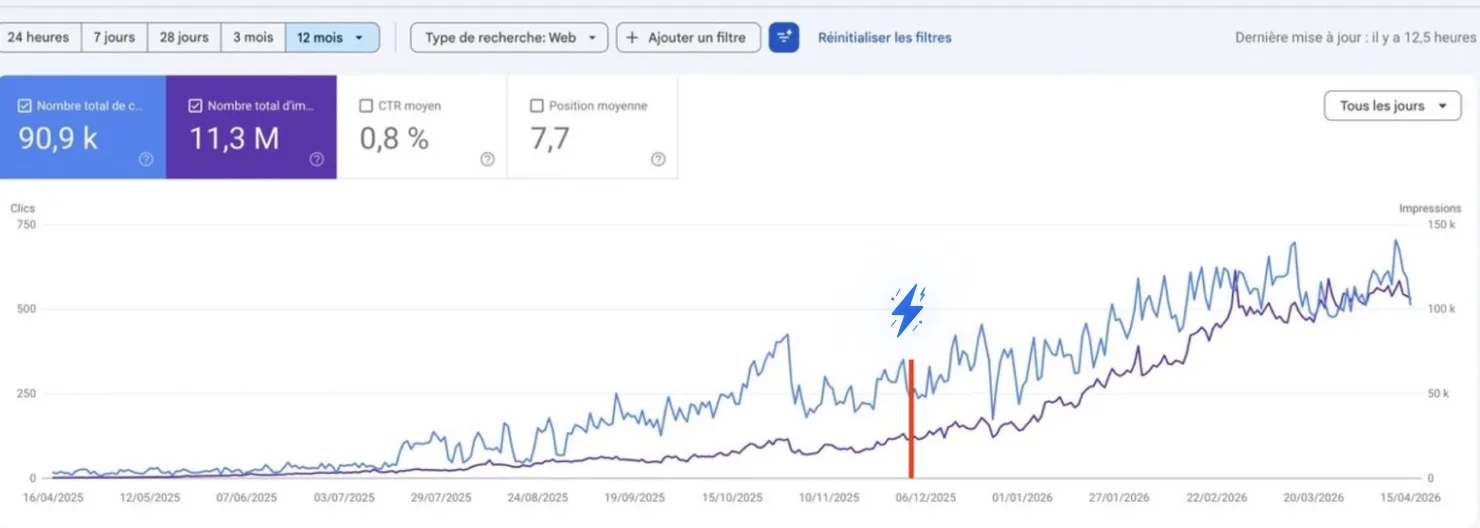
Why this works when SEO tools don't
Everything on this page runs on exports and two hundred text files. You can try it here for free if you'd rather not be the one doing the exporting.
Old SEO tools
- 47 issues ranked by somebody else's severity score
- A dashboard for every function, and no one to read them
- Keyword lists with 4,000 rows and no page to build
- A traffic chart with no idea what you changed
- Five tools that don't talk to each other
What you actually want
- One method per job, and one action back from each
- Ten areas covered, none of them by you
- A capped list where every row names the page to fix
- A report that ties every rise to a dated change
- One connection, from Search Console to shipped fix
That's the whole idea behind ChatSEO
One SEO employee that reads your Search Console, tells you exactly which page to fix and why, writes the fix, ships it, and tells you a month later whether it worked.
Try ChatSEO free →No credit card required