Six SEO skills
for Astra
Everyone is testing Astra on code right now. Almost nobody is writing SEO skills for it. Here are the six I run on my own Search Console and GA4 data — full files, copy them.
The one that found 120,354 impressions and 2 clicks on my own site →
Free · No credit card required

Hey there, I'm Nicholas 👋
I grew my last B2C app to 15K Google clicks/month as a solo founder, then sold it. Turns out I fell in love with SEO along the way.
So now I'm building ChatSEO.app — an all-in-one SEO employee whose job is to make sure you rank #1 in Google and in AI search.
I rebuilt my whole SEO process on Astra this month. These are the six skill files that came out of it. Try it free →
Why a skill file beats a good prompt
A prompt is a request. A skill file is a rule that outlives your mood.
Paste a great prompt and you get a great answer once. Paste it again next month, slightly reworded because you remembered it differently, and you get a different answer — which means you cannot compare this month to last month, which means you learn nothing from either.
A skill file removes the wording from the equation. Same rule, same shape, every run. That's the whole reason these six exist as files rather than as a note in a doc.
And there's a second reason, specific to Astra, which is the most useful thing I learned building these:
Astra follows skill files strictly. A vague rule doesn't get ignored — it gets executed vaguely. And two rules that contradict each other can stop the skill working altogether.
That cuts both ways. It's why these skills are worth having: the constraint you write down is the constraint you get. It's also why a sloppy skill file is worse than no skill file at all, and why there's a whole section below on how to write a rule Astra can execute precisely.
First: Astra needs your actual data
Six skills that reason about your site are worth nothing if the model can't see your site.
Every skill below reads live Search Console and GA4 data. Without that connection you get a well-structured essay about SEO in general — confident, well-formatted, and about nobody's website.
The way I do it is the ChatSEO plugin: it connects once to your Search Console and GA4 with read-only Google OAuth, and then exposes them to Astra as tools it can query. No API key to generate, no CSV to export, no pasting rows into a chat window.
Connect it once
Two minutes, then every skill below has something real to read.
- Create a free account at chatseo.app, add your site, and click Connect Google Search Console. Read-only OAuth. Connect GA4 the same way if you want skill 5.
- Add ChatSEO to Astra as a plugin. The endpoint is the same for everybody:
https://api.chatseo.app/mcp - Ask one question before you save a single skill file — the test below.
The test, before anything else:
Which of my pages lost the most clicks last month?
If it comes back with your actual URLs, you're connected. If it comes back with advice about how to find pages that lost clicks, you aren't — and every skill below will produce beautifully formatted fiction.
This is the step people skip. Connect ChatSEO free → It's what turns the six files from templates into an audit of your site.
The 6 skills
In the order I run them. Each one is the complete file — copy it, save it as a skill in your client, call it by name.
Every file below obeys the same three constraints, and they are the product: it caps its own output, it ends on one action, and it refuses to state a number it didn't pull. Delete any of those and you get an audit again.
constraint-finder
The rule: commit to ONE bottleneck. Audits with 47 findings are banned. One constraint — everything else waits.
This is the skill that makes the other five safe to run. Without it you get five reports and no order to work them in, which is the same as no reports. The refusal to name a second constraint is not a stylistic preference — it's the entire function.
---
name: constraint-finder
description: Read the full Search Console funnel and name the single constraint holding the site back. Use first, before any other SEO skill, and once a quarter after that.
---

Use the connected Search Console data. If no site is set, list my sites and ask which one.
Do not guess which site I mean.

Pull the last 90 days and walk the funnel in this order. The order is not negotiable —
each stage gates the one below it.

1. INDEXING — pages indexed versus pages I intend to be indexed
2. IMPRESSIONS — total, and the direction versus the previous 90 days
3. POSITION — the distribution: how many queries sit 1-3, 4-10, 11-20, 21+
4. CTR — actual CTR per position band, against that band's average on THIS site
5. CONVERSION — if GA4 is connected, clicks to conversions by landing page

Give me one line per stage: the number, the direction, and healthy or not.

Then name THE ONE binding constraint: the EARLIEST stage in that list that is broken.
Explain in two sentences why that stage and not the next one, using the numbers you pulled.
A CTR problem is not worth solving on pages Google is not showing.

BANNED: a list of findings. A severity ranking. A second constraint mentioned "for later".
A summary of the stages that were fine. If you catch yourself writing "additionally", stop.

If a figure is not in the data, write "cannot compute from this data" and move on.
Never estimate a number, and never carry an estimated number into the next stage.

End with ONE sentence: the constraint, and the single next action.
dead-page-detector
The rule: flag every page with high impressions and near-zero clicks. Report impressions, clicks, position. No commentary.
Ranked. Seen. Never clicked. These pages are the cheapest thing to fix on any site, because you already paid for the ranking — and they're invisible in a clicks report, which is the only report most people open.
"No commentary" is the load-bearing rule. The moment the model starts explaining each row, it starts guessing at causes, and a guessed cause is indistinguishable from a measured one once it's written in the same font.
---
name: dead-page-detector
description: List pages that earn impressions but almost no clicks. Table only, no analysis. Use monthly.
---

Use the connected Search Console data on my active site. Last 28 days.

Find every page matching ALL THREE:
- 1,000+ impressions
- CTR under 0.5%
- average position between 5 and 25

Return ONE table, ranked by impressions, capped at 10 rows:
page | impressions | clicks | average position

Then a second table, same cap, of the top query per page:
page | top query, verbatim | that query's impressions | that query's position

RULES:
- No commentary. No "why this is happening". No recommendations. No summary line.
- Do not describe the table you just produced.
- Do not mark rows as urgent, high priority, or quick wins.
- If a page qualifies on impressions but the position is outside 5-25, leave it out
  rather than mentioning it as a borderline case.
- Every number comes from the data. If a column is unavailable, write "not in data"
  in that cell. Never fill a cell with an estimate.

End after the second table. Nothing follows it.
What it returned on my own site
Real output, 7 August – 3 September 2026. Over that window the site did 4,723 clicks from 297,075 impressions — and 4,175 of those clicks, 88%, came from three brand queries: "chatseo", "chat seo", "chatseo app".
Which means the non-brand half of the site was doing this:
| Page | Impressions | Clicks | Avg position |
|---|---|---|---|
| Free Ahrefs alternative | 120,354 | 2 | 19.7 |
| Free Moz Pro alternative | 23,274 | 6 | 11.9 |
| Free Similarweb alternative | 23,367 | 37 | 13.6 |
| Free Semrush alternative | 14,518 | 13 | 14.6 |
120,354 impressions and two clicks. I had been looking at a clicks chart that was going up and feeling fine about it, because 88% of it was people typing my own name.
Note what the skill did not do: it did not tell me the titles were bad. At position 19.7 a low CTR is what you'd expect — nobody scrolls to the bottom of page two. That distinction is skill 3's job, and it's the reason skill 2 is forbidden from commentary.
no-overclaiming
The rule: for every diagnosis, state what the data can't prove yet.
An agency sells you the fix. This skill forces the honest version — and it's the one that changes what you actually do, because half the time the honest version is "we don't know yet, and here's the cheap thing that would tell us".
Run it on the output of any other skill. It's a reviewer, not a reporter.
---
name: no-overclaiming
description: Review an SEO diagnosis and separate what the data proves from what it only suggests. Use after every diagnosis, before acting on it.
---

I will give you a diagnosis — yours or someone else's. Do not re-run the analysis.
Your job is to audit the claims in it.

For each claim, produce three lines:

CLAIM — the claim, in the words it was made.
PROVEN BY — the specific data that supports it. Name the metric, the period and the
  comparison. If the support is "this is generally true in SEO", write "not proven by
  this data" instead.
CANNOT PROVE YET — what would have to be true for this claim to be right, that this data
  does not show. Be specific about the missing observation, not vague about uncertainty.

Then, for the whole diagnosis:

THE CHEAPEST TEST — the single observation that would move the biggest claim from
  "suggested" to "proven". One test, not a research plan.

Rules:
- A low CTR at position 18 is not evidence of a bad title. Depth explains it. Say so.
- A drop that coincides with a date is not caused by that date. Say so.
- Page-level averages hide query-level, country-level and device-level differences.
  If a claim rests on a page-level average, that goes in CANNOT PROVE YET, every time.
- Never soften a claim into vagueness. "May be underperforming" is not honesty, it is
  noise. Either it is proven, or name exactly what is missing.

If a claim survives with nothing in CANNOT PROVE YET, say so plainly. That is allowed
and it should be rare.

End with one sentence: which claim is safe to act on today.
intent-mapper
The rule: build a table of every visitor type and the next step the site should give them.
Traffic is not one audience. The person searching "free ahrefs alternative" and the person searching "how does search console work" arrived at the same site wanting incompatible things, and a page that tries to serve both serves neither.
The output is deliberately a table with a column that is usually empty — the next step. Empty cells in that column are the finding.
---
name: intent-mapper
description: Map every visitor type arriving from search to the next step the site currently gives them, and name the gaps. Use quarterly.
---

Use the connected Search Console data on my active site. Last 90 days.

Group my queries into visitor types by what the person is trying to finish, not by topic.
Derive the groups from the actual queries — do not apply a standard taxonomy and do not
assume a group exists because most sites have one. Cap at 6 groups.

For each group, give me one row:

VISITOR TYPE | example query, verbatim | clicks | the page they land on |
WHAT THAT PAGE OFFERS THEM NEXT | is that the right next step? yes / no / nothing offered

Rules for the last two columns:
- Read the actual landing page. If you cannot load it, write "page not read" and leave
  the next-step columns empty. Do not infer the next step from the URL.
- "Nothing offered" is a valid and common answer. Write it rather than describing the
  navigation bar as a next step.
- The right next step is the one that visitor would want, not the one I would want. A
  buyer query gets a trial. A learning query gets the next thing to learn.

Then, below the table, list ONLY the rows where the answer was "no" or "nothing offered".

End by naming the ONE visitor group that sends the most clicks into a dead end, and the
single next step that group should be given.
Do not design the page. Do not write the copy.
funnel-auditor
The rule: recompute every conversion rate from raw events. Never accept a stacked metric.
Every analytics tool ships pre-stacked funnels, and every pre-stacked funnel encodes a decision someone else made about what counts as a step, a session, and a conversion. Recomputing from raw events costs one extra minute and changes the number surprisingly often.
The second rule matters as much as the first: a conversion rate with no denominator stated is not a measurement.
---
name: funnel-auditor
description: Rebuild the organic conversion funnel from raw GA4 events rather than reading a prepared funnel report. Use monthly.
---

Use the connected GA4 data. Organic search traffic only. Last 30 days.

Do NOT read a prepared funnel, a conversion-rate widget, or any metric that arrives
already divided. Pull raw event counts and compute every rate yourself.

Build the funnel from events, in this order, and state the exact event name behind
each step:
1. landed from organic
2. viewed a page that can convert
3. started the conversion action
4. completed it

For every step give me:
count | the event name it came from | rate vs the PREVIOUS step | rate vs step 1

Every rate must be written as its arithmetic: "412 / 5,830 = 7.1%". A percentage with
no visible denominator is not allowed anywhere in the output.

Then:
- Name the step with the largest drop in absolute users, not in percentage. A step losing
  60% of 80 people is not the problem when another loses 20% of 5,000.
- State the date range and the sample size for that step. If the sample is under 100
  users, say the step is not measurable yet and stop there.

If an event I need does not exist in the data, say which one is missing and what it would
have to be called. Do not substitute a similar event and do not model the step.

End with ONE sentence: the step to work on, and its arithmetic.
self-auditor
The rule: check my own product's SEO advice against current Google documentation before checking any competitor.
The order is the point. It is much more comfortable to audit a competitor, and much more useful to audit yourself — especially if, like me, you sell SEO advice, in which case shipping advice Google has since contradicted is an unusually expensive mistake.
And the output is one experiment, not thirty ideas. Thirty ideas is a way of not choosing.
---
name: self-auditor
description: Check my own site's SEO claims and advice against current Google documentation, before looking at any competitor. Use quarterly.
---

Audit MY site first. Do not open a competitor, do not run a comparison, and do not
mention what competitors do. If I ask for a competitor mid-run, finish this audit first.

Step 1 — collect the claims.
List the SEO claims and recommendations my own pages make. Quote each one verbatim with
the URL it appears on. Cap at 12 claims, chosen by page traffic.

Step 2 — check each against current Google documentation.
For each claim, find what Google's own current documentation says. Cite the specific page
you checked. Mark each claim:
  SUPPORTED — the documentation says this
  OUTDATED — the documentation used to support this and no longer does
  CONTRADICTED — the documentation says the opposite
  NOT ADDRESSED — Google's docs do not cover it, so this is opinion, not guidance

If you cannot open Google's documentation, write "could not verify against source" for
that claim. Do not mark a claim SUPPORTED from memory of the documentation.

Step 3 — one experiment.
From everything above, design exactly ONE experiment: the change to make, the page to make
it on, the metric that would show it worked, and the date to check.

BANNED: a list of 30 improvements. A prioritised backlog. A "quick wins" section.
If two experiments seem equally good, pick the one on the page with more impressions and
say that is why you picked it.

End with the experiment, in five lines.
The warning: how to write a rule Astra can execute
Astra follows skill files strictly. That's the feature, and it's also the trap.
This was the genuinely surprising part of building these, and it's worth more than any individual skill above, because it applies to every skill file you'll ever write.
A vague rule doesn't get ignored. It gets executed vaguely.
This is the failure people don't anticipate. You assume a woolly instruction gets skipped, and that the model falls back on good judgement. It doesn't. It follows the rule you wrote, at exactly the precision you wrote it.
Vague
- "Focus on the important pages"
- "Don't give too many recommendations"
- "Be honest about uncertainty"
- "Look at recent data"
Executable
- "Rank by impressions. Cap at 10 rows."
- "End with exactly one action. No list."
- "For each claim, write what the data cannot prove yet."
- "Last 28 days, versus the 28 before."
The test I use: could two different people read this rule and produce different output? If yes, the model will too, and you won't be able to compare this month's run to last month's.
Conflicting rules can stop the skill working entirely
This one cost me an afternoon. A skill that says "be thorough" in the description and "cap at 5 rows" in the body has been given two instructions that cannot both be satisfied, and the failure isn't a compromise — it's a skill that stalls, or produces something unrecognisable, or quietly drops one of the two rules without telling you which.
The conflicts that actually bite are rarely obvious. Mine were:
- A description that promises breadth, a body that demands focus. The description is read first, to decide whether to run the skill at all. If it says "comprehensive audit" and the body says "one constraint", you've already lost.
- "Never estimate" plus a required field that can only be estimated. Either give it a way out — "write cannot compute from this data" — or don't ask for the field.
- "No commentary" plus "explain your reasoning". Pick one per skill. That's why skills 2 and 3 are separate files rather than one clever file.
Four rules for writing the file
- Write the description as when to use this, not what this is. It's the sentence that decides whether the skill runs at all.
- Cap every output with a number. "A few" is not a cap. "10 rows" is.
- Give every prohibition an escape hatch. "Never estimate" needs "write cannot compute from this data" beside it, or the skill has nowhere to go and will improvise.
- Say what to do with the borderline case. Most weird output comes from a row that half-qualified and had no instruction attached to it.
One skill, one job. Every time I merged two skills to save a step, the merged version got worse at both. Six small files beat two clever ones.
The routine
Six skills is not six weekly jobs. Two repeat monthly. The rest fire on a trigger.
- Monthly, 30 minutes — 2 · dead-page-detector, then 5 · funnel-auditor. One finds the traffic you're not converting into clicks, the other the clicks you're not converting into anything.
- After every diagnosis — 3 · no-overclaiming, on whatever the previous skill just told you. This is the cheapest of the six and the one that most often stops a wasted week.
- Quarterly — 1 · constraint-finder to decide what the quarter is about, 4 · intent-mapper to see who's arriving and where they dead-end, 6 · self-auditor to check your own advice hasn't gone stale.
Start with two: constraint-finder and dead-page-detector. Run them for a month before you save the other four. Six new files in one afternoon is how you end up with six files you never call.
The four mistakes that kill this
Running them without the data connected
Every skill here reasons about your site. Disconnected, they produce fluent, confident, correctly formatted output about nobody's website — and it reads exactly like the real thing.
Editing out the cap because you want "the full picture"
Every file ends on one action on purpose. The first time you delete that line, you've rebuilt a 47-finding audit with extra steps and a nicer interface.
Merging skills to save a step
"No commentary" and "explain your reasoning" cannot live in one file. Astra will follow both, badly, or drop one without saying which.
Trusting a number the skill didn't pull
Every file forbids estimation and gives it a way to say so. If an answer contains a confident figure with no data call behind it, ask where it came from before you act on it.
Where this still needs a human
- Whether the page can honestly deliver the query. Skill 2 finds the impressions you're not converting. Only you know whether the page behind them keeps its promise.
- What the right next step is. Skill 4 finds the dead ends. What belongs there is a business decision.
- Approval on anything that ships. These skills diagnose. None of them should be deciding to publish.
- The weird stuff. If a number looks wrong, it might be. Go and look at the page.
What a skill file structurally cannot do
You'll hit this in week three, and it isn't a flaw in the files.
A skill file is a rule. It has no memory and it doesn't run on its own.
Every one of these six starts from zero. It can re-pull the numbers, but it doesn't know that you rewrote that title in March, what it used to say, or that you were waiting to see whether it moved. Nothing fires when the 120,354-impression page finally starts getting clicks, and nothing fires when it stops — decay never announces itself, and by the time it shows up in a monthly total it's a rebuild rather than a fix.
That's the half a chat window can't hold, and it's what ChatSEO keeps on the other side of the plugin: the site, the history, the change you shipped and the date you said you'd check it. Astra is the interface and it's a very good one. The record has to live somewhere that doesn't reset between sessions.
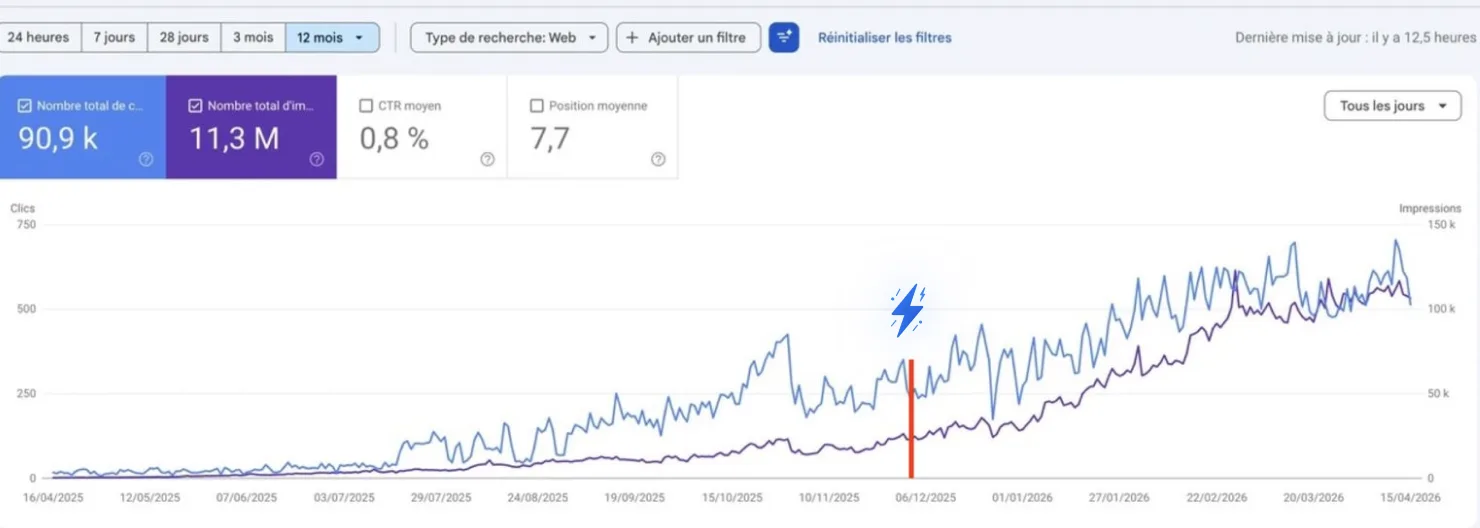
How one founder went from 250 → 750 clicks a day
He added +14,500 clicks just by chatting with AI.
No SEO expertise. He simply ran the recommendations he was given — the same loop as skills 1, 2 and 5, running without him having to remember it. Start free →
Why this works when old SEO tools don't
Here's the blunt truth about SEO in 2026. Everything on this page runs on nothing but your Search Console, your GA4 and six text files — and you can try it here for free if you'd rather not be the one remembering to run them.
Old SEO tools
- 47 findings sorted by somebody else's severity score
- A clicks chart that's 88% your own brand name
- Conversion rates you can't see the denominator of
- Advice written before Google's docs changed
- Five tools that don't talk to each other
What you actually want
- One constraint, named, with the reason
- The pages with 120,354 impressions and 2 clicks
- Every rate shown as its arithmetic
- Your own claims checked against current documentation
- One connection, from Search Console to published fix
That's the entire idea behind ChatSEO
One SEO employee that reads your Search Console and GA4, tells you the single thing holding the site back, writes the fix, ships it to your site — and tells you a month later whether it worked. From Astra, from Claude, or from ChatSEO itself.
Try ChatSEO free →No credit card required