The Astra/Fable
SEO Folder
15 skills that take you from auditing your site to knowing exactly which pages to fix and why. Plus the shared GSC data file, the scoring model and the three workflows that chain them. Every file is here in full.
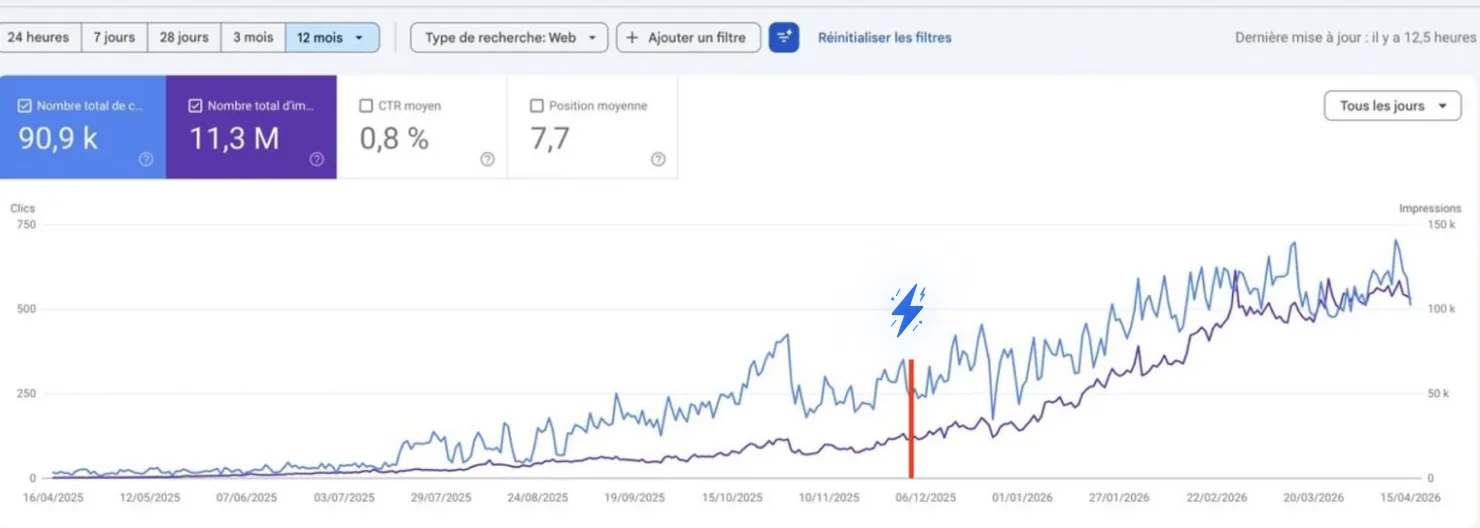
How one founder went from 250 to 750 clicks a day on this method →
Free · No credit card required

Hey there, I'm Nicholas 👋
I grew my last B2C app to 15K Google clicks/month as a solo founder, then sold it. Turns out I fell in love with SEO along the way.
So now I'm building ChatSEO.app — an all-in-one SEO employee whose job is to make sure you rank #1 in Google and in AI search.
This folder is the version of my process that runs in Astra. Try it free →
Why a folder, and not 15 prompts
Fifteen prompts give you fifteen opinions. A folder gives you one.
I ran SEO out of a prompt library for a year. It worked until it didn't: the "quick win" prompt would call a page a quick win, the "priority" prompt would rank the same page ninth, and the monthly report would say something else again. None of them were wrong. They just weren't reading the same numbers, or agreeing on what "low CTR" meant.
So I rebuilt the whole thing as a folder for Astra running Fable. Astra is the interface, Fable is the model doing the reasoning, and the folder works in any Claude client that loads skill files. Three things make it a system rather than a pile of prompts:
- One data file. Every skill reads
gsc-data.md, so skill 4 and skill 13 are looking at the same rows, not at whatever you happened to paste that day. - One scoring model. "Opportunity" and "effort" are defined once in
scoring.md. A quick win is a quick win in every file, and the priority list is the same list whichever skill produced it. - One action per skill. Every file caps its own output and ends on a single thing to do. Not a ranked list of things. One. That constraint is the product.
Install it in four minutes
A folder, two root files, fifteen skill files, three workflow files.
Set it up once
Then every skill below has something real to read.
- Make a folder called
seo. Save the two root files below inside it asgsc-data.mdandscoring.md. Do this first, even if you only ever use three skills. It is what stops two skills disagreeing. - Save each of the 15 skills as its own
.mdfile in the same folder, named after thename:line in its frontmatter. Same for the three workflow files. - Give Astra the folder: put it where your project's other skills live, or attach it to a Project if you're in Claude. Then call a skill by name, or call a workflow and let it call the skills.
- Fill
gsc-data.mdwith your real data before you run anything. The step below.
The step people skip
Fifteen skills that reason about your site are worth nothing if the model can't see your site. Every skill below reads Search Console numbers out of gsc-data.md. Leave it empty and you get a well-structured essay about SEO in general: confident, beautifully formatted, and about nobody's website.
You can fill the file from CSV exports by hand, and the section below walks through exactly which exports. The way I do it is the ChatSEO plugin: one read-only Google OAuth connection, then Astra can query Search Console and GA4 as tools. No export, no pasting, and every skill can re-pull next month without you.
Test it before you save a single file. Ask: "Which of my pages lost the most clicks last month?" Real URLs back means the model can see your data. Advice about how to find those pages means it can't, and all 15 skills will produce fiction in a nice table. Connect ChatSEO free →
The shared GSC data file
One file, filled once a month, read by all fifteen skills.
Most SEO prompts fail at the input, not the reasoning. You paste 200 rows into one chat and 300 into the next, brand queries in one and not the other, a 28-day window here and a 3-month window there. Then you wonder why the answers don't agree.
gsc-data.md fixes the input. It holds four things: the site and the window, the brand terms to strip out before any average is computed, the exports themselves, and a changelog of what you shipped and when. That last block is what lets the reporting skill say "this rise lines up with the title change on the 12th" instead of guessing.
How to fill it, by hand
- In Search Console, open Performance → Search results. Set the date range to last 3 months and turn on Compare against the previous period, so both windows land in one export.
- Use Export (top right) to download the CSV. You get one file per tab. Paste the Pages table and the Queries table into the file, top 500 rows of each is plenty.
- The standard export does not pair queries with pages. For the skills that need pairs (quick wins, cannibalization), filter the report on one page, export its queries, and paste that block under that page's URL. Do this for your top 10 pages only.
- List your brand terms. Every skill excludes them before computing an average, because brand CTR is high enough to hide everything else.
If your export only shows one period, export twice and paste both, labelled. And if this list already feels like a monthly chore: it is, and it's the exact chore the ChatSEO connection removes. The file format stays the same either way.
Copy the data file template
---
name: gsc-data
description: The one Search Console dataset every skill in this folder reads. Skills never ask for data that is in here, and never use data that is not.
---

SITE
  property:      https://example.com/          <- replace
  window:        last 3 months (YYYY-MM-DD to YYYY-MM-DD)
  compared to:   previous 3 months (YYYY-MM-DD to YYYY-MM-DD)
  country:       all | one country code
  exported on:   YYYY-MM-DD

BRAND TERMS — strip every query containing these before computing any average
  example, examples, example.com, <founder name>

BAND AVERAGES — computed by best-page-analyser on first run, then pasted here
  winning (1.0-3.0)            avg CTR: __%   non-brand
  striking distance (3.1-10.0) avg CTR: __%   non-brand
  page two (10.1-20.0)         avg CTR: __%   non-brand
  Leave blank until skill 1 has run once. Skills that need a band average and
  find it blank must say "band averages not yet computed, run best-page-analyser".

PAGES — paste the Pages export, current period AND previous period
  url | clicks | impressions | ctr | position | prev clicks | prev impressions | prev ctr | prev position
  ...

QUERIES — paste the Queries export, current period AND previous period
  query | clicks | impressions | ctr | position | prev clicks | prev impressions | prev ctr | prev position
  ...

QUERY x PAGE — optional, top 10 pages only
  ## https://example.com/page-one/
  query | clicks | impressions | ctr | position
  ...
  ## https://example.com/page-two/
  ...

CHANGELOG — one line per shipped change, newest first
  YYYY-MM-DD | url | what changed (title / meta / section / links / schema / new page) | which skill proposed it
  ...

RULES FOR EVERY SKILL READING THIS FILE
  - If a section a skill needs is empty, say which section and stop. Do not
    proceed on general knowledge.
  - Brand terms are excluded before any average, ratio or ranking.
  - A page or query that is not in this file does not exist for the purpose of
    the skill. Never add one from memory.
  - The window is the window. Never compare the current period to anything
    other than the "compared to" period listed above.
The scoring model
One formula, so every skill ranks things the same way.
The question behind every SEO decision is the same one: how many clicks is this worth, and how much work is it? Most tools answer with a severity score somebody else designed. This folder answers with your own numbers.
Opportunity is the clicks a page or query would gain if its CTR reached the average of the band above it, on this site, brand excluded. Effort is a four-step ladder from "change the title" to "rebuild the section". Priority is one divided by the other. That's it, and it's enough: every skill that ranks anything ranks by priority, so the quick-win skill, the priority skill and the monthly report agree by construction.
| Effort | What it means | Typical fix |
|---|---|---|
| 1 | Under an hour, no new content | Title, meta description |
| 2 | Half a day, existing page | Rewrite one section, add internal links, add schema |
| 3 | Days, one page | Full rewrite, or a new page from a brief |
| 4 | Weeks, many pages | Site structure, templates, technical change |
Copy the scoring model
---
name: scoring
description: Shared definitions and the opportunity/effort model. Every skill in this folder reads this before it ranks, labels or recommends anything. Never override these locally.
---

POSITION BANDS
  winning 1.0-3.0 | striking distance 3.1-10.0 | page two 10.1-20.0 | noise 20.1+
  CTR is judged against THIS site's own non-brand average for that band,
  taken from gsc-data.md. Never use a published industry CTR table.

FLOORS — below a floor, write "below the floor, not ranked". Do not rank it quietly.
  page enters a priority list:    200+ impressions in the current window
  query named individually:        50+ impressions in the current window
  CTR treated as signal:           20+ clicks
  a trend may be called a trend:   both periods present in gsc-data.md

OPPORTUNITY — in clicks, for one page or one query
  band        = position band of its average position
  target_ctr  = this site's average CTR of the band ABOVE it
                (for the winning band, target_ctr = current ctr, opportunity = 0)
  opportunity = impressions x max(0, target_ctr - ctr)
  Round to a whole number. Show the three inputs next to it, always.

EFFORT
  1  title and meta only
  2  one section rewritten, or internal links added, or schema added
  3  full rewrite, or a new page from a brief
  4  site structure, template or technical change
  When unsure between two levels, take the higher one.

PRIORITY = opportunity / effort. Rank descending. Ties go to the lower effort.

QUICK WIN = position 4.0-15.0 AND effort 1 or 2 AND opportunity >= 20 clicks.
  All three. A page at position 2 is not a quick win, it is a page to defend.

DECAY = clicks down 30%+ versus the previous period, AND impressions flat or
  down less than 10%. If impressions fell too, it is a demand change. Say so.

CANNIBALIZATION = 2+ of my URLs in the top 20 for one query, neither above
  position 5. One strong page plus one weak page is not cannibalization.

SEASONALITY = before diagnosing any drop, ask whether the same weeks last year
  are in the data. If they are not, label the diagnosis "seasonality unchecked".

CONFIDENCE — attach one label to every claim about cause
  confirmed     visible in gsc-data.md; quote the figure
  probable      consistent with the data; name the test that would confirm it
  unverifiable  needs data not in the file; list it as what to pull next

UNIVERSAL RULES
  Never state a number that is not in gsc-data.md or computed from it by the
  formulas above. Write "cannot compute from this data" and move on. Never
  estimate, and never carry an estimated number into a later step.
  Every skill ends on ONE action. Not a ranked list of actions. One.
The 15 skills
In the order from the post, which is roughly the order you'd meet them. Every file is complete: open the dropdown and copy it.
Every file below obeys the same three constraints, and they are the product: it reads the two root files first, it refuses to state a number it didn't get from them, and it ends on one action. Delete any of those and you have a prompt again.
best-page-analyser
The rule: your best pages are ranked by what they could earn, not by what they earn today.
Sorting pages by clicks tells you what already works. Sorting them by opportunity tells you where the next clicks are, which is a different list and the only one worth having. This skill also computes the band averages every other skill leans on, so it runs first.
Open the full skill file
---
name: best-page-analyser
description: Rank the site's pages by opportunity, not by clicks, and give each one a verdict. Run first, and again whenever gsc-data.md is refreshed.
---

Read gsc-data.md and scoring.md first.

INPUTS — stop and say which is missing if it is not in gsc-data.md:
- the PAGES section, with both periods
- the BRAND TERMS list

PROCESS
1. Drop every page under the page floor in scoring.md.
2. Compute the non-brand average CTR per position band from the QUERIES section.
   Write the three numbers out. Tell me to paste them into BAND AVERAGES in
   gsc-data.md so the other skills can use them.
3. For every remaining page, compute opportunity using scoring.md. Show the
   three inputs (impressions, ctr, target_ctr) next to it.
4. Give each page one verdict:
   DEFEND   winning band, CTR at or above its band average
   PUSH     striking distance or page two, opportunity above 20 clicks
   RESCUE   clicks down 30%+ versus the previous period (hand to content-decay-tracker)
   IGNORE   noise band, or opportunity under 20 clicks
5. Sort by opportunity, descending.

OUTPUT — one table, capped at 10 rows:
url | position | impressions | ctr | band avg ctr | opportunity | verdict

RULES
- Opportunity is only computed with the formula in scoring.md. Never estimate
  a "potential traffic" figure any other way.
- A page whose position is in the winning band gets opportunity 0, even if its
  CTR looks low. Say "defend" and move on.
- If BAND AVERAGES cannot be computed because QUERIES is empty, say so and stop.

End with ONE line: the single PUSH page to open first, and why in ten words.
keyword-opportunity-finder
The rule: the best keyword is one Google already shows you for, and you keep losing.
Keyword research usually starts from a tool's volume estimate for a query you've never ranked for. This starts from queries you already get impressions on at position 8 to 30. Google has already told you the page is relevant. It just hasn't been convinced it's the best one.
Open the full skill file
---
name: keyword-opportunity-finder
description: Find the queries the site already gets impressions for but does not win, and say which page should own each one. Use before any content planning.
---

Read gsc-data.md and scoring.md first.

INPUTS — stop and say which is missing:
- the QUERIES section, both periods
- the PAGES section (to map queries to existing URLs)
- BRAND TERMS

PROCESS
1. Drop brand queries and every query under the query floor.
2. Keep queries with average position between 8.0 and 30.0. Above 8 is
   already winning enough; below 30 is not yet a signal.
3. Compute opportunity for each with scoring.md.
4. For each query, find the existing URL most likely ranking for it: the page
   whose topic matches, using QUERY x PAGE if present, otherwise your best
   reading of the PAGES list. Mark that reading "probable" if you had to guess.
5. Decide: STRENGTHEN the existing page, or NEW PAGE if no existing page is
   a credible home for the query.
6. Group queries that a single page could satisfy. One group, one destination.

OUTPUT — one table, capped at 15 rows, sorted by opportunity:
query | position | impressions | opportunity | destination URL or "new" | action

RULES
- Never invent search volume. Impressions are the only demand number allowed.
- No difficulty score. You cannot see one, and inventing one is worse than
  leaving it out.
- A query maps to exactly one destination. If it fits two pages, that is a
  cannibalization-detector job. Say so and pick the higher-impression page.

End with ONE line: the single query to go after this month, and its destination.
search-intent-classifier
The rule: read the SERP that exists, not the intent you'd prefer the query had.
Nearly every "we wrote the page and it didn't rank" story is this: a guide aimed at a query where Google only shows product pages. The format is the fight, and you can see who won it before you write a word. This is the one skill that needs something other than the data file, because the data file can't see a results page.
Open the full skill file
---
name: search-intent-classifier
description: Read a live SERP and name the intent class and the page format that can rank. Use before writing or rewriting any page.
---

Read scoring.md first.

INPUTS — ask for what is missing:
- the query, and the country and language it should be read in
- the SERP itself: a screenshot, a paste of the top 10, or a live fetch
If you cannot see the SERP, say so and stop. Do not describe what the SERP
"probably" looks like. That is the one failure mode of this skill.

INTENT CLASSES
  informational  guides, forums, videos, People Also Ask dominate
  comparison     listicles, "best", "vs", review sites dominate
  transactional  product pages, pricing, ads above the fold dominate
  navigational   one brand owns the top 3. Never target it.

PROCESS
1. List the top 10 results: URL, page type, and whether it is a brand's own page.
2. Count the page types. The majority type is the format Google is rewarding.
3. Note SERP features present: ads, People Also Ask, video, images, local
   pack, shopping, AI overview.
4. Assign the intent class.
5. Judge whether a page of the winning format is realistic for this site.

OUTPUT
- intent class, one word
- winning format, one line, with the count that justifies it ("7 of 10 are listicles")
- SERP features present, comma separated
- what would have to be true for us to rank, 2 bullets maximum
- verdict: TARGET or SKIP, with the reason in one sentence

RULES
- Only describe results you can actually see. Never reconstruct a SERP from
  memory. Rankings change and yours are months stale.
- If the top 3 are one brand's own properties, the verdict is SKIP.
- Hand the intent class to content-brief-builder. Never write the page from here.

End with ONE line: TARGET or SKIP, and the format if TARGET.quick-win-detector
The rule: position 4 to 15, effort 1 or 2, at least 20 clicks on the table. All three, or it isn't one.
"Quick win" is the most abused phrase in SEO because nobody defines it. The scoring model does: a page close enough to move, a fix small enough to ship this week, and enough clicks at stake to bother. This skill finds those and nothing else, and it names the fix, not just the page.
Open the full skill file
---
name: quick-win-detector
description: Find the pages that meet the quick-win definition in scoring.md and name the specific fix for each. Use weekly.
---

Read gsc-data.md and scoring.md first.

INPUTS — stop and say which is missing:
- the PAGES section with BAND AVERAGES filled in
- QUERY x PAGE for the top pages. If it is empty, say "query-to-page pairs
  missing: fix type will be limited to title/meta" and continue on PAGES only.

PROCESS
1. Keep pages with average position 4.0 to 15.0 and above the page floor.
2. Compute opportunity with scoring.md. Drop anything under 20 clicks.
3. For each remaining page, diagnose the cheapest fix from the data:
   TITLE/META   CTR below band average, position stable -> effort 1
   INTRO        top query's words absent from the page's title and first 100
                words (only if the page text was provided) -> effort 2
   LINKS        position 8-15 with impressions rising, few internal links
                (only if a crawl or link count was provided) -> effort 2
   SCHEMA       page type matches a rich-result type and has no schema
                (only if the page source was provided) -> effort 2
   If you cannot tell which, write "fix: unknown, open the page" and effort 2.
4. Drop anything that needed effort 3 or 4. That is not a quick win.
5. Rank by priority = opportunity / effort.

OUTPUT — one table, capped at 7 rows:
url | position | impressions | ctr | band avg ctr | opportunity | fix | effort | priority

RULES
- Never label a winning-band page a quick win. It is a page to defend.
- Every "fix" must be justified by a number in gsc-data.md or a file the
  user provided. No "the content could be better".
- If nothing meets the definition, say "no quick wins this week" and stop.
  A short list is a valid output. An inflated one is not.

End with ONE line: the single quick win to ship today, and the fix.topical-authority-mapper
The rule: a topic is a pillar page plus the supporting pages Google expects to find next to it. Count what's missing.
Sites don't rank for topics because they have one great page. They rank because they have the whole shelf. This skill builds the shelf from your own query data, marks each cluster covered, thin or missing, and tells you which missing page closes the biggest gap.
Open the full skill file
---
name: topical-authority-mapper
description: Build the site's topic map from its own query data, mark coverage per cluster, and name the missing page that matters most. Use monthly, before briefing new content.
---

Read gsc-data.md and scoring.md first.

INPUTS — stop and say which is missing:
- the QUERIES section (non-brand)
- the PAGES section
- optionally, the output of keyword-opportunity-finder

PROCESS
1. Drop brand queries and queries under the query floor.
2. Group the remaining queries into topics: a PILLAR is a broad head term the
   site gets impressions for; a CLUSTER is a group of 3+ queries under it that
   one page could satisfy. Fewer than 3 queries: fold into the nearest cluster.
3. Cap at 5 pillars, chosen by total impressions.
4. For each cluster, find the URL that currently ranks for most of its queries
   and mark coverage:
   COVERED  a page exists and ranks in the top 10 for the cluster's top query
   THIN     a page exists but ranks 11+ for the top query
   MISSING  no page in PAGES plausibly targets the cluster
5. Sum the impressions of every MISSING and THIN cluster per pillar.

OUTPUT
For each pillar (max 5):
  pillar | total impressions | clusters covered / thin / missing
Then one table of the MISSING and THIN clusters, capped at 10 rows, sorted by impressions:
  cluster (named after its top query) | pillar | impressions | coverage | current URL or "none"

RULES
- The map is built from gsc-data.md only. Do not add topics the site has no
  impressions for; that is competitor-gap-analyser's job.
- One cluster maps to exactly one URL. That constraint is what prevents
  cannibalization later.
- Never state a "topical authority score". There is no such number in the data.

End with ONE line: the single MISSING cluster to brief first, and its pillar.
content-brief-builder
The rule: a brief tells the writer what has to be true on the page. It does not write the page.
A brief is where the research becomes something a person, or skill 14, can execute. It takes one cluster from the topical map, one verdict from the intent classifier, and produces the outline, the questions the page must answer, and the internal links it must carry. Short on purpose. A brief that runs to four pages is a draft with no author.
Open the full skill file
---
name: content-brief-builder
description: Turn one cluster and one intent verdict into a one-page brief a writer or draft-writer can execute. Use once per new or rewritten page.
---

Read gsc-data.md and scoring.md first.

INPUTS — ask for what is missing:
- the target cluster: its top query and the 3-10 queries under it
- the intent class and winning format, from search-intent-classifier
- the destination URL, existing or "new", and the pillar it belongs to
- optionally: the top 3 ranking pages' headings, if the user pasted them

PROCESS
1. State the one job of the page in a sentence: who searches this and what
   they need to leave with.
2. Write the H1 and an outline of H2s. The outline follows the winning format,
   not a generic template. A comparison page gets a comparison outline.
3. List the questions the page must answer, drawn from the cluster's queries.
   One question per query, deduplicated.
4. List the entities and terms the page must mention, only ones present in the
   cluster's queries or the pasted competitor headings.
5. List internal links: 3-5 pages from PAGES that should link TO this page,
   with the anchor text (a query the page targets), and 2-3 this page should
   link OUT to.
6. Give 3 title candidates under 60 characters and one meta description under
   155 characters.
7. If competitor headings were provided, give a length range from them.
   If not, write "length: not observed".

OUTPUT — under 400 words, in this order:
job | H1 | outline | questions | terms | internal links in | internal links out |
titles | meta | length

RULES
- No word counts, keyword densities or "LSI keywords" pulled from nowhere.
- Every internal link source must be a URL in gsc-data.md.
- Do not write body copy. That is draft-writer's job.

End with ONE line: the single section that must be the best on the web for
this page to rank.
title-meta-rewriter
The rule: the title says what the top query says, and promises only what the page delivers.
The highest-leverage fix in SEO is still a title change on a page that ranks 5th with a CTR below its band. It's effort 1, and it moves within days. This skill writes three candidates from the page's own top queries and then, crucially, picks one. You don't get to A/B test in your head.
Open the full skill file
---
name: title-meta-rewriter
description: Rewrite one page's title and meta description from its own query data, and pick one. Use on any page flagged TITLE/META by quick-win-detector.
---

Read gsc-data.md and scoring.md first.

INPUTS — ask for what is missing:
- the URL
- its current title and meta description (paste them; do not fetch from memory)
- its queries from QUERY x PAGE, or the top QUERIES you can attribute to it
- what the page actually contains, in one sentence from the user

PROCESS
1. Name the top query by impressions and the CTR gap versus its band average.
2. Diagnose in one sentence why the current title underperforms: query words
   missing, promise unclear, truncated, or duplicate of another page's title.
3. Write 3 titles, each under 60 characters, each starting with or containing
   the top query's words in natural order. One plain, one with a specific
   benefit the page delivers, one with a number that is ACTUALLY on the page.
4. Write 1 meta description under 155 characters that says what the reader
   gets and ends with a verb.
5. Pick ONE title. Say why in one sentence, using the CTR gap.

OUTPUT
diagnosis | title A | title B | title C | meta | chosen: A/B/C, reason

RULES
- No number, year or claim in a title that the user has not confirmed is on
  the page. "2026 guide" on a page that says nothing about 2026 is banned.
- No clickbait patterns: "you won't believe", "the secret", "ultimate".
- Do not change the title of a winning-band page unless its CTR is below its
  band average. Say "defend, do not touch" instead.
- Character counts are shown next to each candidate.

End with ONE line: the chosen title, ready to paste.
internal-link-builder
The rule: the anchor is a query the target already ranks for, and the source is a page that already has traffic.
Internal links are the cheapest ranking signal you control completely, and the one most sites leave to a "related posts" widget. This skill picks sources that have impressions of their own, anchors that match what the target already ranks for, and tells you which sentence to put the link in.
Open the full skill file
---
name: internal-link-builder
description: Propose internal links to one target page, with source, anchor and placement, from pages that already have traffic. Use on any page flagged LINKS, or on any new page after it is published.
---

Read gsc-data.md and scoring.md first.

INPUTS — ask for what is missing:
- the target URL and its top 3 queries
- the PAGES section (candidate sources)
- optionally: the text of candidate source pages, or a crawl export with
  existing internal links

PROCESS
1. Candidate sources are pages in PAGES above the page floor. Rank them by
   topical closeness to the target's top query: shared words, same pillar.
2. Drop any source that already links to the target, if a crawl was provided.
3. For each source, choose an anchor: one of the target's top 3 queries, or a
   close natural variant of it. Never the bare URL, never "click here".
4. For each, write the sentence the link belongs in. If the source text was
   provided, quote the existing sentence to edit. If not, write a sentence to
   add and mark it "new sentence".
5. Cap at 8 links. Fewer is fine.

OUTPUT — one table:
source URL | source impressions | anchor text | placement sentence | existing or new sentence

RULES
- No site-wide links: no nav, footer or sidebar suggestions. Body links only.
- Never suggest a source page that is not in gsc-data.md.
- Two links from the same source to the same target is one link. Do not pad.
- If the target's queries are not in the file, say so and stop. You cannot
  choose an anchor without them.

End with ONE line: the single link to add first, source and anchor.
cannibalization-detector
The rule: two URLs in the top 20 for one query, neither above 5. One strong page and one weak page is not cannibalization.
Cannibalization is over-diagnosed by tools and under-fixed by people, because the tool flags every query with two URLs and the person can't tell which ones matter. The definition in the scoring model cuts the list to conflicts where neither page is winning. Those are the ones where merging actually moves a ranking.
Open the full skill file
---
name: cannibalization-detector
description: Find queries where two or more of the site's pages compete and neither wins, and say what to do with each pair. Use monthly.
---

Read gsc-data.md and scoring.md first.

INPUTS — stop and say which is missing:
- the QUERY x PAGE section. Without it this skill cannot run. Say
  "query-to-page pairs missing, export queries per page for the top 10 pages"
  and stop. Do not infer pairs from the PAGES list.

PROCESS
1. For every query that appears under 2 or more URLs, list the URLs with
   position and impressions.
2. Apply the definition in scoring.md: keep only pairs where both URLs are in
   the top 20 and neither is above position 5.
3. Drop queries under the query floor.
4. For each remaining conflict, choose a verdict:
   MERGE         same intent, same audience: fold the weaker into the stronger, redirect
   DIFFERENTIATE different intent (one informational, one transactional): retitle
                 the weaker page toward its own intent
   REDIRECT      the weaker page has no queries of its own
   LEAVE         positions are moving apart month over month; check again next month
5. Rank by the query's impressions.

OUTPUT — one table, capped at 10 rows:
query | impressions | URL A (position) | URL B (position) | verdict | which page survives

RULES
- The surviving page is the one with more clicks across ALL its queries, not
  the one with the better position on this one query. Show both numbers.
- Never recommend deleting a page without a redirect target.
- If no pair meets the definition, say "no cannibalization by this definition"
  and stop. Do not lower the bar to produce a list.

End with ONE line: the single conflict to resolve first, and its verdict.content-decay-tracker
The rule: decay is clicks down with impressions holding. If impressions fell too, nobody searched, and no rewrite fixes that.
The pages that used to carry the site are the ones nobody looks at, because they used to be fine. This skill compares the two periods in the data file and separates real decay, where you lost the click, from demand change, where the query itself shrank. The fix is different and so is the urgency.
Open the full skill file
---
name: content-decay-tracker
description: Find the pages losing clicks while demand holds, separate decay from demand change, and say which to refresh first. Use monthly.
---

Read gsc-data.md and scoring.md first.

INPUTS — stop and say which is missing:
- the PAGES section with BOTH periods. One period is not enough to detect
  anything. Say so and stop.
- the CHANGELOG (to rule out changes we made ourselves)

PROCESS
1. For every page above the page floor, compute clicks change and impressions
   change versus the previous period, in percent, with the raw numbers.
2. Apply the definition in scoring.md:
   DECAY          clicks down 30%+, impressions flat or down less than 10%
   DEMAND CHANGE  clicks down 30%+ AND impressions down 10%+
   Everything else is not this skill's business.
3. Check the CHANGELOG. If we changed the page inside the window, label the
   decay "self-inflicted, probable" and name the change.
4. Check seasonality per scoring.md. If last year's data is not in the file,
   label every finding "seasonality unchecked".
5. For each DECAY page, recommend one of:
   REFRESH      position slipped 2+ places: update the content, re-check intent
   RETITLE      position held, CTR fell: hand to title-meta-rewriter
   CONSOLIDATE  a newer page of ours now ranks for its queries: hand to
                cannibalization-detector
6. Rank by clicks lost.

OUTPUT — one table, capped at 10 rows:
url | clicks now | clicks before | change | impressions change | position change | label | recommendation

RULES
- Every percentage is shown with the two raw numbers behind it.
- Demand-change pages are listed separately, in 3 rows maximum, with no
  recommendation. There is nothing to rewrite.
- Never attribute a drop to an algorithm update. You cannot see one in this data.

End with ONE line: the single page to refresh first, and the recommendation.competitor-gap-analyser
The rule: a gap is a topic a competitor ranks for that we have no page for. Not a keyword they beat us on.
The data file only knows about your site, so this skill needs one thing from outside it: a competitor's top pages or queries, pasted from whatever tool you use, or read off the SERPs. It then does the part tools don't: it checks each gap against your own topical map and says whether it's worth a page.
Open the full skill file
---
name: competitor-gap-analyser
description: Compare a competitor's ranking topics with the site's own coverage and name the gaps worth a page. Use quarterly, or when planning new content.
---

Read gsc-data.md and scoring.md first.

INPUTS — ask for what is missing:
- one competitor domain
- that competitor's top ranking pages or queries, pasted from a tool export or
  from SERPs the user looked at. If none is provided, say "I cannot see a
  competitor's rankings; paste their top pages or queries" and stop. Do not
  describe what a competitor "probably" ranks for.
- the output of topical-authority-mapper, if it has run

PROCESS
1. Group the competitor's pages or queries into topics, the same way
   topical-authority-mapper does.
2. For each topic, check our coverage in PAGES and QUERIES:
   NO PAGE     nothing in PAGES plausibly targets it, and we have no impressions
   WEAK        we have impressions but average position 20+
   COVERED     we rank in the top 20. Not a gap. Drop it.
3. For each NO PAGE or WEAK topic, judge fit: is this topic something our
   site should credibly own, given the pillars we already have? YES / NO.
4. Where the competitor's demand number is present in the paste, show it and
   label it "competitor tool estimate". Where it is not, write "demand: not in data".
5. Rank by fit first, then by our impressions if WEAK, then by the estimate.

OUTPUT — one table, capped at 10 rows:
topic | competitor URL | our coverage | our impressions or "none" | fit | verdict: BRIEF / SKIP

RULES
- Never merge a competitor's estimate with our GSC numbers in one column.
  They are not the same unit.
- A gap with fit NO is listed once with SKIP and no further commentary.
- Do not recommend copying the competitor's page. Hand BRIEF topics to
  search-intent-classifier, then content-brief-builder.

End with ONE line: the single gap to brief first, and why it fits.
schema-generator
The rule: one schema type per page, matching what the page is, using only facts that are on the page.
Schema is effort 2 and it either earns a richer result or it doesn't, but it never hurts as long as it's true. Most generated schema fails on the second half: invented ratings, a FAQ block for questions the page never asks. This skill generates one type, from the page, and refuses the rest.
Open the full skill file
---
name: schema-generator
description: Generate one valid JSON-LD block for one page, of the type that matches the page, using only facts present on it. Use on pages flagged SCHEMA, or on any new page before publishing.
---

Read scoring.md first (for the one-action rule).

INPUTS — ask for what is missing:
- the URL
- the page's content, pasted or fetched. If you cannot see the page, say so
  and stop. Schema written from a URL alone is invented.
- whether the page already has schema (paste it if so)

PROCESS
1. Name the page type from its content, and pick ONE schema type:
   Article / BlogPosting   an editorial page with an author and a date
   Product                 a product with a name, and a price if shown
   FAQPage                 a page with visible question-and-answer pairs
   HowTo                   a page with numbered steps the reader performs
   Organization            the home or about page only
   BreadcrumbList          add alongside any type above, if the breadcrumb is visible
   If the page matches none, say "no schema type fits this page" and stop.
2. Fill the block only with values that are visibly on the page: names, dates,
   prices, questions, steps. Copy them exactly.
3. If the page already has schema, say whether to replace or merge, and why.
4. Validate: every required property present, valid JSON, no empty strings.

OUTPUT
- schema type, and the one sentence that justifies it
- the JSON-LD block, ready to paste inside a script tag of type application/ld+json
- where to paste it: in the page head, or in the template if the CMS handles it
- the one property you left out and why, if any was required but not on the page

RULES
- No aggregateRating, review, or ratingValue unless the page visibly shows
  reviews with a count. Invented ratings are a manual-action risk.
- No FAQPage for questions that do not appear on the page as questions.
- No dates, authors or prices that are not on the page.
- One type. Do not stack Article and FAQPage and HowTo on one page.

End with ONE line: the type, and "paste into head" or "paste into template".
page-priority-ranker
The rule: one list, sorted by opportunity over effort, with the skill to run next on each row. This is the decision.
This is the skill the post promises: exactly which pages to fix and why. It takes whatever the audit and protect skills found, puts everything through the same scoring model, and produces one ranked list where every row says what's at stake, what it costs, how sure we are, and which skill does the work. Then it picks the top one.
Open the full skill file
---
name: page-priority-ranker
description: Merge everything the audit skills found into one priority list scored by opportunity over effort, and name the page for this week. Run after best-page-analyser, quick-win-detector, cannibalization-detector and content-decay-tracker.
---

Read gsc-data.md and scoring.md first.

INPUTS — use what is present, and say which are missing:
- the outputs of best-page-analyser, quick-win-detector, cannibalization-
  detector and content-decay-tracker, pasted or from earlier in this session
- if none are present, run on PAGES alone with the opportunity formula and
  effort 2 for every row, and label every effort "assumed"

PROCESS
1. Collect every page named by any input skill into one list. A page named
   twice is one row; keep the highest opportunity and note both sources.
2. For each row, carry over or compute: opportunity (scoring.md formula),
   effort (from the fix type the source skill named), priority = opportunity
   / effort, confidence label.
3. Attach the NEXT SKILL for the row:
   TITLE/META fix    -> title-meta-rewriter
   LINKS fix         -> internal-link-builder
   SCHEMA fix        -> schema-generator
   DECAY refresh     -> content-brief-builder, then draft-writer
   CANNIBALIZATION   -> the verdict from cannibalization-detector
   DEFEND            -> none, remove from the list
4. Sort by priority, descending. Ties go to the lower effort, then to the
   higher confidence.
5. Cap at 10 rows.

OUTPUT — one table:
rank | url | source skill | opportunity | effort | priority | confidence | next skill

RULES
- Every opportunity number was computed by scoring.md or carried from a skill
  that did. Never adjust a number "to reflect strategic importance".
- Confidence is shown per row. A "probable" row with a huge opportunity does
  not outrank a "confirmed" row unless its priority is at least double.
- Do not add pages from general knowledge of "what usually matters".

End with ONE line: the single page to work on this week, the next skill to
run on it, and the opportunity in clicks.
draft-writer
The rule: write the brief, only the brief, and mark every claim that needs a human's proof.
AI drafts fail for one reason: they sound finished. They carry a confident statistic nobody checked and an example nobody lived. This skill writes to the brief's outline and length, and every sentence that needs a fact, a number or an experience gets flagged instead of faked. The draft is done when a human has cleared the flags.
Open the full skill file
---
name: draft-writer
description: Write a first draft from a content-brief-builder brief, in the winning format, with every unverified claim flagged. Use once per brief. Never without a brief.
---

Read scoring.md first (for the universal rules).

INPUTS — stop if missing:
- a brief from content-brief-builder: job, H1, outline, questions, terms,
  internal links, length. If there is no brief, say "run content-brief-builder
  first" and stop. Do not write from a keyword.
- optionally: the user's own notes, examples, numbers or experience to include

PROCESS
1. Follow the outline exactly. Same H2s, same order. If a section cannot be
   written honestly, write the heading and "[SECTION NEEDS INPUT: what]".
2. Answer every question in the brief, each in the section where it belongs.
3. Use the brief's terms naturally. Never repeat a term to hit a count.
4. Place every internal link from the brief in a sentence where it earns its
   place, with the brief's anchor text.
5. Flag, do not fake:
   [SOURCE NEEDED]  any statistic, study or external claim
   [EXPERIENCE]     any place where a real example from the user would replace
                    a generic one
   [VERIFY]         any product fact, price, feature or date
6. Stay within the brief's length range. If the brief said "length: not
   observed", write to the outline and stop when the questions are answered.
7. End the draft with the user's CTA if one was given, otherwise "[CTA]".

OUTPUT
The draft, in markdown, with the H1 and every H2 from the brief.
Then a short list: every flag in the draft, one per line, so the user can
clear them in order.

RULES
- No opening with "In today's fast-paced world" or any sentence about how
  important the topic is. Start with the answer.
- No invented statistics, quotes, case studies or customer names. Flag them.
- Write in the second person unless the brief says otherwise.
- The draft is not finished until every flag is cleared by a human. Say so
  at the top.

End with ONE line: the single flag the user should clear first, because the
page cannot publish without it.rank-audit-reporter
The rule: every percentage has its raw numbers next to it, and every rise is matched to a dated change or it isn't attributed.
The monthly report is where SEO earns or loses its budget, and most reports lose it by being a chart with adjectives. This one is four short sections and a line. What moved because of us, what moved without us, what we shipped that didn't work, and the single thing next month is about. The changelog in the data file is what makes the first section honest.
Open the full skill file
---
name: rank-audit-reporter
description: Write the monthly report from gsc-data.md and the changelog: what moved because of us, what moved without us, what did not work, and the one focus for next month. Use once a month, last.
---

Read gsc-data.md and scoring.md first.

INPUTS — stop and say which is missing:
- the PAGES section with both periods
- the QUERIES section with both periods
- the CHANGELOG. If it is empty, say "no changelog: nothing can be attributed
  this month" and write only sections 2 and 4.

PROCESS
1. Site totals: clicks, impressions, non-brand CTR, versus the previous period,
   with raw numbers.
2. For every CHANGELOG entry inside the window, find its page in PAGES and
   compare both periods. Attribute a rise ONLY if the change date precedes the
   rise and the page's impressions did not also jump. Label each "confirmed",
   "probable" or "timing does not support attribution".
3. Find the 3 biggest movers, up and down, that are NOT in the changelog.
   These moved without us.
4. Find every changelog entry older than 60 days whose page has not moved.
   These did not work. Do not skip this section because it is uncomfortable.
5. Take the top row from page-priority-ranker if it ran this month, otherwise
   the top PUSH page from best-page-analyser, as next month's focus.

OUTPUT — under 300 words, in this order:
TOTALS         2 lines, raw numbers and percentages
MOVED BECAUSE OF US   one line per attributed change, with the confidence label
MOVED WITHOUT US      3 lines maximum
DIDN'T WORK           one line per stale change, or "nothing shipped 60+ days ago"
NEXT           one action, carried from whichever skill named it

RULES
- Every percentage is shown with the raw numbers behind it.
- Never attribute a rise to work whose date does not line up. Write "timing
  does not support attribution".
- No revenue projection from clicks unless the user gave a conversion rate
  and a value per conversion.
- No chart descriptions. Numbers and sentences.

End with ONE line: the single thing next month is about.
The three workflows
Fifteen skills is a toolbox. Three workflows is a routine.
Nobody runs fifteen skills. You run three routines, and each routine calls the skills it needs in order and hands the output of one to the next. Each workflow is a file too, so you call it by name and let it drive. The whole cadence is under three hours a month.
workflow-fix-what-ranks
Weekly, 30 minutes. The one that produces most of the clicks, because it only touches pages Google already likes.
Open the workflow file
---
name: workflow-fix-what-ranks
description: The weekly loop. Find the page closest to more clicks, fix the cheapest thing on it, ship it, log it. Run every Monday.
---

Read gsc-data.md and scoring.md first. If gsc-data.md is older than 35 days,
say so and stop: the loop runs on fresh data or not at all.

STEPS — run each skill, hand its output to the next, do not skip
1. best-page-analyser. Keep its table in the session.
2. quick-win-detector. If it returns "no quick wins this week", go to step 5
   with the top PUSH page from step 1 instead.
3. page-priority-ranker, on the outputs of 1 and 2. Take row 1 only.
4. Run the NEXT SKILL that row names: title-meta-rewriter, internal-link-builder
   or schema-generator. Present its single output.
5. Ask me to ship it. Do not proceed until I say it is live.
6. Write the CHANGELOG line for gsc-data.md:
   today's date | url | what changed | which skill proposed it
   Tell me to paste it.

RULES
- One change per week. If I ask for a second, remind me that the reporter
  cannot attribute two changes on one page in one window, then do it if I insist.
- Never touch a DEFEND page in this workflow.
- Total output across all steps under 600 words. Tables count.

End with ONE line: what shipped, and the date to re-check it (28 days on).
workflow-build-whats-missing
Monthly, about two hours. The one that grows the shelf. One page a month, chosen from data, not from a content calendar.
Open the workflow file
---
name: workflow-build-whats-missing
description: The monthly build. Find the one page the site is missing, confirm the SERP wants it, brief it, draft it, mark it up. Run in the first week of the month.
---

Read gsc-data.md and scoring.md first.

STEPS — run each skill, hand its output to the next
1. keyword-opportunity-finder. Keep the rows marked NEW PAGE.
2. topical-authority-mapper. Keep the MISSING clusters.
3. competitor-gap-analyser, only if I paste a competitor's pages. Otherwise
   say "skipped: no competitor data" and continue.
4. Merge the candidates from 1, 2 and 3 into one list. Rank by impressions,
   with any competitor estimate shown separately. Pick the top 3.
5. search-intent-classifier on each of the 3. I will paste the SERPs, or you
   fetch them if you can. Keep the first one that returns TARGET. If all three
   return SKIP, take the next 3 and repeat once, then stop and say so.
6. content-brief-builder on the TARGET cluster.
7. Stop and show me the brief. Do not draft until I approve it.
8. draft-writer on the approved brief.
9. schema-generator on the draft, if a type fits.
10. Write the CHANGELOG line for gsc-data.md and tell me to paste it when the
    page is live.

RULES
- One page per run. The second-best candidate goes in a "next month" line
  at the end, and nowhere else.
- Never brief a cluster whose SERP you have not seen. Step 5 is not optional.
- If step 1 and step 2 return nothing above the floors, say "the site has no
  data-backed gap this month; grow the existing pages instead" and stop.

End with ONE line: the page being built, its target query, and the flag
count left in the draft.workflow-protect-and-report
Monthly, 45 minutes, last thing. The one that keeps what you built and tells you honestly whether the month worked.
Open the workflow file
---
name: workflow-protect-and-report
description: The month-end loop. Catch decay and cannibalization before they cost a quarter, patch the worst one with links, then write the report. Run on the last working day of the month, after gsc-data.md is refreshed.
---

Read gsc-data.md and scoring.md first. Confirm gsc-data.md was exported this
week. If not, stop and ask for a fresh export: a month-end report on
mid-month data is not a report.

STEPS — run each skill, hand its output to the next
1. content-decay-tracker. Keep the DECAY rows.
2. cannibalization-detector. If QUERY x PAGE is empty, it will stop; note
   "cannibalization unchecked" for the report and continue.
3. Take the single worst row across 1 and 2: the DECAY page with the most
   clicks lost, or the cannibalization conflict with the most impressions,
   whichever has the larger number.
4. If it is a DECAY page marked RETITLE or REFRESH: internal-link-builder
   on it. Present the first link only.
   If it is a cannibalization conflict: present the verdict and the surviving
   page. Do not execute a merge; that is a human decision.
5. Ask me to ship the link or approve the verdict. Write the CHANGELOG line.
6. rank-audit-reporter. Its NEXT line becomes next month's focus.

RULES
- Steps 1 and 2 may each return "nothing found". That is a good month, not a
  failure. Say so in the report.
- Never fix more than one thing in this workflow. The other rows are carried
  into the report's DIDN'T WORK or MOVED WITHOUT US sections, not acted on.
- Total output under 700 words including the report.

End with ONE line: next month's single focus, from the report.
The routine, on a calendar
| When | Workflow | Time | Ends on |
|---|---|---|---|
| Every Monday | A · Fix what already ranks | 30 min | One title, link or schema change, live and logged |
| First week of the month | B · Build what's missing | 2 h | One new page, briefed, drafted, flags to clear |
| Last working day | C · Protect and report | 45 min | One report, one focus for next month |
| Same day, first | Refresh gsc-data.md | 15 min | Fresh exports, band averages re-pasted |
Six changes a month, one page a month, one report. That's the whole cadence, and the reason it works is that every one of those changes was chosen by the same scoring model from the same data, and the report checks them against a changelog instead of a memory.
What the folder can't do
Worth saying plainly, because you'll hit it in week two.
Fifteen skills, a data file and a scoring model make Astra reason like an SEO operator. They don't make it employed as one. Four things are structurally outside what a folder of text can do:
- It can't see the rows you didn't paste.
gsc-data.mdholds what you exported. The answer is about those 500 pages, not your site. - It can't pair queries with pages on its own. The standard export doesn't, so the two skills that need pairs run on your top 10 pages, the ones you filtered by hand.
- It can't refresh itself. Next month is a new export, pasted by you, on a day you remembered. The changelog only knows what you told it.
- It can't ship the fix. The rewriter writes the title. Someone still pastes it into the CMS, and someone still checks 28 days later.
That gap is exactly what I've been building ChatSEO to close: it holds the Search Console connection so nothing gets exported, it has every query-to-page pair for every page, it remembers what it told you in March, and it can push the fix to your site and check a month later whether it worked. The folder above is genuinely the same thinking. This is the version that doesn't need you to remember to run it.
How one founder went from 250 → 750 clicks a day
This is the Search Console graph from a ChatSEO user running this exact loop: find the pages already ranking, fix the cheapest thing on them, recheck the following month. No new content, no link building.
Why this works when SEO tools don't
Everything on this page runs on a Search Console export, two root files and eighteen text files. You can try it here for free if you'd rather not be the one doing the exporting.
Old SEO tools
- 47 issues ranked by somebody else's severity score
- A "quick wins" tab that means something different in every tool
- A traffic chart with no idea what you changed
- Fifteen prompts, fifteen opinions, no way to compare them
- Five tools that don't talk to each other
What you actually want
- Exactly which pages to fix, and why, in clicks
- One definition of a quick win, shared by every skill
- A report that ties every rise to a dated change
- Fifteen skills reading one data file and one scoring model
- One connection, from Search Console to shipped fix
That's the whole idea behind ChatSEO
One SEO employee that reads your Search Console, tells you exactly which page to fix and why, writes the fix, ships it, and tells you a month later whether it worked.
Try ChatSEO free →No credit card required